
Industrial Data Logging and Remote Monitoring: Loggers, Architectures, Communication and Security
On this page
Data logging records measurements over time, usually unattended. Remote monitoring makes those measurements and alarms available away from the equipment, often across a site, a region or a fleet of assets. Together they support troubleshooting, compliance records, energy management and maintenance, but only if the data is time-stamped correctly, stored reliably and protected.
Types of data loggers
| Type | Typical use | Notes |
|---|---|---|
| Single-channel standalone | Temperature or humidity in storage, transport | Battery powered, downloaded periodically |
| Multi-channel portable | Commissioning, troubleshooting, energy surveys | Temporary installation |
| Paperless recorders | Panel-mounted replacement for chart recorders | Display and record several channels; often used for compliance |
| DAQ systems with software | Tests and high-speed recording | See Signal Conditioning and DAQ |
| Telemetry loggers / RTUs | Remote sites with communication | Water networks, pipelines, environmental monitoring |
| Edge devices and IIoT gateways | Collect from PLCs, meters and sensors | Buffer and publish to SCADA, historian or cloud |
Designing what to log
| Decision | Considerations |
|---|---|
| Signals | What question must the data answer? Log only what is needed, plus context signals |
| Sample rate | Fast enough for the phenomenon: seconds for process trends, much faster for transients |
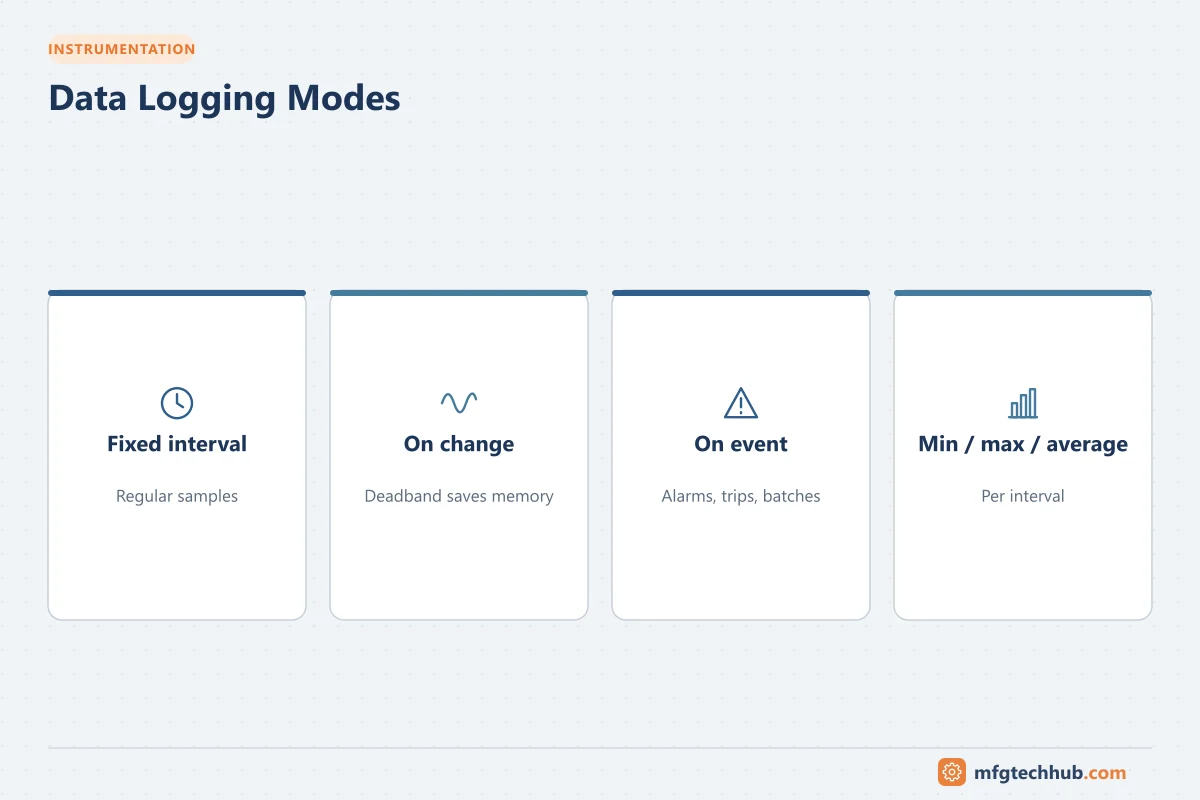
| Logging mode | Fixed interval, on change (deadband), on event, or min/max/average per interval |
| Memory | Channels × rate × duration; choose ring buffer or stop-when-full deliberately |
| Time | Synchronised clock and time zone, preferably stored in UTC |
| Metadata | Tag names, units, ranges, calibration status |
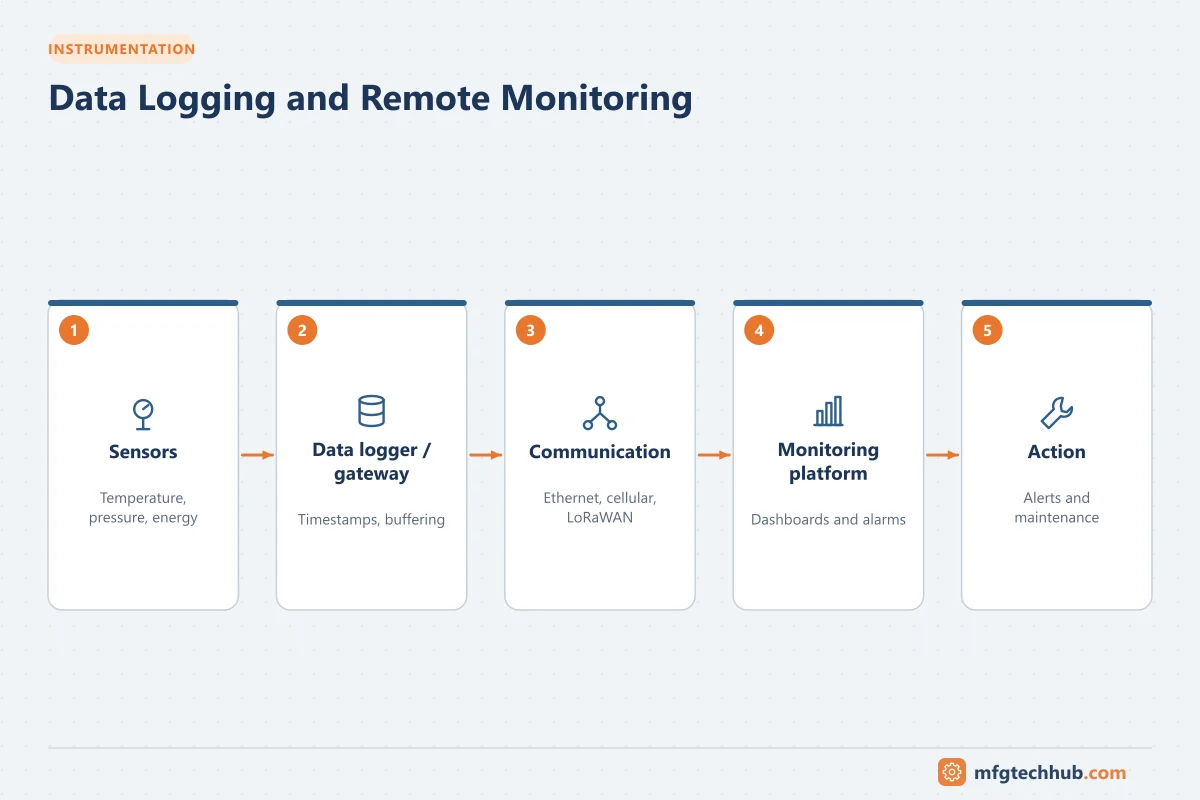
Remote monitoring architectures
| Architecture | How it works | Suits |
|---|---|---|
| Logger with periodic download | Technician visits or data is emailed | Low-cost, non-urgent data |
| Logger or RTU to SCADA | Telemetry protocol to a control centre | Utilities and infrastructure; see RTUs and PLCs in SCADA |
| Gateway to historian | OPC UA or native protocol to a site historian | Plant monitoring; see Industrial Historians |
| Gateway to cloud platform | MQTT or HTTPS to a cloud service | Fleets of assets, vendor services; see IIoT |
Store-and-forward is essential for any remote link: the device buffers data during communication loss and sends it when the link returns, so records have no gaps.
Communication options
| Option | Typical use |
|---|---|
| Ethernet and Wi-Fi | Within a site |
| Cellular (LTE, LTE-M, NB-IoT) | Remote sites with coverage |
| LoRaWAN and other LPWAN | Low-data, battery-powered sensors |
| Licensed radio | Utility telemetry networks |
| Satellite | Very remote sites |
See Wireless Sensor Networks and SCADA Telemetry Communications.
Alarms and notifications
- Define who receives which alarms, by SMS, email, app or SCADA call-out.
- Use delays and deadbands to avoid floods from noisy signals.
- Include communication-loss and low-battery alarms, so silence is not mistaken for normal.
- Test notification paths regularly.
Power at remote sites
Battery, solar or mains with UPS: size for the logging rate, communication interval and worst-case weather. Longer communication intervals and report-by-exception extend battery life considerably. Report battery and supply status as data points.
Data integrity and compliance
For regulated uses (pharmaceutical storage, environmental reporting, food safety), logged data may be an official record:
- Unique user accounts, audit trails and protection against editing.
- Calibrated sensors with records.
- Time synchronisation and documented time zone.
- Validated software where GMP rules apply.
Security
- Change default passwords; disable unused services.
- Use encrypted connections (TLS, VPN); avoid exposing devices directly to the internet.
- Keep firmware updated and manage certificates.
- Segment remote monitoring devices from control networks. See OT Network Design.
Troubleshooting
| Symptom | Likely cause | First check |
|---|---|---|
| Gaps in data | Buffer overflow, power loss, communication failure without store-and-forward | Buffer size, power log, link status |
| Timestamps shifted by an hour | Daylight saving or time zone configuration | Clock settings, UTC storage |
| Flat values | Sensor fault, deadband too large, frozen gateway | Local reading, logging mode |
| Battery drains quickly | Communication too frequent, poor signal causing retries | Interval settings, signal strength |
| Alarms not received | Notification configuration, carrier issues | Test message, contact list |
Frequently asked questions
What is the difference between a data logger and a historian?
A data logger is usually a device that records a limited number of signals locally, often unattended. A historian is server software that collects large numbers of signals from control systems and stores them for long-term analysis.
How often should data be logged?
As often as needed to answer the question the data is for: seconds or minutes for most process trends, much faster for transients or vibration. Logging on change with a deadband saves memory for slow signals.
Why is store-and-forward important?
Because remote communication links fail. Store-and-forward buffers data during outages and sends it later, preventing gaps in records.
Key takeaways
- Choose loggers and architecture by purpose, number of sites and urgency.
- Design signals, rates, memory and time handling deliberately.
- Use store-and-forward, alarm on communication loss, and plan power.
- Protect data integrity and security, especially for official records.
Related tutorials
Before you apply this in a plant: this article is for education. Always check the current edition of the relevant standards, the manufacturer's documentation for your exact product and version, and your site's procedures. Safety-related work needs qualified personnel. See our editorial policy.