
SCADA Control and Command Functions: Commands, Setpoints, Select-Before-Operate and Interlocks
On this page
SCADA does more than display data. Operators use it to start and stop equipment, open and close valves and breakers, change setpoints and switch modes. This is supervisory control. The controller (PLC, RTU or DCS) still does the real-time control and protects the equipment; SCADA sends requests and shows the result.
Because a wrong or unexpected command can damage equipment or endanger people, command functions need careful design. This guide explains how.
Types of SCADA commands
| Command type | Examples | Design notes |
|---|---|---|
| Discrete commands | Start/stop pump, open/close valve, trip/close breaker, reset | Pulse or latched output; confirmation for critical equipment |
| Setpoints and analog outputs | Level setpoint, speed reference, valve position in manual | Minimum/maximum limits, ramp rates, validation in the controller |
| Mode changes | Auto/manual, cascade, remote/local, duty/standby selection | Show the current mode clearly; bumpless transfer |
| Sequence and batch commands | Start filter backwash, start batch phase, hold/restart | The sequence runs in the controller; SCADA starts, holds or aborts it. See ISA-88 |
| Parameter and recipe downloads | Timer values, recipe parameters | Access control, audit trail, and verification after download |
The command and feedback path
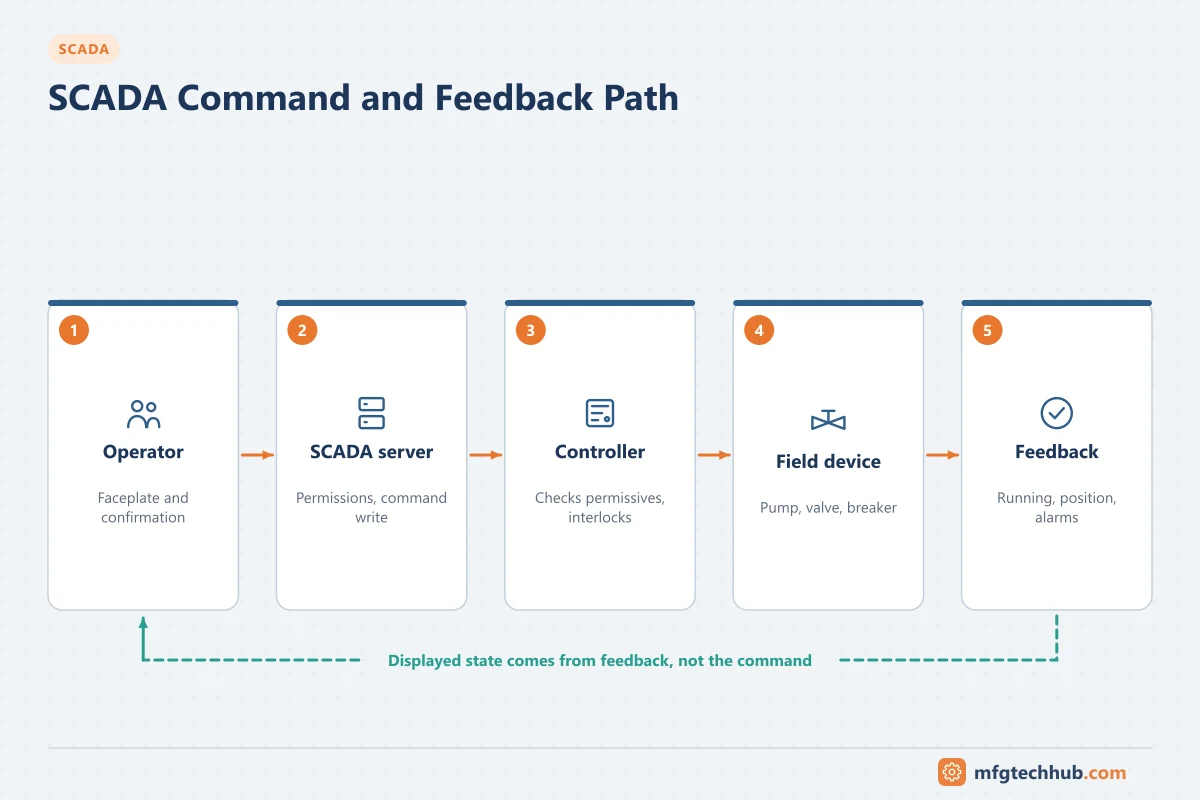
- The operator selects equipment on the HMI, usually through a faceplate showing its current state, mode and interlock status.
- The HMI checks the user’s permission for that area and action and asks for confirmation for significant commands.
- The SCADA server writes the command to the controller through the driver or telemetry protocol.
- The controller checks mode, permissives and interlocks, then drives the output.
- The field device acts; feedback (running signal, limit switches, position) returns to the controller.
- SCADA shows the new state. If feedback does not match the command within the expected time, a command disagree (failure to start, failure to open) alarm is raised.
Command is not status. A display that shows “running” because a start command was sent, rather than because a running feedback was received, will mislead operators. Always show measured feedback.
Local, remote and control authority
- A local/remote selector (hardware switch or controller mode) at the equipment determines who has control. In local, SCADA commands are rejected so that people working on the equipment are protected.
- Where several control locations exist (control room, local panel, another site), define one location with control authority at any time and show it on the HMI.
- Maintenance isolation (lock-out/tag-out) relies on physical isolation, never on a SCADA state.
Direct operate vs select-before-operate
Telemetry and power-system protocols offer two ways to execute a command:
| Model | How it works | Used for |
|---|---|---|
| Direct operate | Master sends a single operate message; outstation executes it | Low-risk commands, setpoints on reliable links |
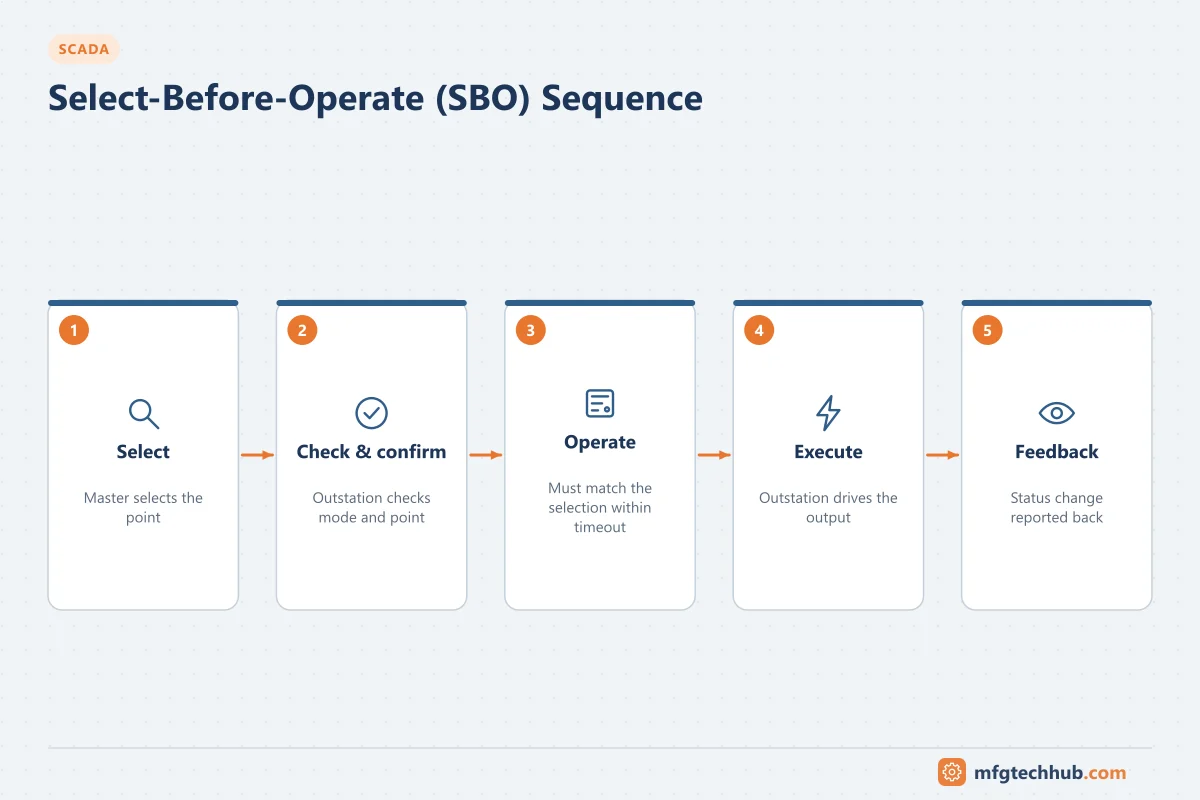
| Select-before-operate (SBO) | Master first selects a point; outstation checks and confirms; master then sends operate, which must match the selection within a timeout | Breakers, critical valves, commands over noisy or long links |
SBO protects against commands reaching the wrong point because of a corrupted message or an operator slip, and it lets the outstation report a problem (point in local, already selected) before anything moves. DNP3 supports both direct operate and select/operate sequences, IEC 60870-5-101/104 provide select and execute commands, and IEC 61850 defines control models including direct and SBO variants with normal or enhanced security. See SCADA Telemetry Communications.
On plant networks, the same idea is implemented in the HMI and controller: select the device, confirm, then command.
Interlocks and permissives belong in the controller
| Term | Meaning | Example |
|---|---|---|
| Permissive | Condition that must be true before a start or open is allowed | Suction valve open before a pump may start |
| Interlock | Condition that stops or prevents an action to protect equipment or process | Pump stops on low suction pressure |
| Safety function | Independent protection against a hazardous event | High-high pressure trip in a safety instrumented system. See Functional Safety |
Rules:
- Implement permissives and interlocks in the controller, so they work even when SCADA or the network is down, and whoever issues the command.
- Show on the HMI why a command is blocked (which permissive is missing, which interlock is active).
- Never rely on SCADA scripts for protection. They depend on servers, networks and scan timing.
Setpoint changes
- Define engineering limits for each setpoint and enforce them in the controller as well as the HMI.
- Use ramp rates where sudden changes upset the process.
- Show the current value, the setpoint and the output together so operators see the effect.
- Record every setpoint change in the event journal with user, old value, new value and time. In GMP environments this supports audit-trail requirements; see Data Integrity (ALCOA+).
Behaviour on communication loss
Decide deliberately what equipment does when SCADA or the link is lost:
- Continue in automatic under controller logic (the usual choice for a pump station running on level control).
- Hold last state for equipment where any change would be worse.
- Go to a defined safe state where continuing without supervision is unacceptable.
Use a heartbeat (watchdog) between SCADA and the controller so the controller can detect loss of supervision. Make sure commands are not queued and executed late after the link recovers. A stale “start” command arriving an hour later is dangerous. Protocol timeouts and command validity checks prevent this.
Access control and accountability
- Role-based permissions by area and function (operator, supervisor, engineer, maintenance).
- Individual user accounts, not shared logins, so the event log shows who issued each command.
- Re-authentication or electronic signatures for critical commands in regulated industries. See Computerised System Validation.
- Remote access with command rights needs extra controls; see ISA/IEC 62443.
Troubleshooting commands
| Symptom | Likely causes | Checks |
|---|---|---|
| Command has no effect | Equipment in local, permissive missing, interlock active, user lacks permission | Faceplate interlock status, mode, event log for rejected commands |
| Command accepted but equipment does not move | Output, wiring or MCC problem; field device fault; isolation in place | Controller output status, motor starter feedback, field check |
| Equipment runs but SCADA shows stopped | Feedback signal failed, wrong address, communication problem | Feedback input in the controller; tag quality |
| “Failure to start/open” alarm after a delay | Travel time longer than configured, mechanical problem | Actual travel time versus configured timer |
| SBO command times out | Timeout shorter than link round-trip time, point already selected elsewhere | Protocol timeouts, outstation diagnostics |
| Command executed twice | Operator double-click without confirmation, retries on a slow link without duplicate protection | HMI confirmation design, protocol sequence handling |
Frequently asked questions
Should interlocks be programmed in SCADA or in the PLC?
In the PLC or controller. Interlocks must work regardless of the state of SCADA servers and networks and regardless of where a command comes from. SCADA shows the interlock status and explains why a command is blocked.
What is select-before-operate?
A two-step command sequence in which the master first selects a control point, the outstation confirms that the selection is valid, and the master then sends the operate command within a timeout. It prevents commands from acting on the wrong point and is standard practice for breakers and critical devices in utility SCADA.
What should happen when SCADA loses communication with a site?
It depends on the process: many sites continue in automatic control under the local controller, some hold their last state, and some go to a defined safe state. The behaviour should be designed, documented and tested, and commands must not execute late when the link recovers.
Key takeaways
- SCADA supervises; controllers execute commands and enforce permissives and interlocks.
- Show feedback, not commands, and alarm when equipment does not follow a command.
- Use local/remote authority, confirmation and select-before-operate for critical commands.
- Limit and audit setpoint changes, design communication-loss behaviour, and control who can command what.
Related tutorials
Before you apply this in a plant: this article is for education. Always check the current edition of the relevant standards, the manufacturer's documentation for your exact product and version, and your site's procedures. Safety-related work needs qualified personnel. See our editorial policy.