
What Is SCADA? Supervisory Control and Data Acquisition Explained
On this page
SCADA (supervisory control and data acquisition) is software and communication infrastructure that lets operators monitor and control equipment spread over a large area from a central control room: pump stations across a water network, compressor stations along a pipeline, substations across a power grid, wells across an oil field. The real-time control happens locally in PLCs and RTUs at each site; SCADA collects their data, shows it to operators, raises alarms, stores history and sends operator commands back.
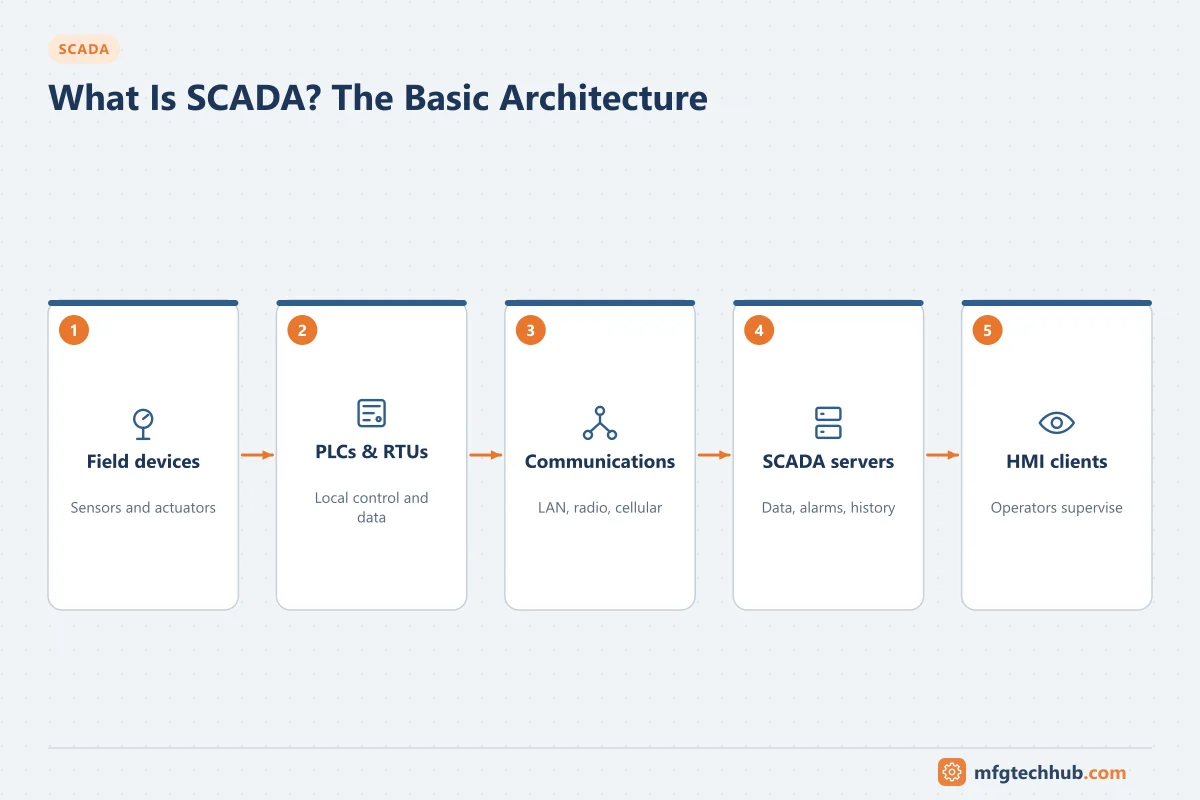
The name describes the two halves: data acquisition (getting values and events from remote sites) and supervisory control (operators or the SCADA system sending commands and setpoints, which the local controllers carry out).
The parts of a SCADA system
| Part | Role | Detail page |
|---|---|---|
| Field devices | Sensors, meters, valves, pumps, breakers at each site | Field instruments |
| RTUs and PLCs | Local controllers: read I/O, run local control, buffer events, talk to the master | RTUs and PLCs in SCADA |
| Telemetry network | Links remote sites to the control centre: fibre, radio, cellular, satellite | SCADA Telemetry Communications |
| SCADA servers | Poll sites, hold the real-time database, process alarms, log events | SCADA Servers and Workstations |
| Operator clients (HMI) | Displays, alarm lists, trends and commands | SCADA HMI Display Design |
| Historian | Long-term storage for trends, reports and analysis | Industrial Historians |
How these are organised in levels and sites is explained in SCADA System Hierarchy.
How SCADA works: a value and a command
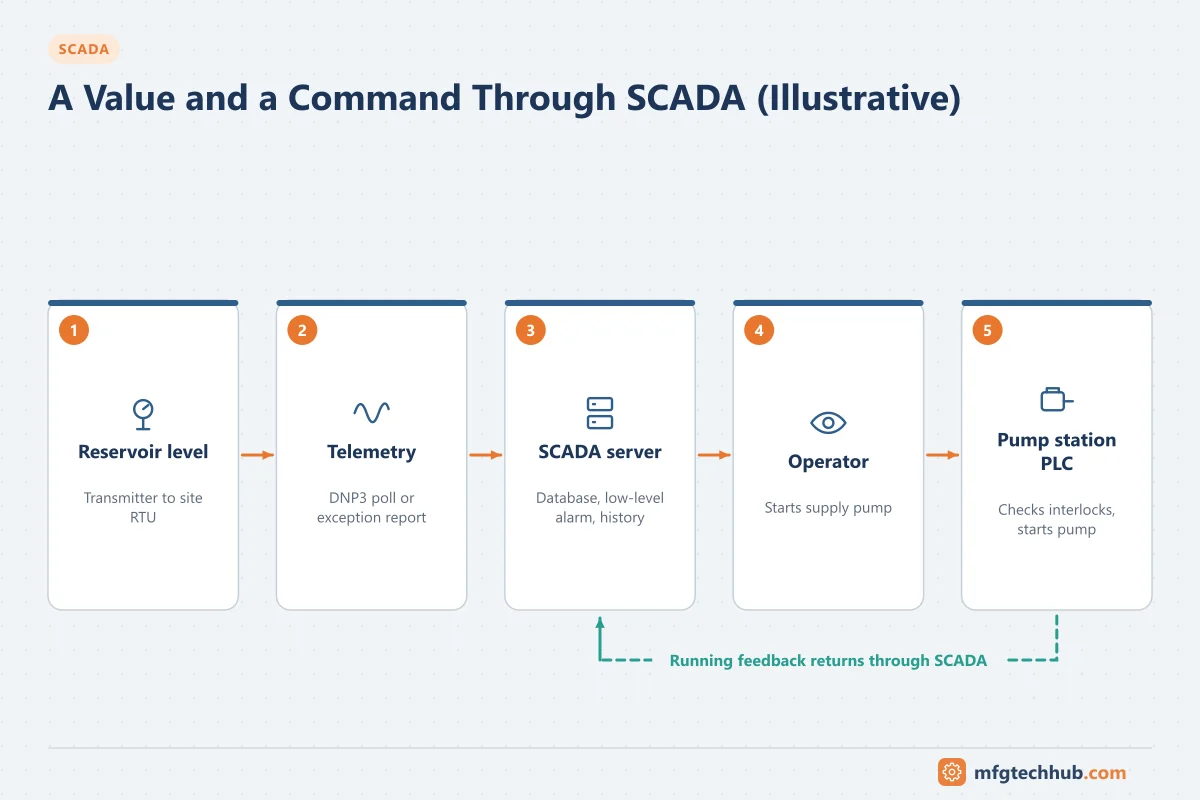
Taking a water reservoir level as an illustrative example:
- A level transmitter at the reservoir sends 4–20 mA to the site RTU.
- The RTU scales the value, checks alarm limits, and time-stamps any change.
- The SCADA server polls the RTU (or the RTU reports the change by exception) over radio or cellular using a telemetry protocol such as DNP3.
- The server updates its real-time database, raises an alarm if the level is low, and passes the value to the historian.
- The operator sees the low level on the network display and starts a pump at the supply pump station.
- The command travels to that station’s RTU or PLC, which checks its local interlocks and starts the pump.
- The pump’s running feedback returns to SCADA, and the display changes only when the feedback arrives.
The local controllers keep running if communication fails: the pump station continues on its local level control, and the RTU buffers events until the link returns. See SCADA Data Acquisition and SCADA Control and Command Functions.
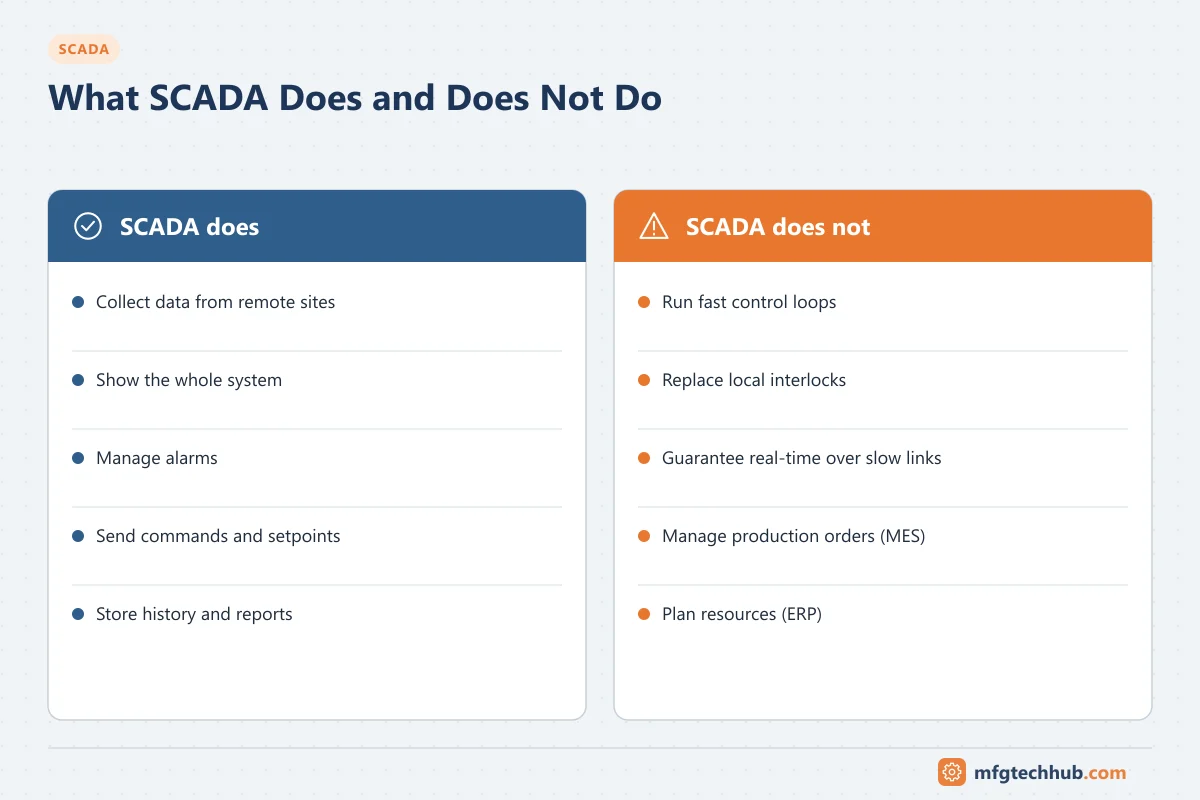
What SCADA does and does not do
| SCADA does | SCADA does not |
|---|---|
| Collect data from many remote sites | Run fast control loops (those run in PLCs and RTUs) |
| Show the whole system to operators | Replace local safety interlocks and protection |
| Raise and manage alarms | Guarantee real-time response over slow links |
| Send supervisory commands and setpoints | Manage production orders or quality records (that is MES) |
| Store history and produce reports | Plan resources and finances (that is ERP) |
See What SCADA Does in Industrial Automation.
Where SCADA is used
- Water and wastewater: reservoirs, pump stations, treatment works, sewage lift stations. See Water and Wastewater Automation.
- Electric power: substations, distribution automation, renewable plants (often with IEC 61850 and IEC 60870-5-104).
- Oil and gas: pipelines, compressor and metering stations, well sites.
- Transport and infrastructure: tunnels, rail systems, traffic management, building portfolios.
- Manufacturing: plant-wide monitoring of PLC-controlled lines, where “SCADA” often means HMI software covering a whole factory.
See SCADA Applications by Industry.
SCADA, DCS and PLC
| SCADA | DCS | PLC | |
|---|---|---|---|
| Typical scope | Assets spread over a region | One process plant | A machine, skid or line |
| Where control runs | PLCs and RTUs at each site | DCS controllers | The PLC |
| Communication | Telemetry over WAN, radio, cellular | Redundant plant networks | Local networks |
| Typical users | Utilities, pipelines, infrastructure | Refining, chemicals, power, pharma | Discrete manufacturing |
In practice the boundaries blur: SCADA software is widely used in factories, and DCS platforms can supervise remote sites. See What Is a DCS? and DCS vs PLC.
Key terms
| Term | Meaning |
|---|---|
| Master station | The central SCADA servers that poll and control remote sites |
| Outstation | A remote site’s RTU or PLC as seen by the master |
| Tag / point | A single value in the SCADA database, with quality and timestamp |
| Polling | The master asking outstations for data at intervals |
| Report by exception | Outstations sending data only when it changes |
| DNP3, IEC 60870-5-104 | Telemetry protocols common in utilities |
| Historian | Time-series database for long-term data |
Frequently asked questions
What does SCADA stand for?
Supervisory control and data acquisition: a system that collects data from remote equipment and lets operators supervise and control it from a central location.
Is SCADA hardware or software?
Both. The SCADA software runs on servers and operator workstations; a complete SCADA system also includes RTUs or PLCs at each site and the telemetry network connecting them.
Does SCADA control the process directly?
It sends supervisory commands and setpoints, but the real-time control and safety interlocks run in the local PLCs and RTUs, which keep working if communication with SCADA is lost.
Key takeaways
- SCADA supervises equipment spread over large areas from a central control room.
- Local PLCs and RTUs do the real-time control; SCADA acquires data, alarms, stores history and sends commands.
- The main parts are field devices, RTUs and PLCs, telemetry, servers, operator clients and the historian.
- Utilities, pipelines and infrastructure are the classic SCADA applications.
Related tutorials
Before you apply this in a plant: this article is for education. Always check the current edition of the relevant standards, the manufacturer's documentation for your exact product and version, and your site's procedures. Safety-related work needs qualified personnel. See our editorial policy.