
SCADA Data Acquisition and Processing: Polling, Scan Rates, Scaling, Deadbands and Data Quality
On this page
Data acquisition is how a SCADA system gets values from the process into its tag database. Data processing is what happens to those values before operators, alarms, historians and reports use them. Most of the “SCADA shows the wrong value” problems plants face come from one of these two steps: the value was read slowly, read wrongly, scaled twice, or its quality was lost on the way.
This guide follows a value from the sensor to the SCADA tag and explains the design choices at each step.
The data path from sensor to tag
| Step | What happens | Typical technology |
|---|---|---|
| 1. Measurement | Sensor converts a physical quantity to a signal | Transmitter, switch, analyser, meter |
| 2. Field signal | Signal travels to the controller | 4–20 mA (often with HART), 24 V DC discrete, fieldbus, IO-Link, Ethernet |
| 3. Input and conversion | I/O module converts the signal to a digital value | Analog input card (raw counts), digital input |
| 4. Controller | PLC, RTU or DCS controller scales, checks and uses the value; may time-stamp and buffer it | Control logic, event buffers |
| 5. Communication | SCADA driver reads the controller over a network | Modbus, EtherNet/IP, PROFINET, OPC UA, DNP3, IEC 60870-5-104, MQTT |
| 6. SCADA server | Real-time database holds value, quality and timestamp for each tag | Tag database, scan classes |
| 7. Consumers | HMI displays, alarms, historian, reports, MES | Alarm server, historian collector, interfaces |
When a value looks wrong, check it at each step in turn. The first step where it differs from the previous one is where the fault is. See Bad Tag Quality and Communication Failures for the full method.
For field signals, see Signal Conditioning and Data Acquisition and HART Protocol Explained.
How SCADA gets the data: three acquisition models
| Model | How it works | Strengths | Limitations | Typical protocols |
|---|---|---|---|---|
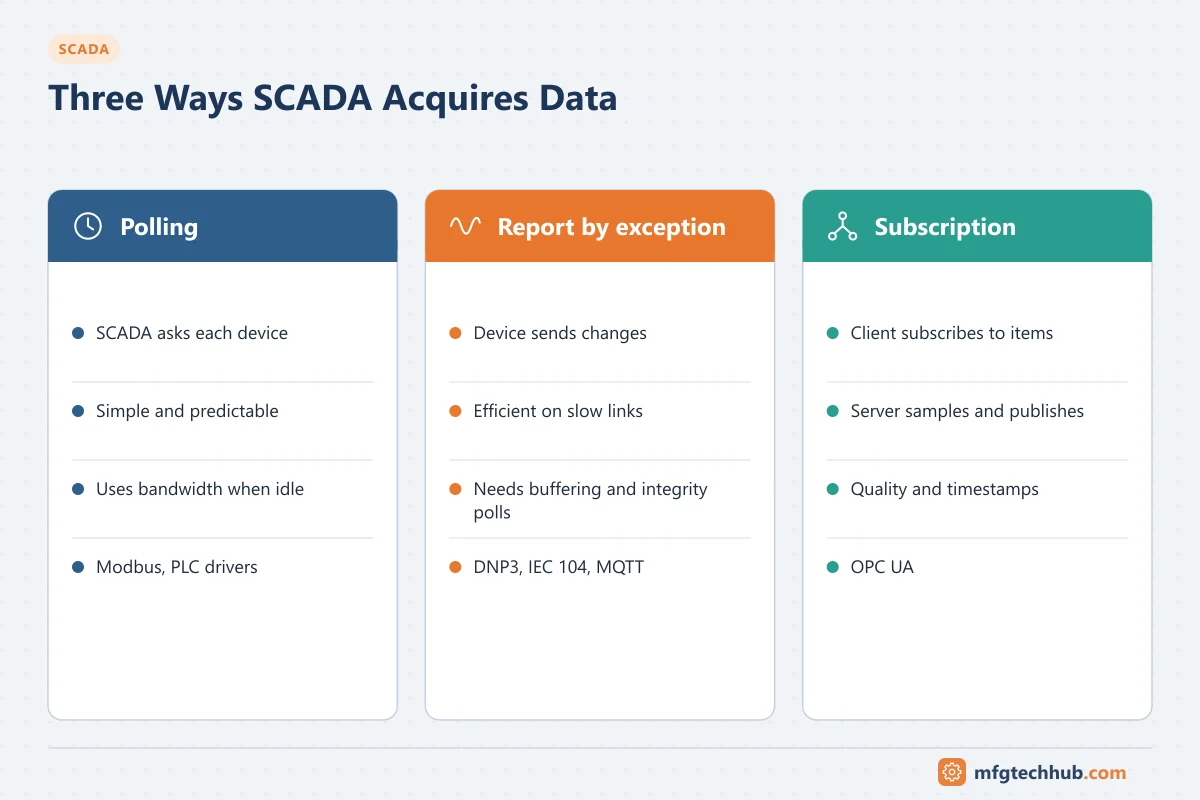
| Polling (master/slave, client/server) | SCADA asks each device for data at a fixed rate | Simple, predictable, easy to detect a dead device | Wastes bandwidth when values do not change; slow links limit the update rate | Modbus RTU/TCP, many PLC drivers |
| Report by exception | Device sends data only when it changes beyond a deadband, plus periodic integrity checks | Efficient on slow or costly links; events keep their timestamps | Needs device-side buffering and configuration; silence must be distinguished from failure | DNP3 (events and unsolicited responses), IEC 60870-5-104, MQTT/Sparkplug |
| Subscription | Client subscribes; server samples and sends changes | Efficient on LANs; carries quality and timestamps | Server and session limits; tuning of sampling and publishing intervals | OPC UA |
Utility and telemetry systems over radio or cellular links rely heavily on report by exception. Plant-floor SCADA on Ethernet usually polls PLCs or uses OPC UA subscriptions. See SCADA Telemetry Communications for DNP3 and IEC 60870-5-104.
Scan rates and communication load
Most SCADA platforms group tags into scan classes (or poll groups), each with its own rate. Set rates by what the value is used for:
| Data | Typical approach |
|---|---|
| Values an operator acts on (pressures, levels, running states) | Fast enough for the operator’s response, often 1 second or a few seconds |
| Slow process values (tank temperatures, analysers) | Slower classes, 5–60 seconds |
| Counters, totals, run hours | Slow class; the controller keeps the true value |
| Diagnostics and configuration data | Slow class or on demand |
Scanning everything at the fastest rate overloads controllers and links without improving control, because control happens in the PLC.
Estimating poll time on a serial link (illustrative)
On Modbus RTU each character takes 11 bits (start, 8 data, parity or second stop, stop). Reading 100 holding registers returns 5 + 200 = 205 bytes:
- Response: 205 × 11 bits ÷ 9600 bit/s ≈ 0.23 s
- Request (8 bytes): ≈ 0.01 s
- Plus device response time and inter-frame gaps: often tens of milliseconds
So one such read takes roughly a quarter of a second at 9600 baud. Twenty devices polled this way need around 5 seconds per complete cycle, before retries. Calculations like this show quickly whether a requested update rate is achievable or whether you need a faster link, fewer registers, or report by exception. See Modbus RTU and Modbus TCP Explained.
Timestamps: where time is assigned matters
| Timestamp | Assigned by | Accuracy |
|---|---|---|
| Source (field) timestamp | RTU, controller or I/O module when the change occurs | Best; needed for sequence-of-events (SOE) analysis |
| Server timestamp | SCADA server when the value arrives | Includes polling and communication delay; can be seconds late |
For trip analysis and events from remote sites, use protocols and devices that time-stamp at source (DNP3 events, IEC 60870-5-104 time-tagged objects, OPC UA source timestamps), and keep clocks synchronised. See Time Synchronisation in OT.
Store-and-forward: RTUs and edge devices buffer time-stamped events during communication loss and send them when the link returns, so the historian can backfill the gap.
Processing: turning raw values into trustworthy information
Scaling to engineering units
An analog input arrives as raw counts. Linear scaling converts it:
EU = EU_min + (raw - raw_min) × (EU_max - EU_min) / (raw_max - raw_min)Raw count ranges depend on the I/O module (check the module manual). Scale in one place only, preferably the controller, and document it. Scaling applied in both the PLC and SCADA is a classic cause of wrong values. The 4–20 mA calculator helps check conversions.
Out-of-range and failure detection
For 4–20 mA transmitters, the NAMUR NE 43 recommendation separates valid measurement from failure signals: signals at or below 3.6 mA or at or above 21 mA indicate a transmitter failure, while the measurement itself may run slightly outside 4–20 mA (about 3.8 to 20.5 mA). Configure the input or controller logic to set bad quality on failure signals instead of displaying a clamped value.
Deadbands and exception reporting
- A reporting deadband sends a new value only when it changes by more than a set amount. This reduces network and historian load.
- An alarm deadband is different; it prevents alarm chattering (see SCADA Alarm Management).
- Set deadbands per signal relative to its accuracy and use. A deadband larger than meaningful process changes hides real behaviour.
Filtering
A first-order filter smooths noisy signals, but it adds lag. Filter as close to the source as possible (transmitter damping or controller), and never filter a signal used for protection without understanding the delay.
Calculated tags
SCADA servers commonly calculate totals (flow totalisers), run hours, start counts, rates, averages and efficiencies. Good practice:
- Keep totalisers and counters in the controller or meter, which keeps counting during SCADA outages; SCADA calculates differences.
- Handle counter rollover and resets explicitly.
- Propagate quality: a calculation using a bad input must itself be marked bad or uncertain.
Data quality and substituted values
Every value should carry quality (good, uncertain, bad) and a timestamp. Manually entered or substituted values must be flagged as such so reports and the historian do not treat them as measured data. This matters for data integrity in regulated industries.
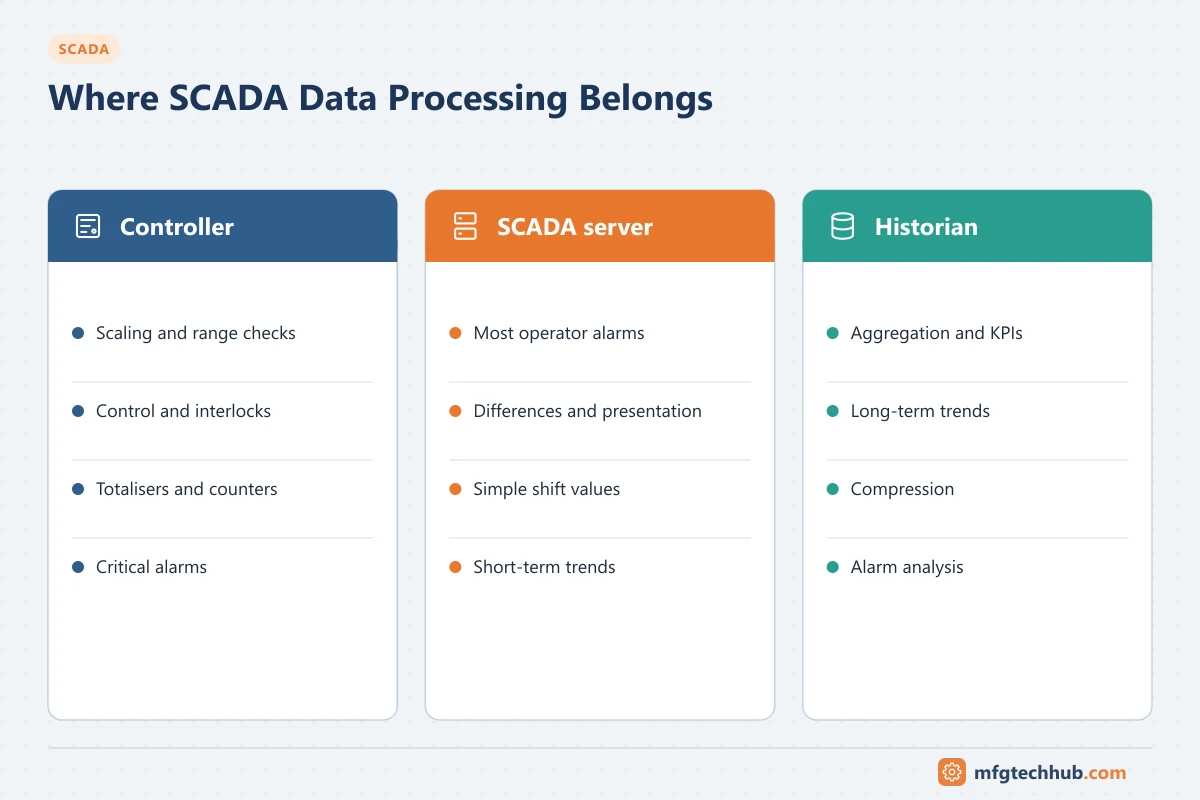
Where should processing happen?
| Function | Controller (PLC/RTU) | SCADA server | Historian / analytics |
|---|---|---|---|
| Scaling, range checks | Preferred | Only if the controller cannot | No |
| Control and interlocks | Always | Never for safety or fast control | No |
| Totalisers, counters | Preferred | Differences and presentation | Reports |
| Alarm detection | Critical and time-sensitive alarms | Most operator alarms | Alarm analysis |
| Aggregation, KPIs | No | Simple shift or batch values | Preferred |
| Long-term trends, compression | No | Short-term trends | Preferred; see Industrial Historians |
Troubleshooting data acquisition
| Symptom | Likely cause | First check |
|---|---|---|
| Value updates slowly | Scan class too slow, overloaded link, too many tags per poll | Scan class settings; driver statistics; poll time estimate |
| Value correct in PLC, wrong in SCADA | Scaling applied twice, wrong address, word order, data type | Compare raw and scaled values at each layer |
| Frozen value with good quality | Device returning a stale value, deadband too large, controller logic no longer writing the tag | Value in the controller; deadband settings |
| Gaps after communication loss | No store-and-forward or buffer too small | RTU/edge buffer configuration and backfill |
| Events in the wrong order | Server timestamps instead of source timestamps; clocks not synchronised | Timestamp source and time sync status |
| Totals differ between SCADA and meter | Counter rollover or resets not handled; SCADA outage | Totaliser logic; use controller or meter totals |
Frequently asked questions
What is the difference between polling and report by exception?
With polling, SCADA asks each device for its data at fixed intervals. With report by exception, the device sends data only when it changes beyond a deadband, usually plus periodic integrity polls. Report by exception uses far less bandwidth and suits slow or remote links.
How fast should a SCADA system scan?
As fast as the operator or application needs, not faster. Operator-critical values often update every second or few seconds; slow process values and diagnostics can be scanned much less often. Control itself runs in the PLC or controller.
Where should scaling be done, in the PLC or in SCADA?
In one place only, usually the controller, so that all consumers see the same engineering value. Document where scaling happens for each signal.
Key takeaways
- Follow the data path: sensor, field signal, I/O, controller, communication, SCADA tag, consumers.
- Choose polling, report by exception or subscriptions according to the network and the data.
- Set scan rates by use, estimate poll times on slow links, and use source timestamps for event analysis.
- Scale in one place, detect failure signals, use deadbands and filters deliberately, and propagate quality.
Related tutorials
Before you apply this in a plant: this article is for education. Always check the current edition of the relevant standards, the manufacturer's documentation for your exact product and version, and your site's procedures. Safety-related work needs qualified personnel. See our editorial policy.