
SCADA Alarm Management: Configuration, Priorities, Alarm Floods and the ISA-18.2 Lifecycle
On this page
An alarm tells an operator about an abnormal condition that requires a response. That last part is the whole point of alarm management. If an alarm does not need an action, it is noise, and noise trains operators to ignore alarms. Many serious industrial incidents have been linked to operators overwhelmed by alarm floods.
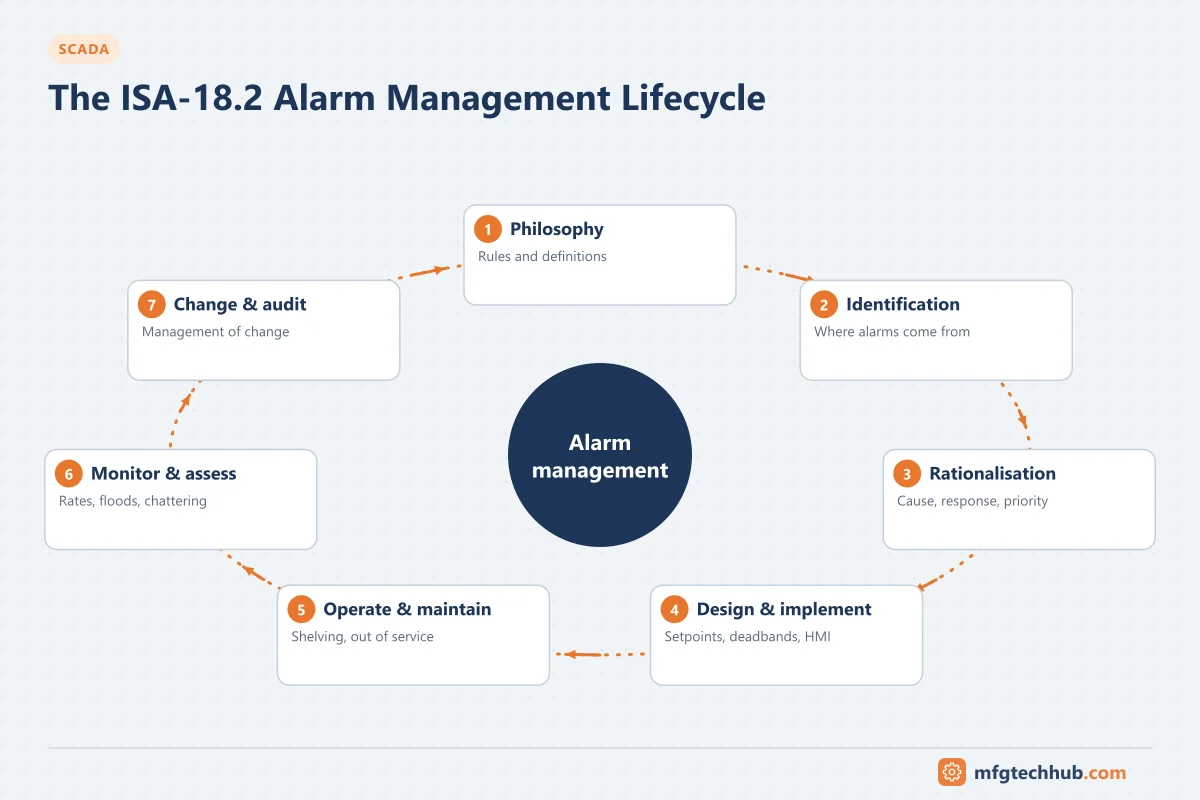
This guide explains how to configure alarms in SCADA and HMI systems so that they stay useful. It also covers the lifecycle defined in ANSI/ISA-18.2 (international equivalent IEC 62682), with the widely used EEMUA 191 guide as a companion reference.
Alarms, events and notifications are different things
| Item | Purpose | Operator action required? | Example |
|---|---|---|---|
| Alarm | Abnormal condition needing a timely response | Yes | Tank high-high level, pump trip |
| Alert / advisory | Awareness, no immediate action | No, or not urgent | Filter differential pressure approaching change interval |
| Event | Record of something that happened | No | Operator changed setpoint, pump started, user logged in |
| Notification | Delivery of an alarm or alert to someone outside the control room | Depends | SMS/voice call-out to an on-call technician |
Configuring events (logins, setpoint changes, state changes) as alarms is one of the most common causes of alarm overload. Record them in the event journal instead.
Alarm types in SCADA
| Type | Triggered by | Configuration notes |
|---|---|---|
| Absolute (limit) alarms | Analog value above/below a limit (H, HH, L, LL) | Use a deadband; configure HH/LL only where a different response is needed |
| Deviation alarms | Difference between process value and setpoint | Useful for control loops; suppress when the loop is in manual |
| Rate-of-change alarms | Value changing faster than expected | Filter noise first, or they chatter |
| Discrete (state) alarms | Digital state: trip, fault, limit switch | Use an on-delay for contacts that bounce |
| Command disagree / uncommanded change | Device state does not match the command | For example a valve commanded open but still closed after the travel time |
| System / diagnostic alarms | Communication loss, bad quality, controller or server fault | Route to the right people (often maintenance or engineering), not only operators |
Bad-quality and communication alarms deserve special attention because they hide real process alarms. See Bad Tag Quality and Communication Failures.
Configuring an alarm: the attributes that matter
- Setpoint (limit). Choose it so the operator still has enough time to act before the consequence occurs. A limit placed at the trip point gives no time to respond.
- Deadband (hysteresis). The alarm clears only when the value returns past the limit by the deadband. This stops alarms from repeatedly activating and clearing around the limit.
- On-delay and off-delay. An on-delay requires the condition to persist before the alarm is raised; an off-delay keeps it active briefly after it clears. Use them for noisy signals and bouncing contacts, but never delay alarms where the response time is already short.
- Priority. Based on consequence and time to respond (next section), not on how important the equipment “feels”.
- Message text. Tag, equipment name and condition: “P-301 discharge pressure HIGH”, not “Error 1023”.
- Area / group. Which operator position and display the alarm belongs to.
- Response documentation. Cause, consequence, corrective action and time to respond, kept in the alarm database (the “master alarm database” in ISA-18.2) and ideally shown to the operator from the alarm.
Setting priorities
Priority tells the operator which alarm to handle first. ISA-18.2 recommends deriving it from the severity of the consequence if the operator does not act and the time available to respond.
| Consequence if no action | Time to respond: > 30 min | 10–30 min | < 10 min |
|---|---|---|---|
| Minor (small loss, no safety or environmental impact) | Low | Low | Medium |
| Major (significant production loss, equipment damage) | Low | Medium | High |
| Severe (safety or environmental consequence) | Medium | High | High |
This matrix is an illustrative example. Each site defines its own categories and time bands in its alarm philosophy document.
Keep to three or four priorities. If most alarms are “high”, priority no longer helps the operator. ISA-18.2 suggests an annunciated distribution of roughly 80% low, 15% medium and 5% high for a three-priority system.
Safety-critical alarms that are part of a safety function are designed under functional safety requirements, not only the alarm philosophy.
Alarm states, acknowledgement, shelving and suppression
| State | Meaning |
|---|---|
| Unacknowledged | Alarm active and not yet acknowledged by the operator |
| Acknowledged | Operator has seen it; condition still active |
| Returned to normal, unacknowledged | Condition cleared before acknowledgement (the operator still needs to know it happened) |
| Shelved | Operator temporarily removed it from the alarm list, for a limited time and under control (for example a known faulty transmitter awaiting repair) |
| Suppressed by design | Logic hides it automatically when it is not relevant (for example low-flow alarms on a pump that is stopped) |
| Out of service | Removed by maintenance or engineering under a permit, for example during instrument replacement |
Rules that prevent problems:
- Shelving must expire automatically and be visible in a shelved-alarms list.
- Out-of-service alarms need an authorisation, a reason and a review at shift handover.
- State-based suppression (by equipment or process state: stopped, starting up, running, cleaning) removes large numbers of meaningless alarms and is one of the most effective improvements.
- First-out indication shows which alarm triggered a trip, so operators are not left guessing among consequential alarms.
Remote notification (call-out)
Unmanned sites (water networks, pipelines, remote pump stations) depend on alarms reaching an on-call person:
- Send only alarms that need an off-site response; everything else stays in the control system.
- Require acknowledgement of the notification and escalate to the next person if it is not acknowledged within a defined time.
- Use two independent channels for critical call-outs (for example voice call plus SMS or app), and send a periodic test message so a failed notification path is detected.
- Remote acknowledgement must not replace a proper response. Remote control from a phone is a separate security decision; see ISA/IEC 62443.
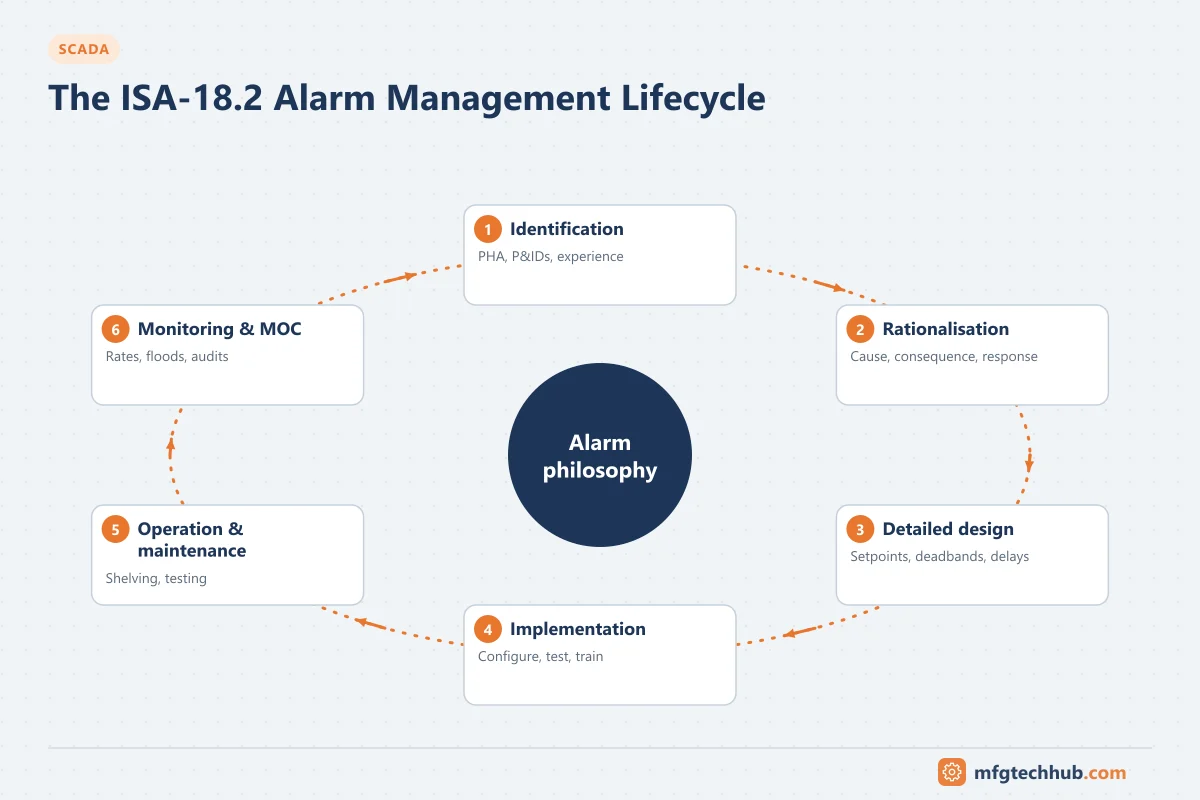
The ISA-18.2 alarm management lifecycle
| Stage | What happens |
|---|---|
| Philosophy | Site document: definitions, priority method, colours, roles, performance targets, shelving and suppression rules |
| Identification | Potential alarms come from process hazard analysis, P&IDs, operating experience and incident reviews |
| Rationalisation | Each alarm is reviewed by a team (operations, process, control): is it needed, what is the cause, consequence, response, time to respond and priority? |
| Detailed design | Setpoints, deadbands, delays, suppression logic, HMI presentation |
| Implementation | Configuration, testing and operator training |
| Operation | Alarms in use; shelving and handover practices |
| Maintenance | Out-of-service handling, testing of alarms |
| Monitoring and assessment | Alarm rates, floods, chattering and stale alarms measured continuously |
| Management of change | Changes to alarms follow the same review as new alarms |
| Audit | Periodic check that practice follows the philosophy |
Most sites that improve alarm performance start with monitoring (to find the worst offenders) and rationalisation of the most frequent alarms, rather than trying to review every alarm at once.
Measuring alarm system performance
ISA-18.2 and EEMUA 191 give indicative targets per operator position, averaged over a long period. Commonly cited ISA-18.2 values include:
| Metric | Indicative target |
|---|---|
| Average alarm rate | About 1 alarm per 10 minutes is very likely acceptable; about 2 per 10 minutes is the maximum manageable |
| Alarm flood | More than 10 alarms in 10 minutes; the share of time in flood should be very small (around 1% or less) |
| Top 10 most frequent alarms | Should contribute only a small share of the total; review them first |
| Chattering and fleeting alarms | Zero |
| Stale alarms (active for more than 24 hours) | Very few, with an action plan for each |
| Unauthorised suppression or attribute changes | Zero |
Use these as a benchmark and confirm the values in the current edition of the standard your site follows. Alarm analysis tools, or queries against the alarm and event journal in the historian, produce these metrics automatically.
Troubleshooting common alarm problems
Alarm flood during an upset
- Symptoms: hundreds of alarms after a trip or utility failure; operators silence everything.
- Causes: consequential alarms from one initiating event, no state-based suppression, duplicate alarms at several layers (field device, PLC, SCADA).
- Diagnostics: export the alarm journal for the event; sort by time and group by equipment; identify the first alarm and the alarms that followed from it.
- Resolution: add state-based or trip-based suppression, first-out indication, and remove duplicates.
- Verification: replay or simulate the event and compare alarm counts.
- Prevention: include upset scenarios in rationalisation.
Chattering or repeating alarm
- Symptoms: the same alarm activates and clears many times per hour.
- Causes: no deadband, limit too close to normal operation, noisy signal, bouncing contact, a failing instrument.
- Diagnostics: trend the value against the limit; check the instrument and wiring.
- Resolution: set a deadband or on-delay, move the limit if rationalisation supports it, or repair the instrument.
- Verification: alarm count for the tag over the following days.
- Prevention: chattering-alarm reports reviewed weekly.
Standing (stale) alarms
- Symptoms: alarms active for days; operators no longer notice them.
- Causes: equipment out of service but alarms still active, wrong limits, failed instruments.
- Resolution: put alarms out of service through the proper procedure, fix the instrument, or correct the limit via management of change.
Notification not received
- Symptoms: an unmanned-site alarm occurred but nobody was called.
- Causes: call-out service stopped, modem/SIM or gateway failure, on-call roster not updated, alarm not configured for notification.
- Diagnostics: notification server logs; test message history; roster.
- Resolution and prevention: restore the service, add periodic test messages and alarms for notification-system failure, and review the roster process.
Frequently asked questions
How many alarms should an operator receive?
ISA-18.2 suggests that around one alarm per 10 minutes per operator position is very likely acceptable over the long term, and that more than 10 alarms in 10 minutes is a flood. Always check the current edition and your site philosophy.
What is alarm rationalisation?
A structured review of each alarm by operations, process and control engineers to confirm it is needed and to document its cause, consequence, operator response, time to respond, setpoint and priority.
What is the difference between shelving and suppression?
Shelving is a temporary, operator-initiated removal of an alarm from the display, with automatic expiry. Suppression by design is automatic logic that hides alarms which are not relevant in the current process or equipment state.
Should SCADA send every alarm by SMS or email?
No. Remote notification should be limited to alarms that need an off-site response, with acknowledgement and escalation. Sending everything leads to people ignoring messages.
Key takeaways
- An alarm must require an operator response; everything else is an event or advisory.
- Configure deadbands, delays, priority by consequence and time to respond, and clear message text.
- Use shelving, out-of-service and state-based suppression under clear rules.
- Follow the ISA-18.2 lifecycle: philosophy, rationalisation, monitoring and management of change.
- Measure alarm rates, floods, chattering and stale alarms, and fix the worst offenders first.
Related tutorials
Before you apply this in a plant: this article is for education. Always check the current edition of the relevant standards, the manufacturer's documentation for your exact product and version, and your site's procedures. Safety-related work needs qualified personnel. See our editorial policy.