
SCADA Software Configuration: A Practical Guide
On this page
SCADA (Supervisory Control and Data Acquisition) software plays a crucial role in monitoring, controlling, and automating industrial processes. Proper configuration and programming of SCADA software ensure seamless communication, efficient data acquisition, real-time visualization, and optimized process control.
What is SCADA Software?
SCADA software is the brain of the system, processing data collected from sensors, PLCs, and RTUs, displaying information on HMIs, and enabling operators to make real-time decisions. It consists of:
- Data Acquisition Module: Collects real-time data from connected devices.
- Communication Module: Supports protocols like Modbus, OPC UA, and Ethernet/IP for data exchange.
- Processing & Control Logic: Automates processes using custom logic and scripts.
- HMI/Visualization Tools: Displays real-time dashboards, alarms, and trends.
- Alarm & Event Management: Detects abnormal conditions and triggers alerts.
- Historical Data Logging: Stores data for trend analysis and reporting.
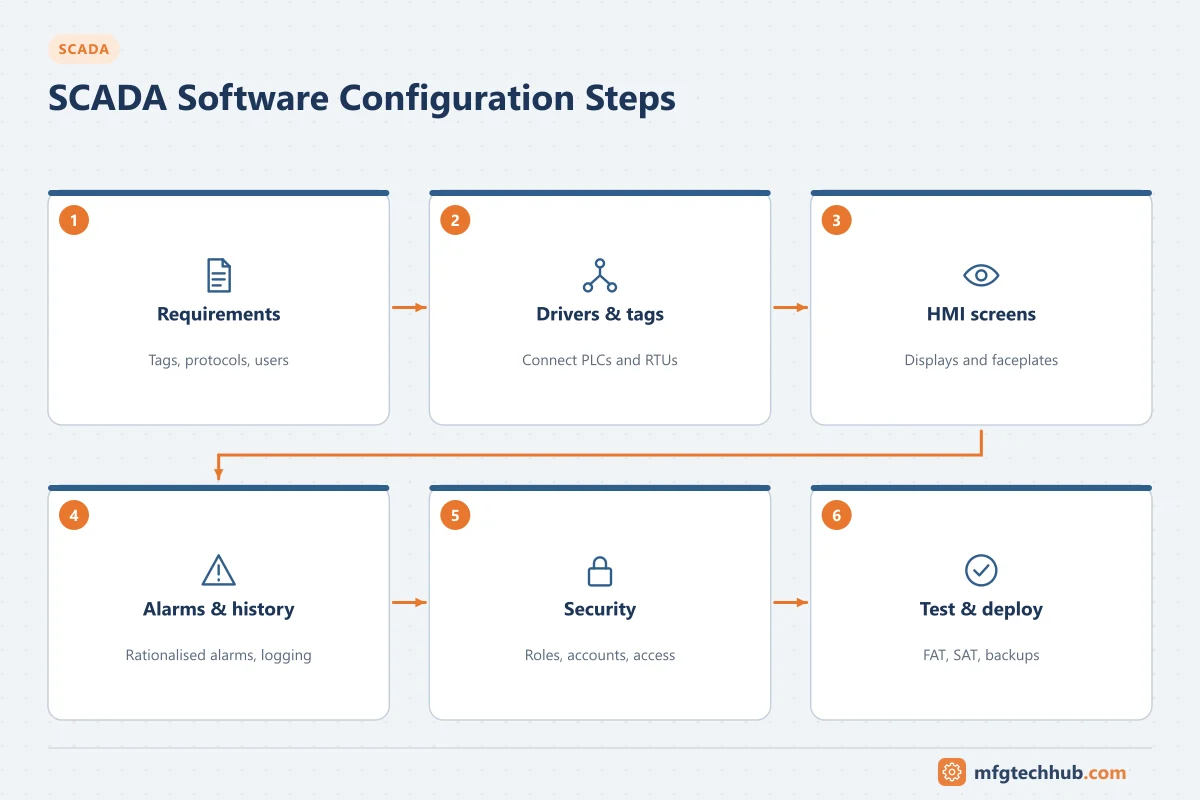
Steps in SCADA Software Configuration
1. System Requirements Analysis
Before setting up SCADA software, it’s essential to analyze the operational needs.
- Identify hardware components (PLCs, RTUs, sensors, HMIs).
- Define data acquisition and control logic requirements.
- Determine communication protocols (e.g., Modbus, DNP3, BACnet).
- Assess network infrastructure (wired vs. wireless connections).
2. SCADA Software Selection
Choosing the right SCADA platform depends on scalability, ease of integration, and specific industry needs.
- AVEVA System Platform (formerly Wonderware) - object-based supervisory platform for large and multi-site systems.
- Siemens WinCC - Advanced HMI customization and automation.
- Ignition by Inductive Automation - Web-based SCADA with unlimited tags.
- FactoryTalk View (Rockwell Automation) - Seamless integration with Allen-Bradley PLCs.
- Proficy iFIX (formerly GE Digital, now an independent Proficy business) - long-established HMI/SCADA with a large installed base.
Considerations for Selection:
- Scalability: Can the software support future expansions?
- Interoperability: Does it work with existing PLCs, HMIs, and databases?
- Security Features: Includes encryption, role-based access, and authentication?
- User-Friendly Interface: Ease of configuring HMI screens, alarms, and reports.
3. Hardware and Software Integration
Once SCADA software is selected, it must be integrated with field hardware.
- Connect PLCs, RTUs, and sensors via supported protocols (e.g., OPC UA, MQTT).
- Configure I/O Servers to define data exchange between devices.
- Set up network configurations for secure communication.
Example: A manufacturing plant connects Siemens S7 PLCs with WinCC SCADA, using OPC UA for real-time data transfer.
4. Tag Configuration
SCADA software relies on tags to represent real-world data points.
- Analog Input (AI): Temperature, pressure, flow rate.
- Digital Input (DI): ON/OFF states of switches, buttons, alarms.
- Analog Output (AO): Control signals for motors, pumps.
- Digital Output (DO): Commands for relays, actuators.
Example Tag Configuration:
| Tag Name | Type | Data Source | Scaling | Update Rate |
|---|---|---|---|---|
| Tank_Level | Analog Input | PLC Register MW100 | 0 - 100% | 1 second |
| Pump_Run_Cmd | Digital Output | PLC Output Q0.1 | ON/OFF | On Event |
| Temperature | Analog Input | RTU Register AI1 | -40 to 150°C | 5 seconds |
5. HMI Screen Design & Visualization
A Human-Machine Interface (HMI) allows operators to visualize and control processes efficiently.
- Use realistic graphics (tanks, pipes, pumps, gauges) for clarity.
- Display real-time data values with color-coded alarms.
- Enable trend charts for historical data analysis.
- Provide interactive buttons for user control (Start/Stop, Adjust Speed).
Example: A water treatment SCADA HMI displays tank levels, valve positions, and pump operations in real-time.
6. Alarm Configuration
Alarms are configured per tag with a limit type, a setpoint, a deadband, optional delays and a priority. Two different things are often confused here:
- Limit type (L, LL, H, HH) says where the alarm is on the measurement range: HH is above H, LL is below L.
- Priority (for example low, medium, high) says how urgently the operator must respond. It is set from the consequence of not acting and the time available, not from the limit type.
Example alarm configuration (illustrative):
| Tag | Limit type | Setpoint | Deadband | Priority | Operator response |
|---|---|---|---|---|---|
| TK101_Level | H | 85 % | 2 % | Low | Reduce inflow or start transfer pump |
| TK101_Level | HH | 95 % | 1 % | High | Stop inflow immediately; check overflow |
| P201_Discharge_Pressure | L | 2.0 bar | 0.1 bar | Medium | Check pump running and suction valve |
Only alarms that need an operator response belong in the alarm system; events such as logins and setpoint changes go to the event journal. For deadbands, priorities, shelving, alarm floods and the ISA-18.2 lifecycle, see SCADA Alarm Management.
7. Historical Data Logging & Reporting
SCADA software stores real-time and historical data for analysis and reporting.
- Select critical parameters (e.g., temperature, energy usage, downtime).
- Choose database storage (SQL Server, Historian, or Cloud).
- Enable trend analysis to visualize long-term patterns.
Example Data Logging Setup:
| Logged Parameter | Sample Interval | Retention Period |
|---|---|---|
| Boiler_Temperature | Every 10 seconds | 1 year |
| Pump_Status | On State Change | 6 months |
| Power_Consumption | Hourly | 5 years |
8. User Access & Security Configuration
To prevent unauthorized access, SCADA software includes role-based user management.
| User Role | Access Rights |
|---|---|
| Administrator | Full system access, user management. |
| Operator | View & control HMI screens, acknowledge alarms. |
| Technician | Limited access to logs, system diagnostics. |
Best Practices:
- Implement multi-factor authentication (MFA) for secure logins.
- Restrict remote access with VPNs and firewalls.
9. Testing & Validation
Before deployment, SCADA software must be tested in a simulated environment.
- Functional Testing: Verify HMI buttons, alarms, and reports.
- Integration Testing: Ensure PLCs, RTUs, and SCADA communicate properly.
- Performance Testing: Assess data update rates and system responsiveness.
Example: A power plant SCADA system was tested under load conditions to ensure alarm notifications were triggered correctly.
10. Deployment & Ongoing Maintenance
Once tested, the SCADA system is deployed for live operations.
- Conduct operator training on SCADA functionality.
- Set up automatic backups for historical data.
- Regularly update security patches and firmware.
Example: A pharmaceutical plant SCADA system is monitored 24/7, with monthly updates for optimization.
Before you apply this in a plant: this article is for education. Always check the current edition of the relevant standards, the manufacturer's documentation for your exact product and version, and your site's procedures. Safety-related work needs qualified personnel. See our editorial policy.