
OPC UA Explained: Architecture, Information Model, Security, PubSub and Integration
On this page
OPC UA (OPC Unified Architecture) is the main vendor-neutral standard for exchanging data between industrial systems: PLCs, SCADA, MES, historians, edge devices and cloud platforms. Published by the OPC Foundation and standardised internationally as IEC 62541, it replaced the Windows-only “OPC Classic” specifications with a platform-independent, secure and model-based architecture.
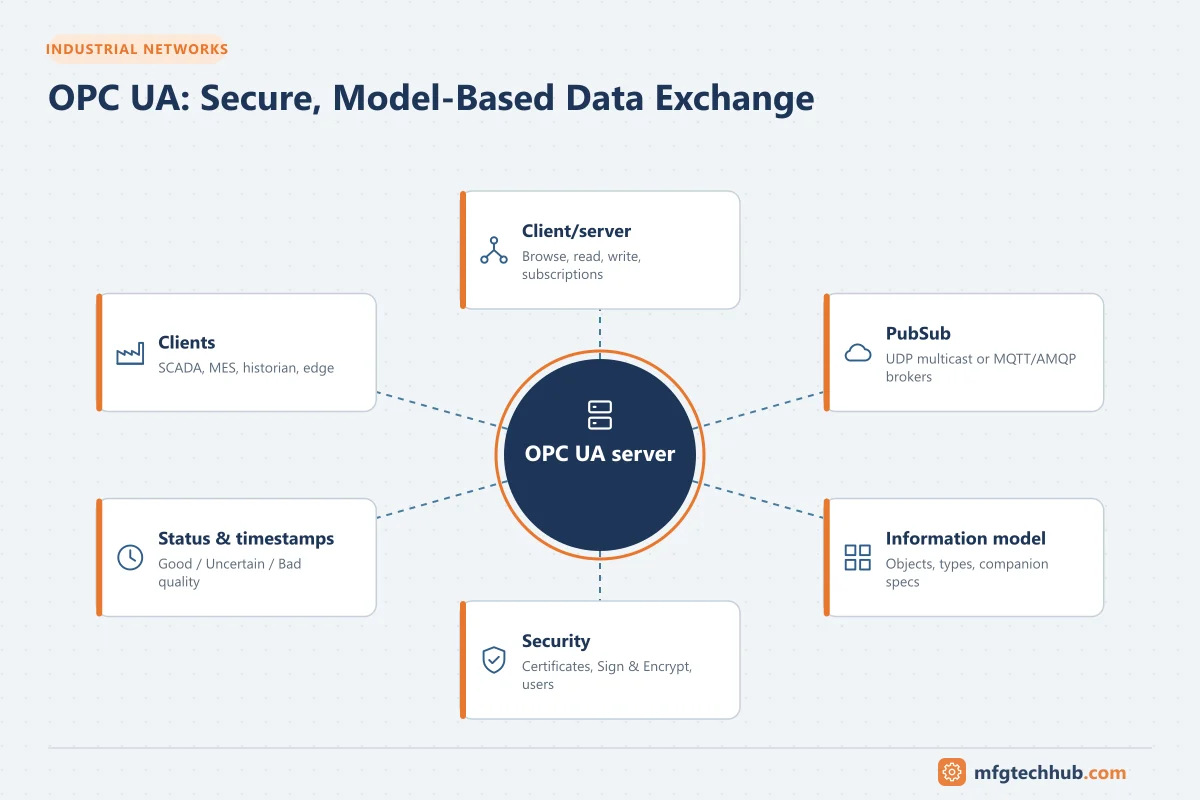
This guide explains how OPC UA works, how to design with it, and how to avoid the problems that commonly appear in projects.
Why OPC UA exists
OPC Classic (OPC DA for real-time data, HDA for history, A&E for alarms and events) solved a real problem in the 1990s: every HMI needed a driver for every PLC. But it depended on Microsoft COM/DCOM, which made it Windows-only, hard to configure across networks and difficult to secure. OPC UA was designed to keep the interoperability while fixing those limitations:
| OPC Classic | OPC UA |
|---|---|
| Windows COM/DCOM | Platform independent (Windows, Linux, embedded devices, PLCs, cloud) |
| Separate specifications for data, history, alarms | One framework covering data, history, alarms, methods and events |
| Flat tag lists | Rich, object-oriented information models |
| Security depends on DCOM configuration | Built-in authentication, signing and encryption |
| Difficult through firewalls | Single configurable TCP port (4840 by default for opc.tcp) |
Communication models
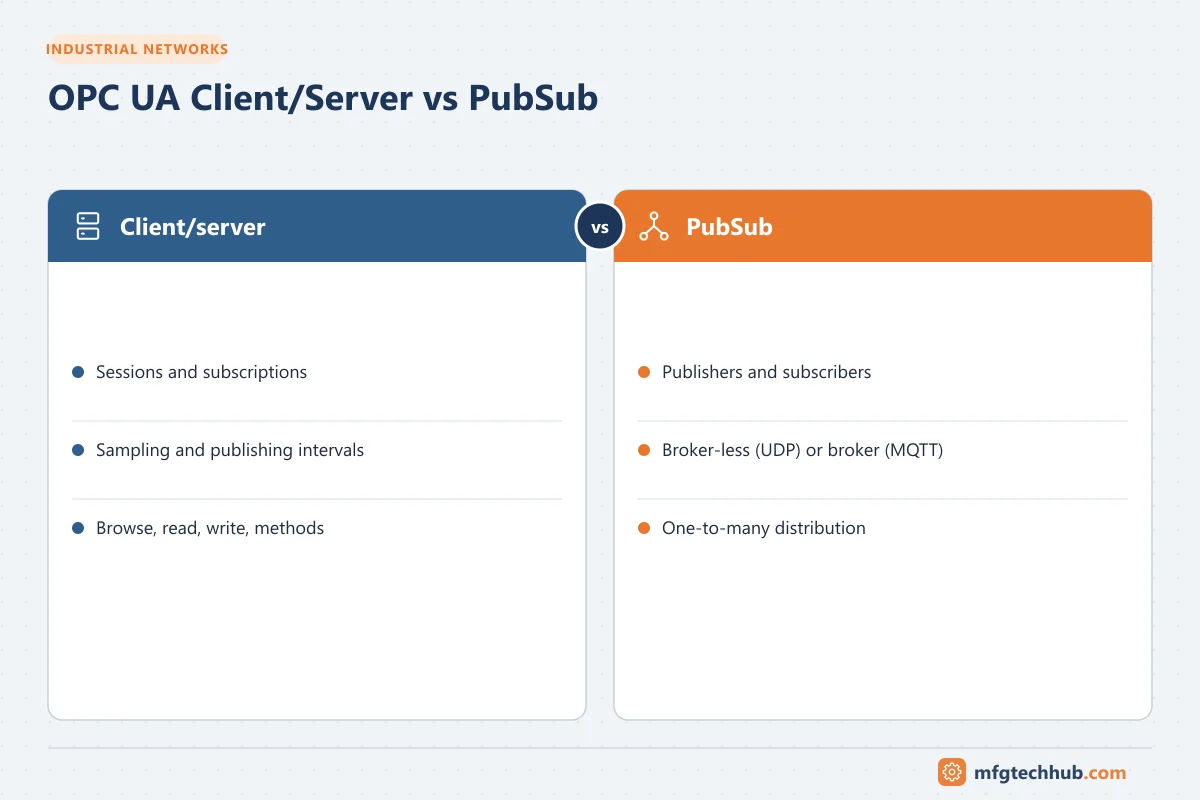
Client/server
The most common model. A client (for example a SCADA, MES or historian) connects to a server (often embedded in a PLC, or a connectivity server that talks to many devices).
- The client discovers the server’s endpoints (URL, security mode and policy, supported user authentication).
- It opens a secure channel (certificate exchange) and creates a session (user authentication).
- It browses the address space, reads, writes, calls methods, or creates subscriptions.
Subscriptions are the efficient way to receive changing data:
| Parameter | Meaning | Design tip |
|---|---|---|
| Sampling interval | How often the server samples a value | Match to process dynamics; not faster than needed |
| Publishing interval | How often the server sends notifications to the client | Group items with similar needs into one subscription |
| Deadband | Minimum change (absolute or percent) before a notification | Reduces traffic for noisy analog values |
| Queue size | How many changes are buffered between publishes | Increase if every change matters (events, counters) |
PubSub
OPC UA PubSub (Part 14) publishes data to many subscribers without sessions:
- Broker-less: UDP multicast (UADP encoding) on local networks, suited to fast, deterministic data exchange, and the foundation for controller-to-controller communication with TSN.
- Broker-based: over MQTT or AMQP, often with JSON encoding, suited to cloud and IIoT architectures.
PubSub complements client/server; many systems use both.
The address space and information models
Everything in an OPC UA server is a node in an address space. Nodes are connected by references, forming a graph rather than a flat list.
| Node class | Example |
|---|---|
| Object | Pump P-101 |
| Variable | P-101 discharge pressure (with value, data type, engineering units, timestamp and status) |
| Method | StartPump() |
| ObjectType | “CentrifugalPumpType”, a template used for every pump |
| DataType, ReferenceType, VariableType, View | Definitions that give the model structure |
Each node has a NodeId consisting of a namespace index and an identifier (numeric, string, GUID or opaque), for example ns=3;s=Line1.Filler.Speed. Namespace indexes can change between server restarts or versions; robust clients resolve them from the namespace URI.
Every value also carries a StatusCode (Good, Uncertain, Bad with detailed codes) and timestamps (source and server). Clients must check status, not just the value.
Companion specifications
The biggest long-term value of OPC UA is standard information models for types of equipment, published as companion specifications by the OPC Foundation together with industry organisations. Examples cover machinery basics, plastics and rubber machines (EUROMAP), robotics, machine tools, PackML-based packaging machines, weighing, analyser devices, ISA-95 objects and many more.
When a machine implements a companion specification, an MES or SCADA can understand “machine state”, “job” or “counter” without custom mapping. When specifying new equipment, ask suppliers which companion specifications they support.
Security
OPC UA security has three layers:
- Application authentication: every client and server has an application instance certificate (X.509). Each side must trust the other’s certificate (or the issuing certificate authority).
- Message security: the security mode is None, Sign or SignAndEncrypt, combined with a security policy that defines algorithms. Older policies (Basic128Rsa15, Basic256) are deprecated; current RSA policies such as Basic256Sha256, Aes128_Sha256_RsaOaep and Aes256_Sha256_RsaPss are preferred, and newer specification versions add ECC-based policies. Check what your products support.
- User authentication: anonymous, username/password, X.509 user certificates or issued tokens, with role-based authorisation on the server.
Certificate management in practice
- Self-signed certificates are simple for small systems: each application’s certificate is copied into the other’s trust list. This does not scale well.
- CA-signed certificates from a plant PKI scale better: trust the CA, and every certificate it issues is accepted (subject to revocation lists).
- Global Discovery Server (GDS) functionality in the specification supports central certificate and trust-list management.
- Certificates expire. Plan renewal before expiry; expired certificates are a common cause of sudden connection failures.
See OPC UA Certificate Errors: Troubleshooting Guide.
Recommended baseline: use SignAndEncrypt with a current security policy, disable security mode None on production endpoints, disable anonymous access where writes are possible, use least-privilege user roles, and manage certificates deliberately. See ISA/IEC 62443.
Typical architectures
| Pattern | Description | When to use |
|---|---|---|
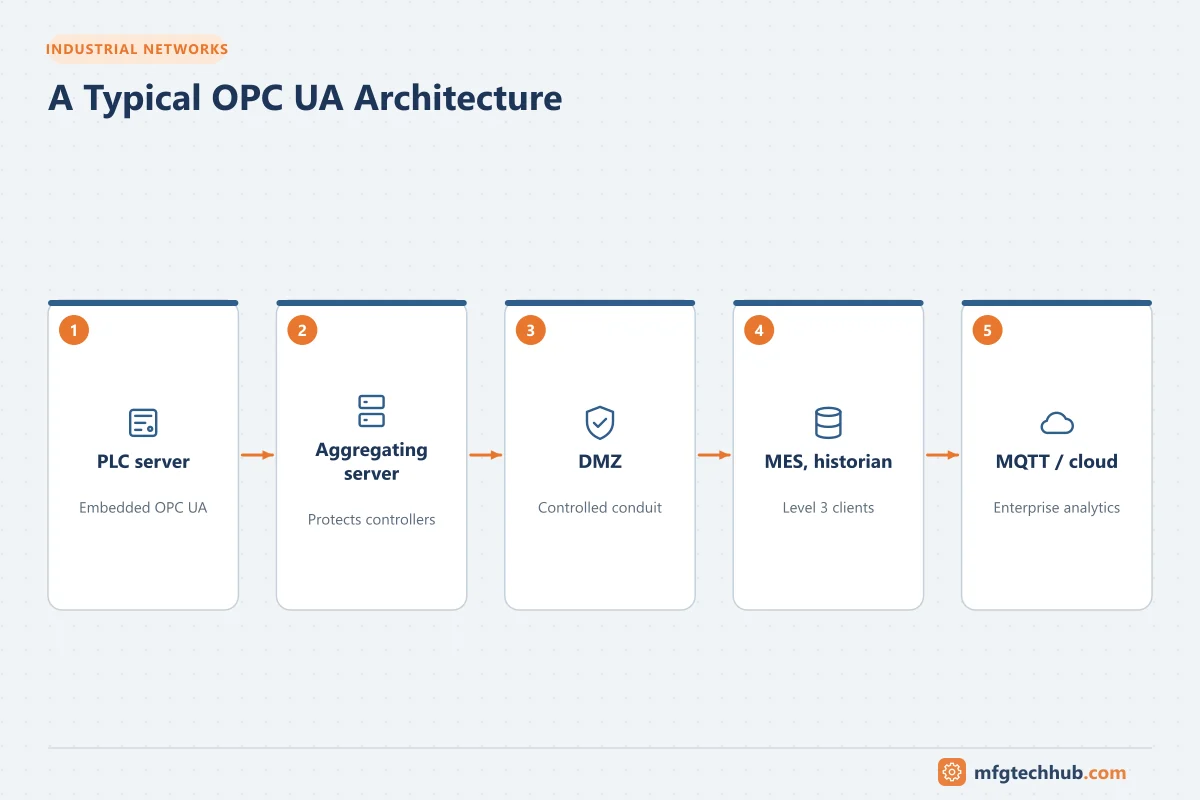
| Embedded server in the PLC | Client connects directly to the controller | Modern PLCs with sufficient performance; moderate numbers of clients |
| Connectivity server / gateway | One server talks native protocols to many devices and exposes them via OPC UA. See Connectivity Software Compared | Legacy or mixed PLC fleets; offload the controllers |
| Aggregating server | Combines several OPC UA servers into one address space | Site-level integration, one endpoint for MES/historian |
| OPC UA to MQTT | Edge device subscribes via OPC UA and publishes to an MQTT broker | IIoT and cloud integration. See MQTT and Sparkplug B |
| Through a DMZ | Aggregating server or broker in the DMZ, connections initiated from the plant side | Enterprise and cloud access without direct control-network exposure |
Design guidelines
- Limit clients per controller. PLC-embedded servers have session and subscription limits; use an aggregating server when many applications need the same data.
- Design the model, not just tags. Use object types for repeated equipment so clients can discover structure.
- Choose sampling and publishing rates deliberately. Hundreds of fast subscriptions can load a controller more than its control program.
- Handle status codes and timestamps in every client.
- Resolve namespaces by URI, not fixed indexes.
- Plan certificates from day one: who issues them, where trust lists live, how renewal is done.
- Test failure cases: server restart, network loss, certificate expiry, redundant server switchover.
Migrating from OPC Classic
Many plants still run OPC DA servers. Options:
- Replace with native OPC UA servers or PLC-embedded servers where available.
- Wrap OPC DA servers with an OPC UA wrapper or connectivity server that exposes them as OPC UA.
- Tunnel Classic data across networks with tunnelling products, avoiding DCOM configuration between machines.
DCOM security hardening changes introduced by Microsoft in recent years have broken some cross-machine OPC Classic connections, which is another reason to move to OPC UA.
Troubleshooting quick reference
| Symptom / status | Likely cause | First check |
|---|---|---|
| Cannot connect, BadCertificateUntrusted / BadSecurityChecksFailed | Certificate not trusted on one side | Rejected-certificates folder on client and server |
| BadCertificateTimeInvalid | Certificate expired or clocks wrong | Certificate validity dates; system time on both hosts |
| BadCertificateHostNameInvalid / UriInvalid | Hostname or application URI in certificate does not match | Endpoint URL vs certificate SAN entries |
| BadUserAccessDenied / BadIdentityTokenRejected | User or password wrong, or role lacks rights | Server user configuration and roles |
| BadTooManySessions / subscriptions | Server limits reached | Number of clients; use an aggregating server |
| BadNodeIdUnknown | NodeId changed (program download, namespace index change) | Browse again; resolve namespace by URI |
| Values arrive slowly | Sampling/publishing intervals too slow, or server overloaded | Subscription settings and server diagnostics |
| Connection drops through firewall | Idle timeout or port blocked | Firewall session timeout, keep-alive settings, port 4840 or configured port |
Frequently asked questions
What port does OPC UA use?
The registered default port for the opc.tcp binary protocol is 4840, but servers can be configured to use other ports. Check each server’s endpoint URL.
Is OPC UA secure?
It provides strong security mechanisms (certificates, signing, encryption, user authentication and authorisation), but they must be configured. Endpoints with security mode None or anonymous write access are insecure.
What is the difference between OPC UA and MQTT?
OPC UA defines rich information models and supports client/server and publish/subscribe communication. MQTT is a lightweight publish/subscribe transport without a built-in data model. They are often combined: OPC UA at the machine and site level, MQTT for distributing data to IIoT and cloud platforms, sometimes carrying OPC UA PubSub messages.
Does OPC UA replace fieldbuses like PROFINET or EtherNet/IP?
Not for I/O and motion today. PROFINET, EtherNet/IP and EtherCAT remain the main real-time field protocols. OPC UA FX (Field eXchange), combined with TSN, targets controller-to-controller and, in future, field-level communication.
Key takeaways
- OPC UA (IEC 62541) is the vendor-neutral standard for secure, model-based industrial data exchange.
- It supports client/server with subscriptions and PubSub over UDP, MQTT or AMQP.
- Information models and companion specifications are its biggest long-term value.
- Configure security properly and manage certificates as a lifecycle, not a one-time setup.
Related tutorials
Before you apply this in a plant: this article is for education. Always check the current edition of the relevant standards, the manufacturer's documentation for your exact product and version, and your site's procedures. Safety-related work needs qualified personnel. See our editorial policy.