
PLC Security: Real Incidents, Common Weaknesses and a Hardening Checklist
On this page
PLCs were designed for isolated networks and trusted users. Many installed controllers accept program changes from any device that can reach them, use protocols without authentication, and run for years without firmware updates. Once plants connected control networks to business networks, remote access and the cloud, those design assumptions stopped being true.
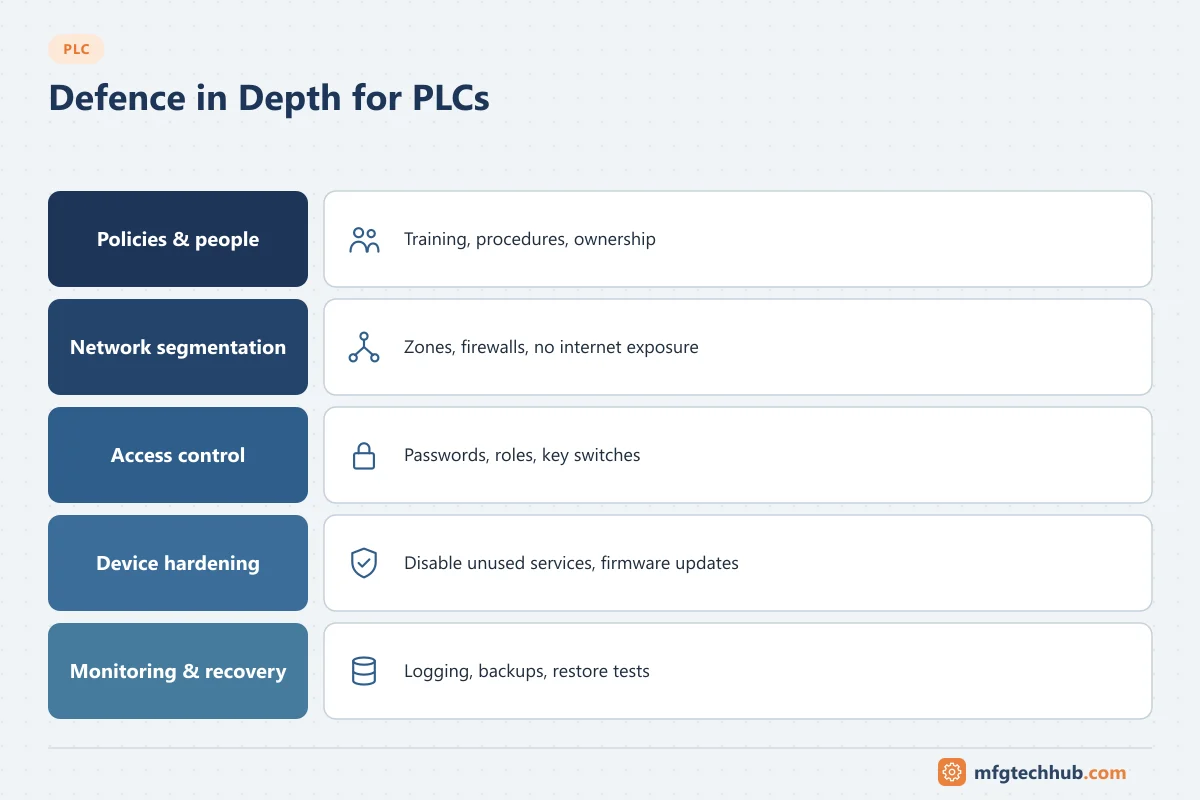
This article explains why PLCs are vulnerable, what documented incidents show, and a practical, defensive checklist to reduce risk. It does not describe attack techniques.
Why PLCs are hard to secure
| Characteristic | Security consequence |
|---|---|
| Legacy protocols (Modbus, older vendor protocols) lack authentication and encryption | Any device on the network may read or write data, or change programs |
| Long service life (15–30 years) | Old firmware and operating systems stay in service |
| Availability is the priority | Patching requires downtime and testing, so it is often delayed |
| Engineering workstations and laptops have full access | A compromised laptop can compromise many controllers |
| Vendor and contractor remote access | Extra entry points that are often poorly controlled |
| Flat networks | Malware in one area can reach every controller |
What real incidents teach
| Incident | What happened (public reporting) | Lesson |
|---|---|---|
| Maroochy Shire, Australia (2000) | A former contractor used radio equipment to send commands to sewage pumping stations, causing spills of raw sewage | Insider knowledge and unauthenticated radio links are real risks; revoke access and authenticate commands |
| Stuxnet (discovered 2010) | Malware spread via Windows systems and removable media, modified Siemens S7 PLC logic controlling centrifuge drives, and hid the changes from operators | Air gaps are not a complete defence; program integrity checking and engineering workstation security matter |
| Ukraine power grid (December 2015) | Attackers used stolen credentials and remote access to operate distribution SCADA and open breakers; they also disabled field devices and support systems | Remote access, credential theft and IT–OT pathways must be controlled; plan manual operation |
| Ukraine, Industroyer/CrashOverride (December 2016) | Malware used substation protocols (such as IEC 60870-5-104 and IEC 61850) to operate breakers at a transmission substation | Industrial protocols themselves can be misused once an attacker is inside the network |
| TRITON/TRISIS (2017) | Malware targeted Schneider Electric Triconex safety instrumented system controllers at a petrochemical facility; the plant tripped safely | Safety systems are targets too; keep safety controllers in run mode with physical key protection and separate networks |
| Colonial Pipeline (2021) | Ransomware on IT systems led the company to shut down pipeline operations as a precaution | IT incidents can stop OT; segmentation and OT-specific recovery plans are needed |
| PIPEDREAM/INCONTROLLER (disclosed 2022) | US agencies described a toolkit able to target certain Schneider Electric and OMRON controllers and OPC UA servers | Capabilities against common PLC platforms exist; prioritise detection and segmentation |
| Internet-exposed PLCs (2023) | Attackers defaced HMIs of Unitronics controllers at US water facilities that were reachable from the internet with default credentials | Never expose PLCs directly to the internet; change default passwords |
| FrostyGoop (reported 2024) | Security researchers reported malware using Modbus TCP to disrupt heating controllers in Ukraine | Simple, widely used protocols can be abused; monitor OT traffic |
For authoritative details, see advisories from CISA and national cybersecurity agencies, and vendor security bulletins.
Defence in depth: a practical checklist
The ISA/IEC 62443 series is the main international framework for industrial automation security. See ISA-99 / IEC 62443. The checklist below applies its principles to PLCs.
1. Know what you have
- Asset inventory: every PLC, HMI, engineering workstation, network device, firmware version and network connection.
- Network diagram kept up to date, showing all paths into the control network.
- Identify critical controllers (safety, high-consequence processes) for priority protection.
2. Segment the network
- Separate the control network from the business network with firewalls; use an industrial DMZ for data exchange (historians, patch servers, remote access).
- Divide the control network into zones (for example per production area or unit) with controlled conduits between them.
- Allow only the protocols and connections that are needed; deny everything else by default.
- No direct internet exposure of PLCs, HMIs or engineering tools.
3. Harden the controllers
- Use the controller’s access protection (password or user-based access levels for read, write and program changes).
- Use the physical run/program key switch or mode protection where available, especially for safety controllers.
- Disable unused services such as built-in web servers, FTP, SNMP or unused communication ports.
- Change default credentials on every device.
- Enable secure communication options where supported (for example OPC UA with signing and encryption, CIP Security, secure PROFINET features).
- Keep firmware at a supported, vendor-recommended version; check vendor security advisories.
4. Control access
- Named user accounts instead of shared logins for engineering tools where possible; role-based access.
- Remote access only through a managed gateway or jump host in the DMZ, with multi-factor authentication, session logging and time-limited vendor access.
- Offboarding: remove access immediately when people or contractors leave.
- Control removable media and require malware scanning of laptops and USB drives before connection.
5. Protect program integrity
- Keep version-controlled backups of every PLC program and configuration.
- Regularly compare running programs with the approved version (many platforms and change-management tools can detect differences).
- Log and review program downloads, online edits and forced I/O.
- Apply formal change management to all logic changes.
6. Monitor
- Use passive OT network monitoring (industrial intrusion detection) to detect new devices, unexpected program downloads and unusual traffic.
- Collect logs from firewalls, remote access gateways, engineering workstations and controllers that support syslog.
- Define who reviews alarms and how they escalate.
7. Prepare to respond and recover
- Offline backups of programs, firmware, HMI projects and engineering software installers and licences.
- An OT incident response plan: who decides to isolate networks, how to operate manually, when to contact vendors and authorities.
- Test restores periodically; a backup that cannot be restored is not a backup.
- Keep spare controllers with known-good firmware for critical systems.
8. Patch realistically
Patching controllers requires downtime and testing. A practical approach:
- Assess each advisory: is the device affected, and is the vulnerable service reachable?
- Apply compensating controls (segmentation, disabling a service, access restrictions) immediately.
- Schedule firmware updates in planned shutdowns after testing on a spare or test system.
Security for different PLC generations
| Controller generation | Typical capability | Main protection |
|---|---|---|
| Legacy (no authentication) | Little or no built-in security | Network segmentation, strict access to the network, monitoring, migration planning |
| Mid-generation | Passwords/protection levels, some logging | Enable all features; segmentation still required |
| Current (secure by design) | User management, secure protocols, signed firmware, IEC 62443-4-2 certified products on many lines | Configure securely; integrate with identity management and monitoring |
See PLC Migration and Upgrade Guide for replacing controllers that cannot be secured.
Frequently asked questions
Is an air-gapped PLC network secure?
An air gap reduces risk but is not complete protection. Stuxnet showed that malware can cross an air gap on removable media and engineering laptops. In practice, most “air-gapped” networks also have undocumented connections. Combine isolation with media control, program integrity checks and monitoring.
Does antivirus software protect PLCs?
Antivirus runs on Windows workstations and servers, not on PLCs. It helps protect engineering workstations and HMIs, which are common entry points. PLCs are protected by network segmentation, access control, secure configuration and monitoring.
Which standard should I follow for PLC security?
ISA/IEC 62443 is the main international standard series for industrial automation and control system security. National guidance, such as NIST SP 800-82 in the United States, and sector regulations may also apply.
Key takeaways
- Many PLCs trust anything on their network; the network, access and engineering workstations must be protected.
- Real incidents show risks from insiders, remote access, removable media, IT ransomware and misuse of industrial protocols.
- Apply defence in depth: inventory, segmentation, controller hardening, access control, integrity checks, monitoring and tested recovery.
Related tutorials
Before you apply this in a plant: this article is for education. Always check the current edition of the relevant standards, the manufacturer's documentation for your exact product and version, and your site's procedures. Safety-related work needs qualified personnel. See our editorial policy.