
PLC Migration and Upgrade Guide: Compatibility, Strategies, Testing and Cutover
On this page
Many plants run PLCs that are 15–30 years old. They still work, but spare parts become scarce, programming software needs old laptops, and integration with modern systems is difficult. Upgrading is rarely just a hardware swap. It touches I/O wiring, networks, code, HMIs, SCADA, historians and operations procedures, often with only a short shutdown window.
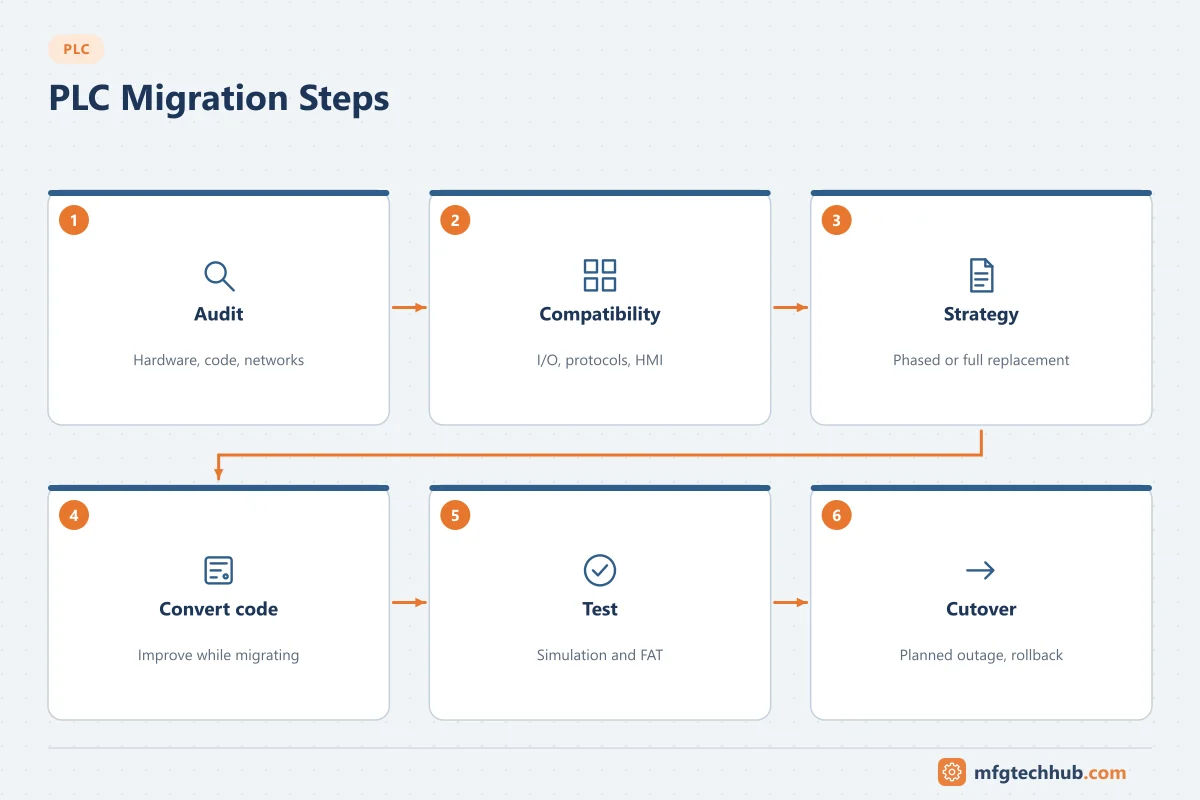
This guide covers how to decide when to migrate, the main compatibility issues, the common migration strategies, and a tested approach to cutover.
When to migrate: the lifecycle trigger
Vendors typically move products through phases such as active → mature/classic → end of sale → end of support. The exact names differ by vendor. Triggers for migration include:
- The controller family is at end of sale or end of support (check the vendor’s lifecycle status for every CPU, I/O and communication module).
- Spare parts are only available second-hand or refurbished.
- Engineering software runs only on unsupported operating systems.
- The system cannot meet cybersecurity requirements.
- New requirements (data to MES, OPC UA, more I/O, faster cycle times) cannot be met.
- Knowledge risk: few people still understand the old platform.
A simple risk score (likelihood of failure × impact on production × time to recover) helps prioritise which systems to migrate first.
Step 1: Audit the installed system
Before designing anything, collect:
| Item | What to record |
|---|---|
| Hardware | CPU, I/O modules, communication modules, firmware versions, rack layouts |
| I/O list | Every point with tag, type, signal, range, terminal and field device |
| Program | Latest backup, compared with the running controller; comments and documentation quality |
| Networks | Protocols, addresses, connected devices (drives, HMIs, remote I/O, other PLCs) |
| Interfaces | SCADA/HMI tags, historian tags, MES or ERP interfaces, data exchanged with other controllers |
| Operation | Sequences, known workarounds, alarms that operators rely on |
| Safety | Safety functions and how they are implemented (hard-wired relays, safety PLC, standard PLC) |
The audit almost always finds undocumented changes. Compare the program in the controller with the archived backup and walk the site with the drawings.
Step 2: Understand the compatibility issues
| Area | Typical issue | Approach |
|---|---|---|
| I/O wiring | New modules have different terminal layouts | Wiring conversion systems / adapter cables where the vendor offers them, or new terminal blocks |
| Signal types | Old special modules (for example high-speed counters, positioning) may have no direct equivalent | Design replacements early; test with the real device |
| Networks | Legacy fieldbuses (for example DH+, older proprietary networks, serial Modbus) | Protocol gateways during transition, or migrate devices to Ethernet |
| Program | Different instruction sets, data types, timers and addressing | Vendor conversion tools plus manual review and restructuring |
| Timing | Faster scan changes behaviour of logic that depended on slow scans | Review timing-sensitive logic and edge detection |
| HMI/SCADA | Tag addresses change | Update tag databases; consider using symbolic tags or an OPC server to decouple |
| Software versions | Firmware and engineering tool versions must match | Standardise on versions per site and archive installers |
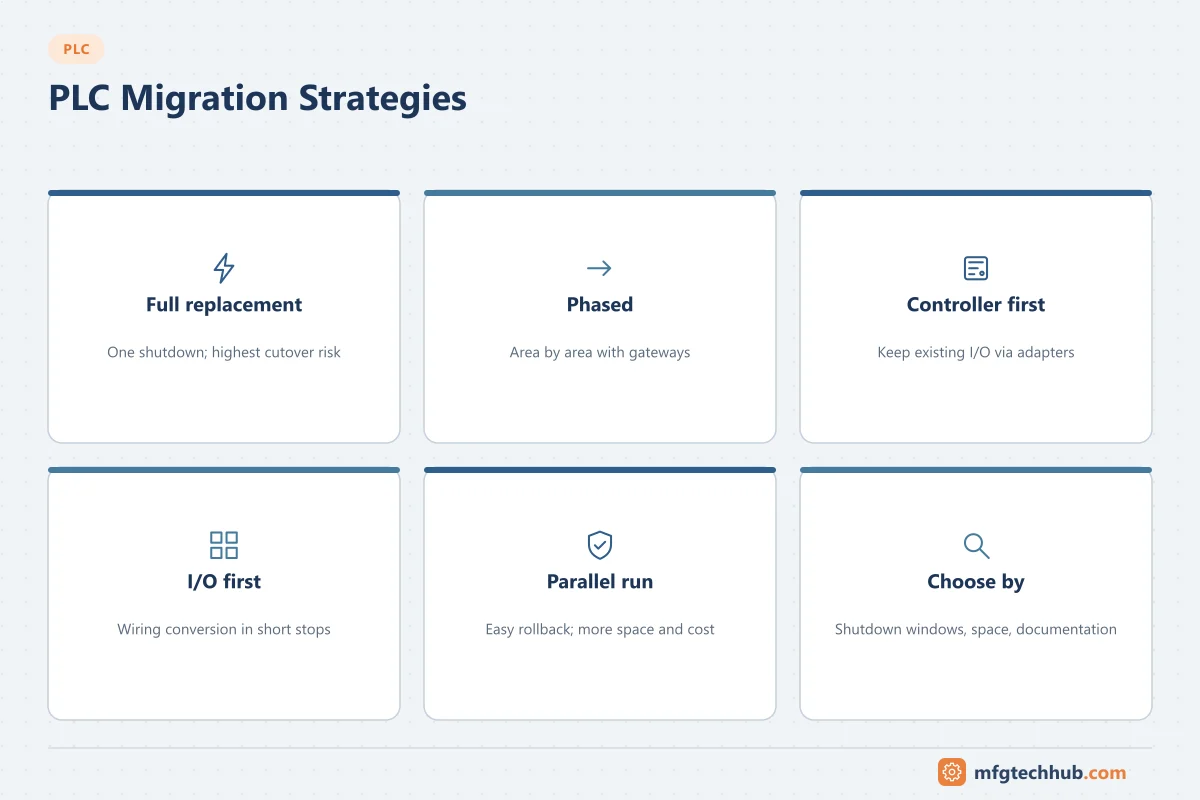
Step 3: Choose a migration strategy
| Strategy | Description | Pros | Cons |
|---|---|---|---|
| Full replacement (big bang) | Replace controller, I/O and code in one shutdown | Clean result; one cutover | Needs a long enough shutdown; highest cutover risk |
| Phased migration | Migrate area by area, with gateways between old and new | Smaller shutdowns; risk spread out | Temporary interfaces; longer project |
| Controller first, keep I/O | New CPU communicates with existing I/O via adapters or remote I/O conversion | Fast cutover; wiring untouched | Old I/O remains an ageing risk; not always available |
| I/O first | Replace I/O with wiring conversion products during planned stops; switch controller later | Uses short outages | Requires careful planning of interim state |
| Parallel run | New system installed alongside old one, switched over signal by signal or unit by unit | Easy rollback | Space, cost and complexity |
The best strategy depends on shutdown windows, cabinet space, how well documented the system is and how much the process can tolerate interim states.
Step 4: Convert and improve the code
- Vendor conversion tools can translate much of the old program, but the result needs thorough review: converted code often keeps old workarounds and poor structure.
- Decide deliberately between “like-for-like” (minimal change, easier validation) and “re-engineer” (new structure using libraries and standards). Many projects do like-for-like for complex process logic and re-engineer the equipment control layer.
- Keep tag names consistent with the I/O list and the HMI.
- Document every functional change; operations must know what behaves differently.
See PLC Programming Best Practices.
Step 5: Test before site
- Offline simulation of the new program.
- Factory Acceptance Test (FAT): test the new controller and HMI with simulated I/O against a test procedure derived from the functional description.
- Interface tests with SCADA, historian, MES and other controllers (in a test environment if possible).
- Performance tests: scan time, communication loads, alarm floods.
Step 6: Plan the cutover
A cutover plan should list, hour by hour:
- Pre-requisites: backups of old and new programs, spare parts, tools, approved test sheets, people available (electricians, programmers, operators, vendor support).
- Sequence: isolate, disconnect, install, re-terminate, power up, download, I/O checkout.
- I/O checkout: every point verified from the field device to the HMI (loop check).
- Functional tests: interlocks, sequences, alarms, safety functions (by authorised personnel).
- Go/no-go decision points and rollback criteria: at what time and in what condition you revert to the old system.
- Rollback method: keep the old controller and wiring (or adapters) available until the new system is accepted.
Step 7: After start-up
- Keep experienced support on site for the first production runs.
- Track punch-list items and operator feedback.
- Update drawings, I/O lists and backups; archive the old system documentation.
- Train maintenance on the new platform’s diagnostics.
Migration checklist
- Lifecycle status confirmed for every module
- Program in the controller compared with the archived backup
- Complete I/O list verified in the field
- All interfaces (HMI, SCADA, historian, MES, other PLCs, drives) listed with owners
- Safety functions identified and handled by qualified safety personnel
- Strategy selected and shutdown windows agreed with production
- Code converted/re-engineered and reviewed
- FAT and interface tests passed
- Cutover plan with go/no-go points and rollback plan approved
- Spares, backups, software versions and licences archived
- Documentation and training completed
Frequently asked questions
How long does a PLC migration take?
The site cutover might be a weekend or a few days for a single machine, but preparation (audit, design, code conversion and testing) usually takes weeks to months. Large multi-area systems are often migrated in phases over several planned shutdowns.
Can I keep the existing I/O wiring?
Often yes. Many vendors and third parties offer wiring conversion systems that plug onto existing field wiring and connect to new I/O modules. This greatly reduces cutover time and wiring errors, but check availability for your specific modules.
Is it better to change PLC brand during a migration?
It depends on site standards, available skills, spare-part strategy and integration with other systems. Staying with the same vendor usually makes conversion easier; changing may be justified by standardisation or technical needs. Evaluate lifecycle cost, not only hardware price.
Key takeaways
- Migrate based on lifecycle, spares, security and business risk, not only age.
- The audit and I/O verification are the foundation; expect undocumented changes.
- Choose a strategy (full, phased, controller-first, I/O-first, parallel) that fits shutdown windows.
- Test thoroughly before site and plan cutover with go/no-go points and a rollback path.
Related tutorials
Before you apply this in a plant: this article is for education. Always check the current edition of the relevant standards, the manufacturer's documentation for your exact product and version, and your site's procedures. Safety-related work needs qualified personnel. See our editorial policy.