
Certificates and PKI for OT: X.509, File Formats, Chains, Renewal and Lifecycle Management
On this page
Certificates used to be an IT topic. Today they appear throughout OT: OPC UA connections, MQTT brokers, web interfaces of PLCs and switches, remote access gateways, historians, MES servers and signed firmware. When a certificate expires or is not trusted, production data stops flowing. Automation engineers need enough PKI knowledge to design, operate and troubleshoot these systems.
What a certificate is
An X.509 certificate binds a public key to an identity (a server, device, application or user), signed by an issuer. Its main fields:
| Field | Meaning | Why it matters in OT |
|---|---|---|
| Subject | Who the certificate identifies | Human-readable identity |
| Subject Alternative Name (SAN) | DNS names, IP addresses, URIs | Clients check that the name they connect to is listed; OPC UA also checks the application URI |
| Issuer | Who signed it | Determines which CA must be trusted |
| Validity (not before / not after) | Lifetime | Expiry stops connections; wrong clocks make valid certificates look invalid |
| Public key and algorithm | For example RSA 2048 or ECC | Must be supported by both sides |
| Key usage / extended key usage | Allowed purposes (server authentication, client authentication, code signing) | Wrong usage causes rejection |
| Serial number | Unique per issuer | Used for revocation |
The private key stays with the owner and must be protected; anyone with the private key can impersonate the system.
A thumbprint (fingerprint) is a hash of the certificate (often SHA-1 or SHA-256), used to identify it quickly, for example when comparing the certificate in a trust list with the one a device presents.
File formats and extensions
| Format / extension | Content | Encoding |
|---|---|---|
| PEM (.pem, often .crt, .cer, .key) | Certificates and/or keys | Base64 text with -----BEGIN CERTIFICATE----- headers |
| DER (.der, often .cer) | A single certificate | Binary |
| .cer / .crt | Certificate only | Either PEM or DER; the extension alone does not tell you which |
| PFX / P12 (.pfx, .p12) | Certificate plus private key (and optionally the chain), password protected | Binary (PKCS#12) |
| .csr | Certificate signing request | PEM text |
| .crl | Certificate revocation list | PEM or DER |
Common inspection and conversion commands with OpenSSL:
# Show certificate details (PEM)
openssl x509 -in device.crt -text -noout

# Show details of a DER-encoded certificate
openssl x509 -inform der -in device.cer -text -noout

# Convert DER to PEM
openssl x509 -inform der -in device.cer -out device.pem

# List the contents of a PFX/P12 file
openssl pkcs12 -in server.pfx -info -nokeys
Treat PFX/P12 files and key files as secrets: store them securely and never email them.
Certificate chains and trust
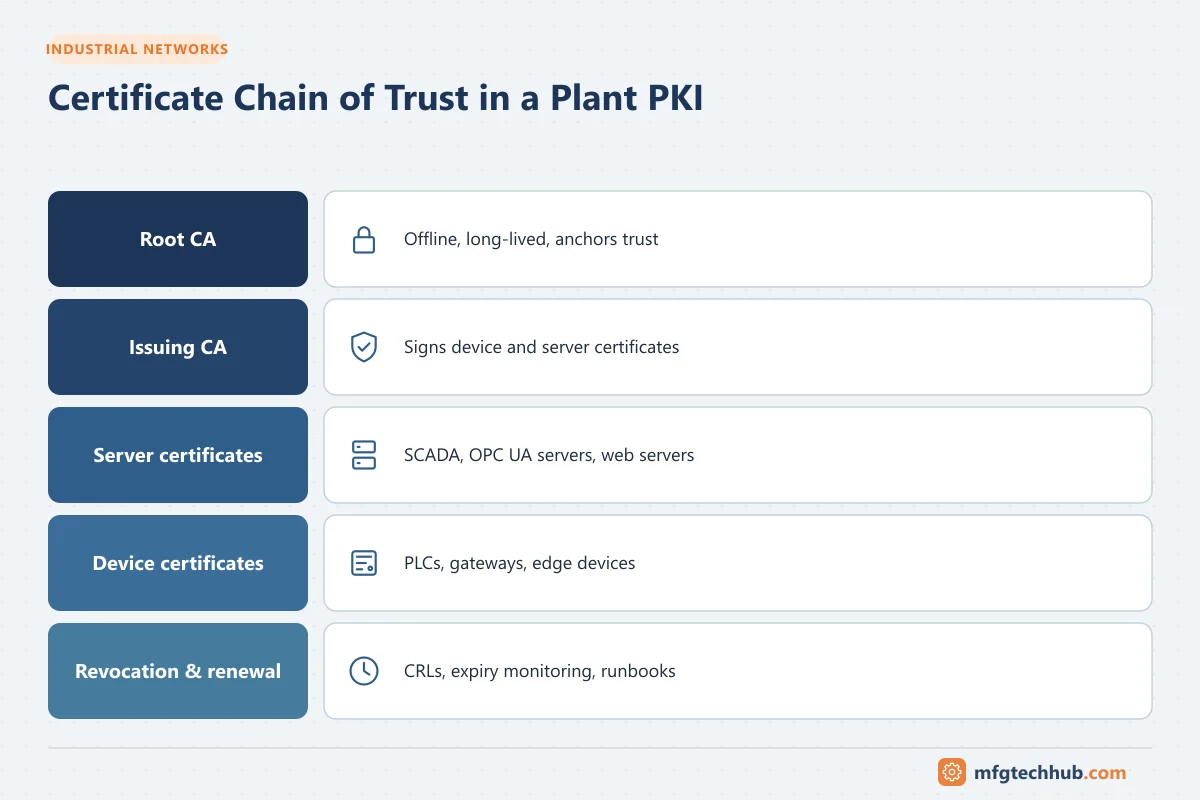
- A root CA certificate is self-signed and is the anchor of trust.
- Intermediate (issuing) CAs are signed by the root and issue device or server certificates.
- A system trusts a certificate if it can build a chain from the certificate to a root it trusts, and every certificate in the chain is valid.
Self-signed certificates (each application signs its own) are simple for small systems: each side adds the other’s certificate to its trust list. For more than a handful of connections, this becomes unmanageable, and a plant PKI is better.
Revocation
If a private key is compromised or a device is decommissioned, its certificate should be revoked:
- CRL (certificate revocation list): a signed list published by the CA, which systems download. CRLs have their own validity period; an expired CRL can cause connection failures in applications that require revocation checks (for example OPC UA revocation errors).
- OCSP: online status checks; often unavailable in isolated OT networks, so CRLs distributed internally are more common.
Where OT uses certificates
| Use | Examples |
|---|---|
| OPC UA | Application instance certificates, user certificates. See OPC UA Explained |
| MQTT | Broker TLS certificates, client certificates. See MQTT and Sparkplug B |
| HTTPS | Web interfaces of PLCs, switches, gateways, historians, MES |
| Remote access | VPN gateways, jump servers |
| Network access control | 802.1X authentication of devices |
| Code and firmware signing | Verifying that firmware and software packages are authentic |
| Windows infrastructure | Domain controllers, RDP, database connections |
| Protocol security | CIP Security, BACnet/SC, Modbus/TCP Security, IEC 62351 in power systems |
Designing a plant PKI
A common structure:
- Offline root CA: kept offline and used only to sign issuing CAs.
- OT issuing CA in the OT environment (or DMZ), separate from the corporate IT PKI or as a dedicated branch of it, depending on policy.
- Enrollment: manual CSR-based enrollment for devices that require it; automated protocols where supported (for example SCEP or EST, and OPC UA’s global discovery server functions).
- CRL distribution reachable from OT zones.
- Inventory and monitoring of all certificates and their expiry dates.
Decide early on key lengths, algorithms, validity periods, naming conventions (hostnames, IP addresses, application URIs) and who approves certificate requests.
Lifecycle and renewal
Certificate expiry is one of the most common causes of sudden, plant-wide integration failures. Build a lifecycle process:
- Inventory: every certificate with owner, system, issuer, expiry date and dependent connections
- Monitoring and alerts well before expiry (for example 90, 30 and 7 days)
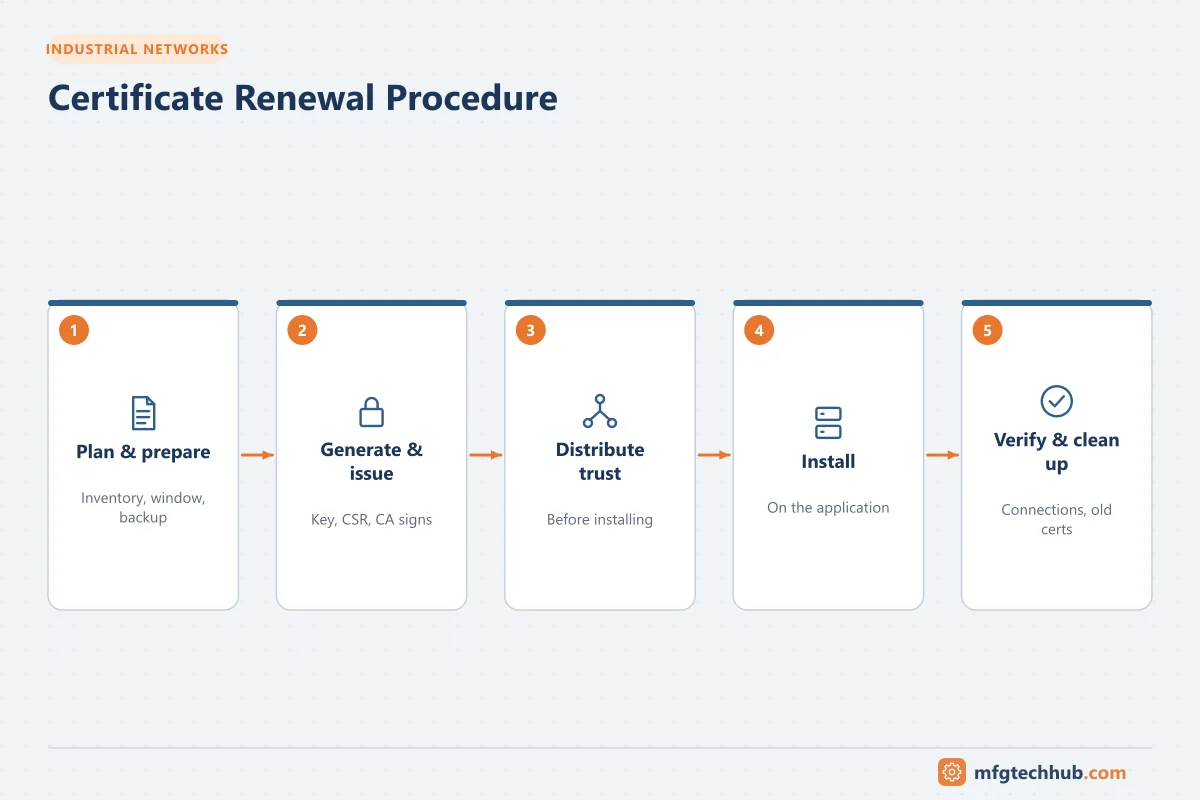
- Renewal runbook: generate new key/CSR, obtain certificate, install, update partners’ trust lists if needed, verify connections, remove the old certificate
- Planned timing: renew during maintenance windows where connections may briefly drop
- Time synchronisation on all systems, because validity depends on correct clocks
- Backups of certificates and keys stored securely, with recovery tested
- Decommissioning: revoke certificates of retired devices
Certificate renewal procedure (runbook)
| Step | Action | Notes |
|---|---|---|
| 1. Plan | Identify the certificate, its dependants (every client or server that trusts it) and a maintenance window | Use the inventory; renew well before expiry |
| 2. Prepare | Back up the current certificate and key; confirm the CA and naming (SAN, application URI) | See OT Backup and Restore Runbook |
| 3. Generate | Create a new key pair and CSR on the device or application (preferred), or use its built-in renewal function | Keep private keys on the device where possible |
| 4. Issue | Submit the CSR to the issuing CA; obtain the certificate and chain | For self-signed certificates, generate the new certificate directly |
| 5. Distribute trust | If partners trust the individual certificate (not the CA), add the new certificate to their trust lists before switching | CA-based trust avoids this step |
| 6. Install | Install the certificate and chain; restart the service only if required | In the agreed window |
| 7. Verify | Confirm every dependent connection (OPC UA sessions, MQTT clients, HTTPS) is secure and working; check logs and rejected folders | See OPC UA Certificate Errors |
| 8. Clean up | Remove the old certificate from trust lists after the overlap period; update the inventory and expiry alerts | Revoke if compromised |
| 9. Rollback | If connections fail and cannot be fixed within the window, reinstall the previous certificate (if still valid) and reschedule | Only possible before the old certificate expires |
Troubleshooting certificate failures
| Symptom | Likely cause |
|---|---|
| Connection fails immediately after a change | Certificate regenerated on one side; not yet trusted by the other |
| Failure on a specific date | Certificate or CA expired |
| “Not yet valid” | Device clock wrong (common after PLC battery or power loss) |
| Name mismatch errors | Connecting by IP address or a name not in the SAN |
| Chain errors | Intermediate CA certificate missing from the store |
| Revocation errors | CRL missing or expired |
| Private key errors after import | Imported certificate without its private key (use the PFX/P12, not the .cer) |
For OPC UA-specific errors, see OPC UA Certificate Errors.
Frequently asked questions
What is the difference between .cer, .crt and .pem?
They are file extensions, not formats. A .cer or .crt file may contain a certificate in PEM (Base64 text) or DER (binary) encoding. PEM files can contain certificates, keys or both. Check the content, for example with OpenSSL.
Why does my PFX file need a password?
A PFX/P12 file contains the private key. The password protects the key when the file is stored or transported. Keep both the file and the password secure.
Should OT use the corporate IT PKI?
It depends on company policy and architecture. Many organisations use a dedicated OT issuing CA (sometimes under the corporate root) so that OT certificate services remain available when IT connectivity is lost and can follow OT change management.
Key takeaways
- An X.509 certificate binds a public key to an identity; the private key must be protected.
- Know the formats (PEM, DER, PFX/P12) and how chains, trust and revocation work.
- For more than a few systems, use a plant PKI with inventory, monitoring and renewal runbooks.
- Most certificate failures are expiry, trust, naming, clock or chain problems.
Related tutorials
Before you apply this in a plant: this article is for education. Always check the current edition of the relevant standards, the manufacturer's documentation for your exact product and version, and your site's procedures. Safety-related work needs qualified personnel. See our editorial policy.