
OPC UA Certificate Errors: Troubleshooting Guide with Causes and Fixes
On this page
Most OPC UA connection problems in the field are certificate and security configuration problems, not network problems. The good news is that they follow predictable patterns. This guide uses a consistent structure: symptoms, likely causes, diagnostic steps, resolution, verification and prevention.
Background on how OPC UA security works is in OPC UA Explained.
How the certificate check works
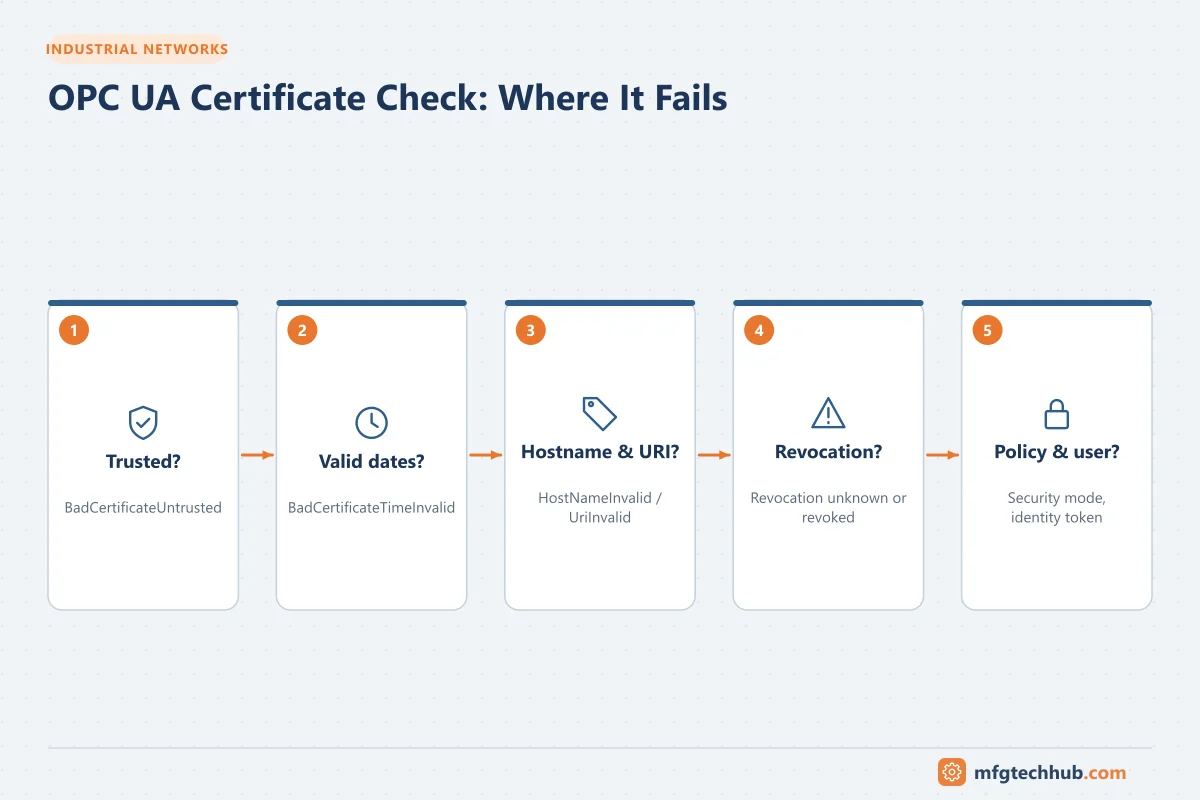
When a client connects to a server with security enabled:
- The client retrieves the server’s endpoints and certificate.
- The client validates the server certificate: is it trusted (or issued by a trusted CA)? Is it within its validity period? Does its hostname and application URI match? Is it revoked?
- The client sends its own certificate; the server validates the client certificate in the same way.
- If both succeed, a secure channel is established; then the user identity is checked.
A failure at step 2 is usually reported by the client; a failure at step 3 is reported by the server (the client may only see a generic error). Always check both sides’ logs.
Where certificates live
Most OPC UA applications use a certificate store with folders or lists such as:
| Store | Contents |
|---|---|
| Own | The application’s own certificate and private key |
| Trusted | Certificates (or CA certificates) the application trusts |
| Issuers | CA certificates needed to build chains, not trusted by themselves |
| Rejected | Certificates that were presented but not trusted, which is where you find the other side’s certificate |
| Revocation lists (CRLs) | Lists of revoked certificates for each CA |
Names and locations differ by product; PLCs often manage them in the engineering tool or a web interface.
Error 1: Certificate not trusted
Symptoms: BadCertificateUntrusted, BadSecurityChecksFailed, “certificate rejected”, or the connection closes immediately after the security handshake.
Likely causes:
- First connection between two applications; certificates never exchanged.
- A certificate was regenerated (software reinstall, PLC reset, hostname change).
- The CA certificate is missing from the trust list.
Diagnostic steps:
- Look in the rejected folder on the client and on the server for the other side’s certificate.
- Compare thumbprints with the certificate the other application is actually using.
- If a CA is used, check that the CA certificate (and intermediate CAs) are in trusted/issuers stores.
Resolution: move the verified certificate from rejected to trusted (or add the CA certificate), following your site’s approval process. Never trust unknown certificates blindly.
Verification: connect again; check that both sides show the session as secure and no new certificates appear in rejected.
Prevention: use a plant PKI or central certificate management; document which applications trust which.
Error 2: Certificate expired or not yet valid
Symptoms: BadCertificateTimeInvalid or BadCertificateIssuerTimeInvalid; connections that worked for months suddenly fail, often on many clients at once.
Likely causes:
- The application certificate or CA certificate has expired.
- The system clock on the client or server is wrong (a PLC with a reset clock can see valid certificates as “not yet valid”).
Diagnostic steps:
- Check the certificate’s valid from and valid to dates.
- Check the time on both machines, and their NTP synchronisation.
Resolution: renew the certificate (and distribute the new one to all partners’ trust lists) or fix the clock.
Verification: reconnect all clients; confirm historian or MES data gaps are backfilled if buffering is available.
Prevention: keep an inventory of certificates with expiry dates, alert well in advance (for example 90 days), synchronise clocks, and plan renewal as maintenance work.
Error 3: Hostname or application URI mismatch
Symptoms: BadCertificateHostNameInvalid or BadCertificateUriInvalid.
Likely causes:
- The client connects using an IP address but the certificate contains only a hostname (or the other way round).
- The server was renamed or moved, but its certificate was not regenerated.
- The application URI in the certificate does not match the URI the application reports.
Diagnostic steps: compare the endpoint URL the client uses with the certificate’s Subject Alternative Name entries (DNS names, IP addresses, URI).
Resolution: connect using a name listed in the certificate, or reissue the certificate with the correct names and URI. Only relax hostname checking in a client as a documented, temporary measure.
Prevention: include both hostname and fixed IP address in certificates where appropriate; regenerate certificates as part of any rename or migration procedure.
Error 4: Revocation cannot be checked
Symptoms: BadCertificateRevocationUnknown or BadCertificateIssuerRevocationUnknown when CA-signed certificates are used.
Likely causes: the application requires a certificate revocation list (CRL) for the CA, but none is present or it has expired.
Resolution: install the current CRL for each CA in the application’s store, and establish a process to update CRLs before they expire.
Prevention: automate CRL distribution through central certificate management.
Error 5: Security policy or mode mismatch
Symptoms: the client finds no suitable endpoint, or reports BadSecurityPolicyRejected.
Likely causes: the server allows only newer security policies that the client does not support, or the client is configured for a deprecated policy (for example Basic128Rsa15 or Basic256).
Resolution: update the client software or select a common, current policy (for example Basic256Sha256 or newer) with SignAndEncrypt. Do not re-enable deprecated policies unless there is no alternative and the risk is accepted.
Error 6: User identity rejected
Symptoms: secure channel succeeds but the session fails with BadIdentityTokenRejected, BadIdentityTokenInvalid or BadUserAccessDenied; or reads work but writes fail.
Likely causes: wrong username or password, anonymous access disabled, user certificate not trusted, or the user’s role does not permit the action.
Resolution: check the server’s user configuration and role mappings; give the application account only the rights it needs.
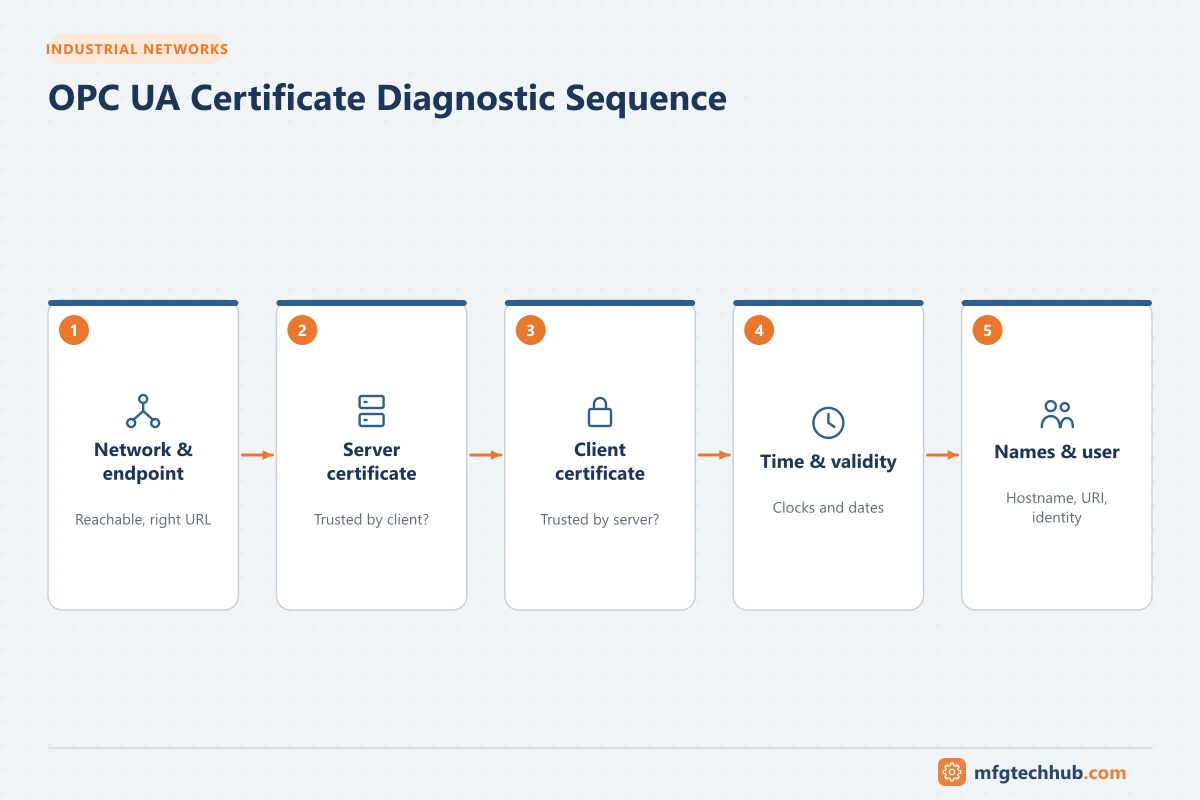
A quick diagnostic sequence
- Network: can the client reach the server’s port (default 4840 or configured port)?
- Endpoints: does the client see the server’s endpoints and security options?
- Server certificate: accepted by the client? (client log, client rejected folder)
- Client certificate: accepted by the server? (server log, server rejected folder)
- Time and validity: clocks and expiry dates.
- Names: endpoint URL vs certificate names and application URI.
- User: identity token and roles.
Prevention checklist
- Certificate inventory with owners and expiry dates
- Expiry alerts well in advance
- NTP synchronisation on all OPC UA hosts and controllers
- Plant PKI or central trust-list management for larger systems
- Documented procedure for certificate renewal and trust updates
- Certificates regenerated as part of rename, reinstall and migration procedures
- Secure defaults: SignAndEncrypt, current policies, no anonymous write access
Frequently asked questions
Can I just turn off OPC UA security to fix the connection?
It may make the connection work, but it removes authentication and encryption and exposes the system. Use it only as a short, controlled diagnostic step on an isolated network, then fix the certificate problem and restore security.
Why did all my OPC UA connections fail on the same day?
Almost always because a certificate or CA certificate expired, or a server’s certificate was regenerated during an update. Check certificate dates and the rejected folders.
Do OPC UA certificates need to come from a public CA?
No. OPC UA commonly uses self-signed certificates or certificates from a private plant PKI. What matters is that each side trusts the other’s certificate or its issuing CA.
Key takeaways
- Most OPC UA connection problems are certificate trust, validity, naming or user configuration issues.
- Check both client and server logs and rejected folders.
- Prevent failures with a certificate inventory, expiry alerts, time synchronisation and managed trust lists.
Related tutorials
Before you apply this in a plant: this article is for education. Always check the current edition of the relevant standards, the manufacturer's documentation for your exact product and version, and your site's procedures. Safety-related work needs qualified personnel. See our editorial policy.