
Industrial Connectivity Software Compared: OPC Servers, DataOps Hubs, MQTT Brokers and Gateways
On this page
Almost every plant needs software that connects devices speaking many different protocols to the applications that need their data. The market uses overlapping terms (OPC server, connectivity platform, IIoT gateway, DataOps, broker), so this guide sorts products by the job they do, then gives objective selection criteria.
Last technical review: September 2026. Ownership and product names in this market change frequently; for example, PTC completed the sale of its Kepware and ThingWorx businesses to TPG in March 2026. Always confirm current product names, ownership, licensing and support on the vendor’s website before selecting a product.
Categories of connectivity software
| Category | Job | Typical examples |
|---|---|---|
| Protocol-conversion (OPC) servers | Talk native protocols to PLCs, drives and devices; expose data via OPC UA/DA, MQTT or other interfaces | Kepware (KEPServerEX), Matrikon OPC (Honeywell), TOP Server (Software Toolbox), Softing products |
| Data tunnelling, aggregation and redundancy | Move OPC data across networks securely, aggregate multiple servers, add redundancy and bridging | Cogent DataHub (Skkynet), OPC tunnellers and aggregators from several vendors |
| Industrial DataOps / contextualisation hubs | Model, contextualise and route data between OT sources and IT/cloud targets | HighByte Intelligence Hub, and similar functions in other platforms |
| Integration / routing tools | Connect OT data to databases, ERP, MES and files with configurable workflows | OPC Router (inray) and similar tools |
| MQTT brokers | Central publish/subscribe message distribution, clustering, security | HiveMQ, EMQX, open-source brokers such as Eclipse Mosquitto |
| SCADA-integrated connectivity | Drivers and MQTT modules within a SCADA platform | Ignition with modules such as those from Cirrus Link for MQTT/Sparkplug |
| OPC UA SDKs and toolkits | Build OPC UA servers or clients into your own products | SDKs from vendors such as Unified Automation, Softing, Prosys OPC and open-source stacks |
| Edge gateways (hardware + software) | Protocol conversion and buffering on industrial hardware near machines | Gateways from industrial networking and automation vendors |
Products often span several categories; check which functions are included in the licence you buy.
How they fit together
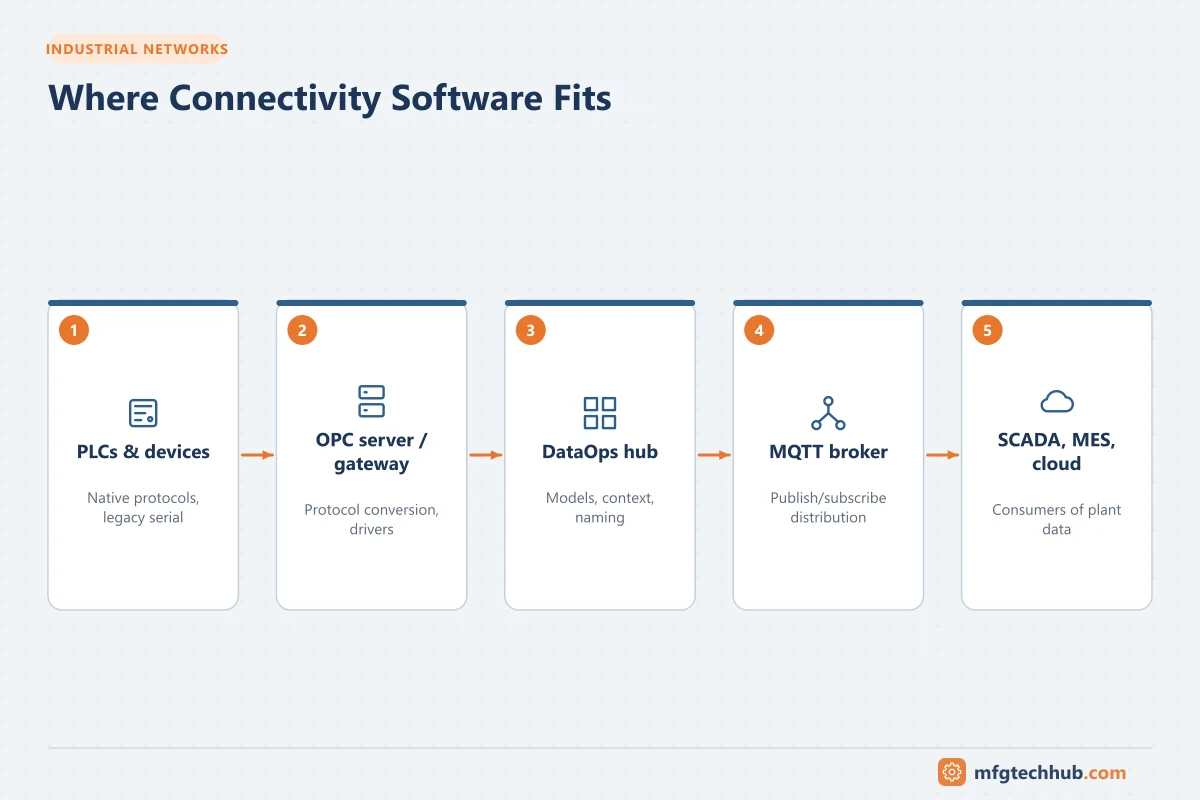
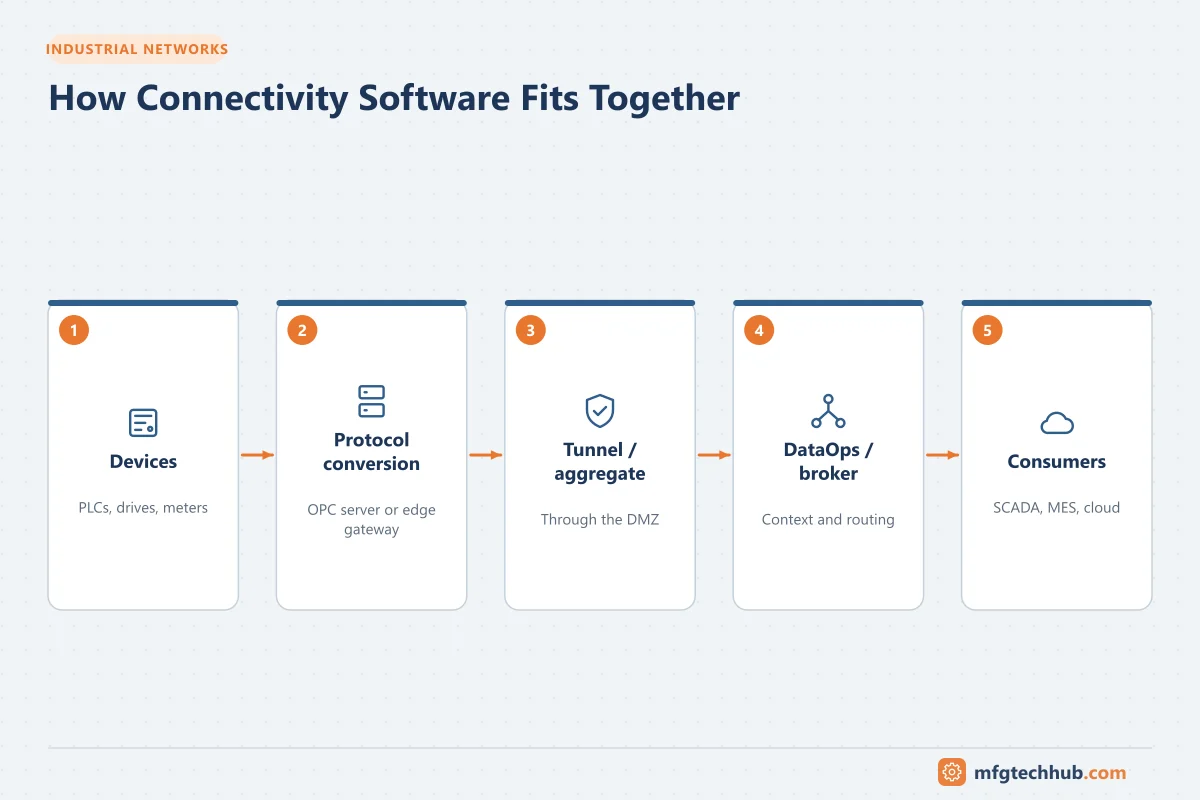
A common architecture:
- Protocol-conversion server or edge gateway reads PLCs and devices natively.
- Data is exposed via OPC UA to SCADA and historians, and published via MQTT/Sparkplug to a broker.
- A DataOps hub models and contextualises data (asset hierarchy, units, naming) and sends it to MES, data platforms and cloud services.
- Tunnelling or aggregation tools handle legacy OPC DA across networks or consolidate multiple servers.
See OPC UA Explained, MQTT and Sparkplug B and the reference architecture in Industrial IoT.
Selection criteria
| Criterion | Questions |
|---|---|
| Device drivers | Does it support all your PLC and device protocols and models, including legacy serial ones? Are drivers licensed individually? |
| Northbound interfaces | OPC UA (server and client), OPC DA, MQTT/Sparkplug, REST, databases, historian interfaces? |
| Scale and performance | Number of devices and tags, update rates, CPU/memory needs; effect on PLC communication load |
| Redundancy | Redundant servers, failover behaviour, store-and-forward |
| Security | OPC UA security, TLS, certificate management, user management, audit logs, vulnerability disclosure and patch cadence |
| Data modelling | Can it build asset models and contextualise data, or only pass tags? |
| Configuration and deployment | Bulk configuration, templates, APIs, version control, containers, central management of many sites |
| Diagnostics | Communication statistics, logs, device status tags, monitoring integration |
| Operating systems and platforms | Windows, Linux, containers, specific hardware |
| Licensing | Per server, per driver, per tag, per device, subscription or perpetual; upgrade and support costs |
| Vendor and support | Local support, integrator ecosystem, product roadmap, ownership stability |
| Regulated use | Validation support, audit trails, change control features |
Practical advice
- Standardise on a small number of connectivity products per site to simplify support.
- Protect controllers: consolidate connections through one connectivity layer instead of letting every application poll PLCs directly.
- Design for failure: buffering, redundancy and monitoring of communication status. See Bad Tag Quality and Communication Failures.
- Secure the layer: it often bridges zones, so place it deliberately (supervisory zone or DMZ), use secure protocols and manage certificates. See Certificates and PKI for OT.
- Run a proof of concept with your own devices, tag counts and update rates before committing.
Frequently asked questions
What does an OPC server do?
It communicates with devices using their native protocols and exposes the data through a standard interface (OPC UA or classic OPC DA, and often MQTT), so SCADA, historians and other applications do not need individual drivers for every device type.
What is industrial DataOps?
A category of software that collects data from OT sources, adds structure and context (asset models, names, units), and delivers it in a consistent form to IT and cloud applications, reducing custom integration code.
Do I need an MQTT broker if I have OPC UA?
Not necessarily. OPC UA covers many integration needs. A broker is useful when many consumers need the same data, when you want event-driven, decoupled architectures (for example a unified namespace), or when sending data to cloud and IIoT platforms.
Key takeaways
- Connectivity products do different jobs: protocol conversion, tunnelling, contextualisation, routing, brokering and SDKs.
- Select on drivers, interfaces, scale, redundancy, security, modelling, deployment, licensing and support.
- Confirm current ownership and product details with vendors; this market changes quickly.
Related tutorials
Before you apply this in a plant: this article is for education. Always check the current edition of the relevant standards, the manufacturer's documentation for your exact product and version, and your site's procedures. Safety-related work needs qualified personnel. See our editorial policy.