
DCS Operator Displays and Alarm Management: Consoles, Faceplates, Display Hierarchy and Alarm Configuration
On this page
In a DCS, operator displays and alarms are not a separate SCADA project on top of the controllers. They are engineered in the same system as the control strategies, share the same tag database, and are often generated automatically from the control modules. That brings consistency and speed, but also a risk: every configured block can produce displays and alarms that nobody designed on purpose.
This guide covers what is specific to DCS operator interfaces and alarm systems. The underlying principles are explained in detail in SCADA HMI Display Design (ISA-101) and Alarm Management (ISA-18.2).
What is different in a DCS
| Aspect | Typical DCS | Typical SCADA on PLCs |
|---|---|---|
| Tag database | One database for controllers, displays, alarms and history | SCADA tags mapped to PLC addresses |
| Faceplates | Generated from standard control module types (PID, motor, valve) | Built from a library, linked to PLC data |
| Alarms | Configured on the control blocks, with system-wide priorities | Configured in SCADA or PLC |
| Operator actions | Logged centrally with user and time | Depends on configuration |
| Consoles | Multi-screen operator consoles per process area in a central control room | Varies widely, including remote and web clients |
Operator consoles and control rooms
- Each operator position covers a defined area of responsibility with its own display set and alarm filtering.
- Consoles usually have several screens, sometimes with large overview displays visible to the whole team.
- Control room layout, sightlines, lighting and ergonomics are covered by ISO 11064 (ergonomic design of control centres).
- Plan workload: display design and alarm rates per console must match what one operator can handle, especially during upsets.
Displays and faceplates from control modules
- Standard control module types (PID loop, motor, on/off valve, analog input) each come with a standard faceplate showing mode, setpoint, output, interlock status and alarm limits.
- Display hierarchy: overview (Level 1), unit control (Level 2), unit detail (Level 3) and diagnostics (Level 4), as described in ISA-101 practice.
- Prefer task-based Level 2 displays over P&ID copies; keep full detail in Level 3 displays.
- Use a style guide and object library for the whole system, so displays from different projects and integrators look and behave the same.
- Show control strategy state clearly: which controller is selected in an override, whether a cascade is closed, which feedforward is active. See DCS Control Strategies.
Alarm configuration in a DCS
Because every function block can carry alarms, DCS systems often start with far too many enabled by default. Good practice:
- Write the alarm philosophy first: definitions, priority method, colours, shelving and suppression rules.
- Disable default alarms that have not been rationalised; enable only alarms that require an operator response.
- Rationalise each alarm: cause, consequence, operator response, time to respond, priority, setpoint, deadband and delays.
- Set priority from consequence and response time, with three or four priorities. Messages that need no action are events or advisories, not low-priority alarms.
- Route system and diagnostic alarms (controller redundancy, I/O card faults, network faults) to maintenance or engineering where appropriate, while keeping operators informed of anything affecting control.
State-based and dynamic alarming
DCS platforms usually provide built-in functions for:
- Suppression by equipment or unit state (shut down, starting, running, cleaning), so alarms that are meaningless in that state are hidden automatically.
- Suppression of consequential alarms after a trip, with first-out indication of the initiating alarm.
- Shelving with automatic expiry and a visible list of shelved alarms.
- Alarm limit changes by state or grade where the normal operating envelope changes with the product.
These features are among the most effective ways to prevent alarm floods, but they must be designed, documented and tested like control logic.
Alarm and event journals
- The DCS alarm and event journal records alarms, acknowledgements, operator actions (setpoint and mode changes), system events and engineering changes.
- Use it for alarm performance metrics (alarm rate, floods, chattering, stale alarms), shift handover and incident investigations.
- Keep journals long enough for analysis and regulatory needs, usually by sending them to the historian or an alarm analysis tool. See Industrial Historians.
- Protect the journal from modification; in regulated plants it is part of the record. See Data Integrity (ALCOA+).
A practical improvement plan
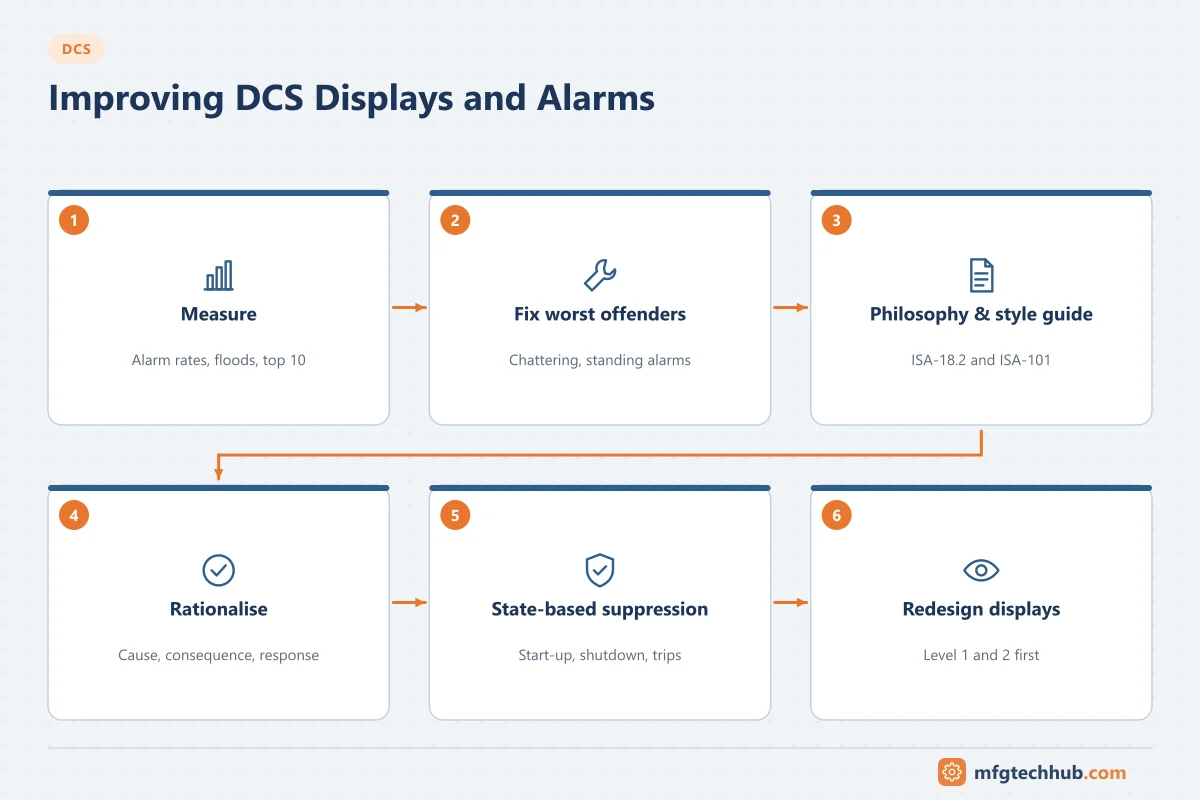
- Measure: export a month of alarm journal data; calculate average alarm rate per console, floods and the top 10 most frequent alarms.
- Fix the worst offenders: chattering alarms (deadbands, delays, instrument repairs), standing alarms and duplicate alarms.
- Write or update the alarm philosophy and HMI style guide.
- Rationalise by unit, starting with the busiest console.
- Add state-based suppression for start-up, shutdown and trips.
- Redesign Level 1 and Level 2 displays for the most-used areas with operator involvement.
- Monitor continuously and apply management of change to every alarm and display change.
Troubleshooting
| Symptom | Likely cause | Action |
|---|---|---|
| Hundreds of alarms after a unit trip | No state-based or trip suppression | Add suppression with first-out indication |
| Operators ignore a group of alarms | Standing or nuisance alarms; alarms without required action | Rationalise; convert to events or remove |
| Displays inconsistent between areas | No style guide or object library | Create style guide; migrate displays progressively |
| Operators cannot see why a loop will not go to auto | Interlock and permissive status not on faceplate | Update faceplate templates |
| Diagnostic alarms flood operator consoles | All system alarms routed to operators | Route to maintenance; summarise for operators |
Frequently asked questions
How are DCS operator displays different from SCADA displays?
DCS displays share one database with the controllers and use faceplates generated from standard control module types, which makes them consistent. The same design principles apply: display hierarchy, colour for abnormal conditions only, and values shown with context.
Why do DCS systems have so many alarms?
Because function blocks often have alarms enabled by default and every configured loop can generate several. Without rationalisation and state-based suppression, alarm counts grow with every project.
What standards apply to DCS displays and alarms?
ISA-101 for HMI design, ISA-18.2 (IEC 62682) and EEMUA 191 for alarm management, and ISO 11064 for control room ergonomics.
Key takeaways
- DCS displays and alarms come from the control configuration; design them deliberately rather than accepting defaults.
- Use standard faceplates, a display hierarchy and a system-wide style guide.
- Enable only rationalised alarms, prioritise by consequence and response time, and use state-based suppression.
- Use the alarm and event journal to measure performance and drive improvements.
Related tutorials
Before you apply this in a plant: this article is for education. Always check the current edition of the relevant standards, the manufacturer's documentation for your exact product and version, and your site's procedures. Safety-related work needs qualified personnel. See our editorial policy.