
Configuring Control Loops in a DCS: Input, PID and Output Blocks, Modes, Commissioning and Loop Performance
On this page
A control loop in a DCS is built from a small set of function blocks: an analog input block for the measurement, a PID block for the control algorithm, and an analog output block for the final control element, usually a control valve or a variable speed drive. Most loop problems in operating plants come from how these blocks were configured and commissioned, not from the PID algorithm itself.
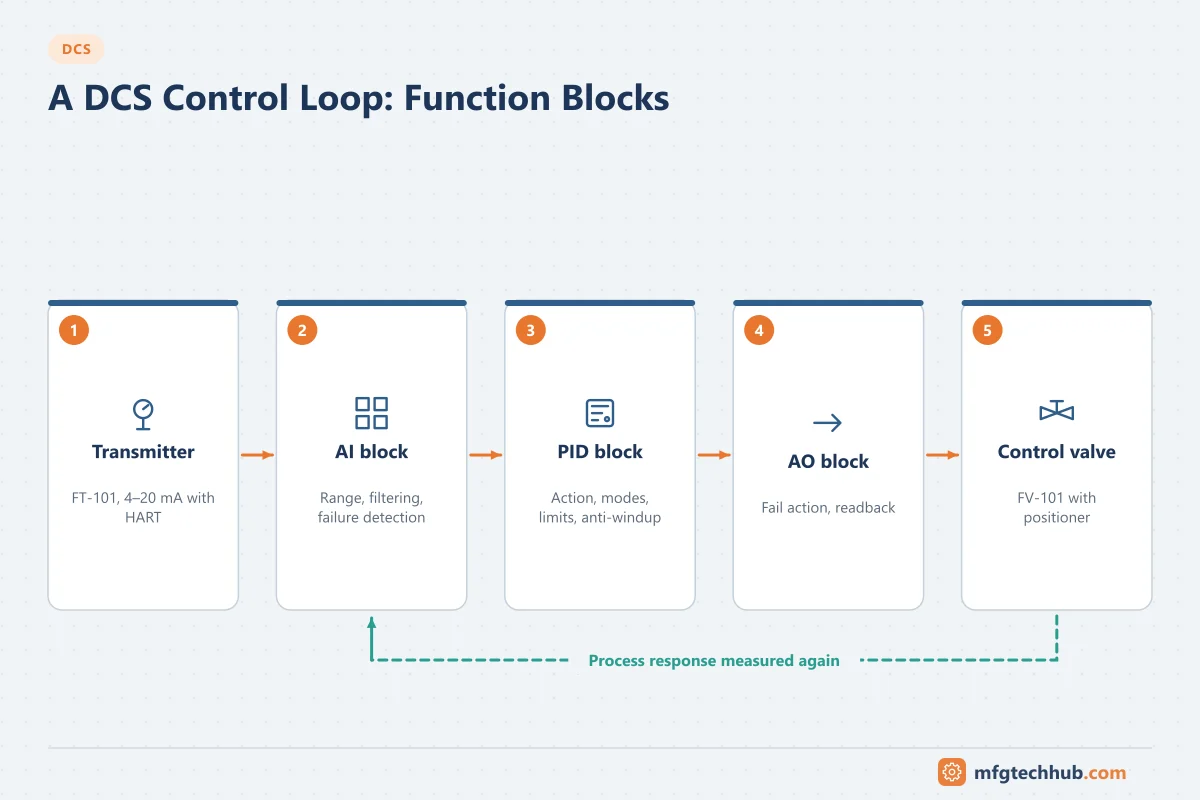
This guide walks through the configuration and commissioning of a single loop. For multi-loop strategies (cascade, ratio, override), see DCS Control Strategies. For PID theory and tuning, see PID Control Explained.
The loop and its tag
A flow loop tagged FIC-101 (flow indicating controller, loop 101, following ISA-5.1 conventions) typically consists of:
| Element | Example | DCS block |
|---|---|---|
| Transmitter | FT-101 flowmeter, 4–20 mA with HART | Analog input (AI) |
| Controller | FIC-101 | PID |
| Final element | FV-101 control valve with positioner | Analog output (AO) |
See Reading P&IDs: Instrument Loops for how loops appear on drawings.
1. Analog input block
| Setting | What to configure | Notes |
|---|---|---|
| Range and units | Must match the transmitter’s calibrated range | A mismatch gives a wrong value with good status; verify during loop check |
| Signal conversion | Linear, square root (older DP flow transmitters) | Apply square root in one place only: transmitter or DCS |
| Filtering / damping | Small first-order filter if noisy | Filtering adds lag; prefer fixing noise at the source |
| Failure detection | Out-of-range limits, NAMUR NE 43 failure currents, HART diagnostics | Set bad status so the PID can react (hold or shed to manual) |
| Alarms | Process alarms if needed | Follow alarm philosophy. See Alarm Management |
2. PID block
| Setting | Meaning | Common mistakes |
|---|---|---|
| Control action | Direct (output increases as PV increases) or reverse | Wrong action makes the loop run away; check with valve fail action |
| Algorithm form and units | Standard/ideal, series or parallel; gain vs proportional band; integral in repeats or time per repeat | Copying tuning values between systems that use different forms or units |
| PV and setpoint ranges and limits | Setpoint high/low limits | Operators able to enter unsafe setpoints |
| Output limits | Minimum and maximum output | Limits that prevent the valve from closing or opening fully when needed |
| Modes | Manual, auto, cascade, remote | Loops left in manual permanently |
| Setpoint tracking | Setpoint follows PV in manual, for bumpless return to auto | Bump when switching modes |
| Anti-windup | Integral stops when the output saturates | Long overshoot after saturation |
| Bad-input handling | Hold output, shed to manual, or go to a safe output | Loop acting on a failed transmitter |
| Execution rate | How often the block runs | Too slow for fast flow or pressure loops |
3. Analog output block
- Output range and whether 0% means closed or open.
- Fail action of the valve (fail closed, fail open) and consistency with the PID action.
- Readback: positioner feedback or HART-reported valve position, compared with the output to detect a sticking or failed valve.
- Output on failure of the controller or I/O card, which must match the process safety requirements.
See Control Valves and Actuators and VFDs.
4. Loop check and commissioning
- Loop check (before process start): inject signals or use the transmitter to confirm the DCS reads the correct value at several points across the range; drive the output and confirm the valve moves the correct way and the full stroke. See Loop Calibrators.
- Valve check: stroke the valve in small steps in manual to check for stiction, deadband and hysteresis. A sticking valve cannot be fixed by tuning.
- Confirm the control action and the valve fail action together.
- Open-loop step test in manual: make a small output step and record how the PV responds (gain, dead time, time constant).
- Initial tuning from the step test, using a tuning method appropriate to the loop type; see PID Control Explained and the PID Tuning Calculator.
- Closed-loop test: setpoint steps and, where possible, disturbance tests; refine tuning.
- Document final tuning, ranges, limits and test results; hand over with operators.
5. Loop performance monitoring
Many plants run a significant number of loops in manual, oscillating, or with valves at their limits. Monitor:
| Indicator | What it reveals |
|---|---|
| Time in normal mode | Loops operators do not trust |
| Oscillation detection | Poor tuning, stiction or interaction between loops |
| Valve saturation | Valve undersized or oversized, or process changed |
| Error statistics (standard deviation, integrated absolute error) | Control quality trends over time |
| Valve travel and reversals | Wear from aggressive tuning or noise |
Many DCS vendors and third parties offer loop performance monitoring tools; the historian can also provide these statistics. See Industrial Historians.
Troubleshooting control loops
| Symptom | Likely cause | First check |
|---|---|---|
| Loop runs away to 0% or 100% | Wrong control action or valve fail action | PID action vs valve action |
| Continuous slow oscillation (sawtooth PV, square-wave output) | Valve stiction | Manual small steps; valve diagnostics |
| Fast oscillation | Gain too high, derivative on noisy signal | Tuning; filtering; derivative settings |
| Sluggish response | Gain too low, integral too slow, excessive filtering | Tuning and filters |
| Overshoot after large upsets | Integral windup | Anti-windup and output limits |
| Bump on mode change | Setpoint tracking or initialisation not configured | PID tracking settings |
| Value correct in field, wrong in DCS | Range mismatch, square root applied twice | AI block configuration vs transmitter |
Frequently asked questions
What function blocks make up a DCS control loop?
Usually an analog input block for the measurement, a PID block for the control algorithm and an analog output block for the valve or drive, plus optional blocks for filtering, characterisation or alarms.
Why does a loop oscillate even after tuning?
Often because of valve stiction or deadband, which tuning cannot fix. Other causes are interaction with other loops, noisy measurements with derivative action, or process changes. Check the valve in manual first.
How do I avoid a bump when switching from manual to auto?
Enable setpoint tracking (setpoint follows the PV while in manual) and use the DCS’s bumpless transfer features, so the output does not jump when the mode changes.
Key takeaways
- Configure the AI, PID and AO blocks consistently: ranges, units, action, fail action, limits and modes.
- Commission with loop checks, valve checks and step tests before tuning.
- Handle bad inputs, windup and mode changes explicitly.
- Monitor loop performance continuously; many problems are valves and instruments, not tuning.
Related tutorials
Before you apply this in a plant: this article is for education. Always check the current edition of the relevant standards, the manufacturer's documentation for your exact product and version, and your site's procedures. Safety-related work needs qualified personnel. See our editorial policy.