
DCS Operator and Engineering Stations: HMI Hardware, Consoles, Access and Lifecycle
On this page
In a DCS, the human-machine interface (HMI) is not a single screen but a set of stations: operator stations in the control room, engineering workstations for configuration, and often maintenance and application stations. Unlike a stand-alone HMI on a machine, DCS stations share one engineering database with the controllers, so a tag, its alarm limits and its faceplate are defined once and appear consistently everywhere.
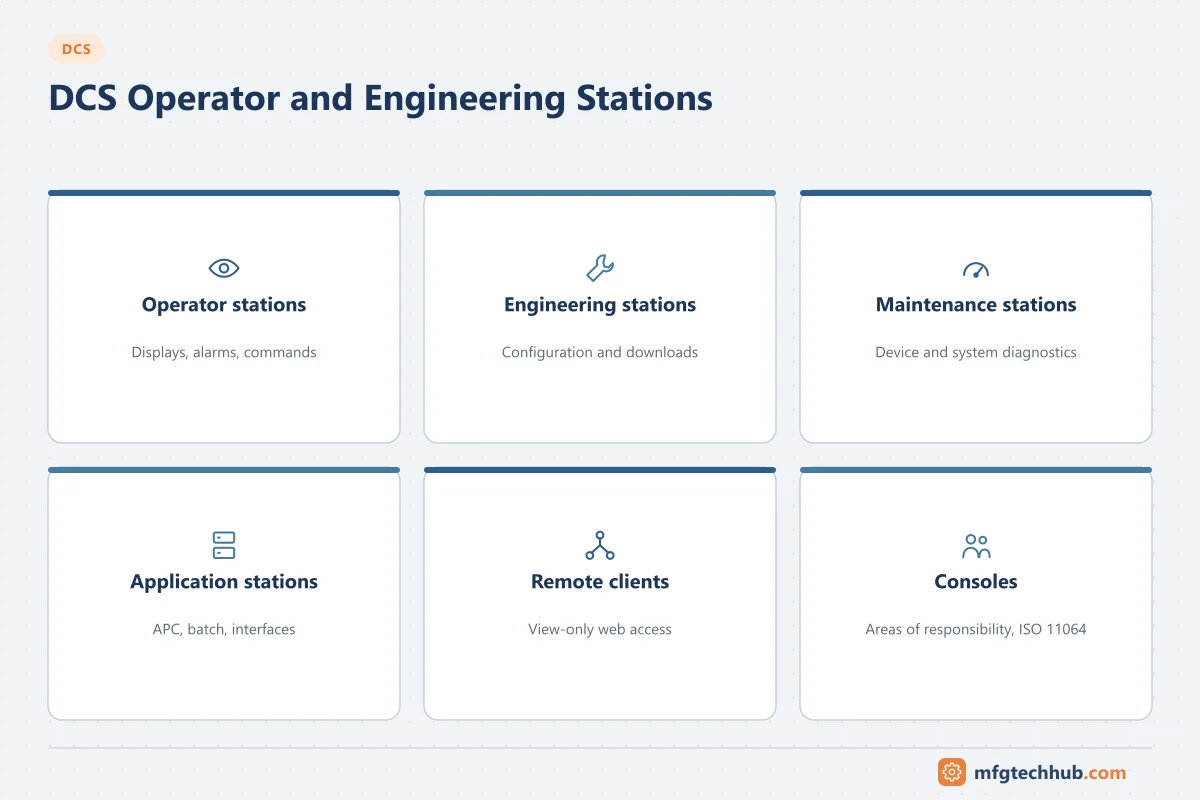
This page covers the stations themselves: roles, hardware, consoles, access and lifecycle. For how to design the displays and alarms that run on them, see DCS HMI Displays and Alarm Management.
Station types and roles
| Station | Main users | Typical functions |
|---|---|---|
| Operator station | Panel operators | Process displays, faceplates, alarm summary, trends, operator commands |
| Engineering workstation | Control engineers | Configuration of control strategies, displays and alarms; downloads; diagnostics |
| Maintenance / asset station | Instrument and system technicians | Device diagnostics (HART, fieldbus), system health, calibration data |
| Application station | Specialists | Advanced control, batch management, historian and interfaces to other systems |
| Remote / web client | Supervisors, on-call staff | View-only displays and trends, normally outside the control room |
Engineering functions should not be available on operator stations. Separating them protects the running configuration and makes user access easier to control.
What an operator can do from a station
- Change mode (manual, automatic, cascade), setpoint and, in manual, output of a loop.
- Start and stop motors, open and close valves, within the interlocks defined in the controller.
- Acknowledge and, where permitted, shelve alarms.
- Start, hold and abort sequences and batch phases.
- Enter operator comments and view the event journal of recent actions.
Every command goes to the controller, which checks interlocks and permissives before acting. The station never controls the process directly, which is why the plant keeps running if a station fails.
Areas of responsibility
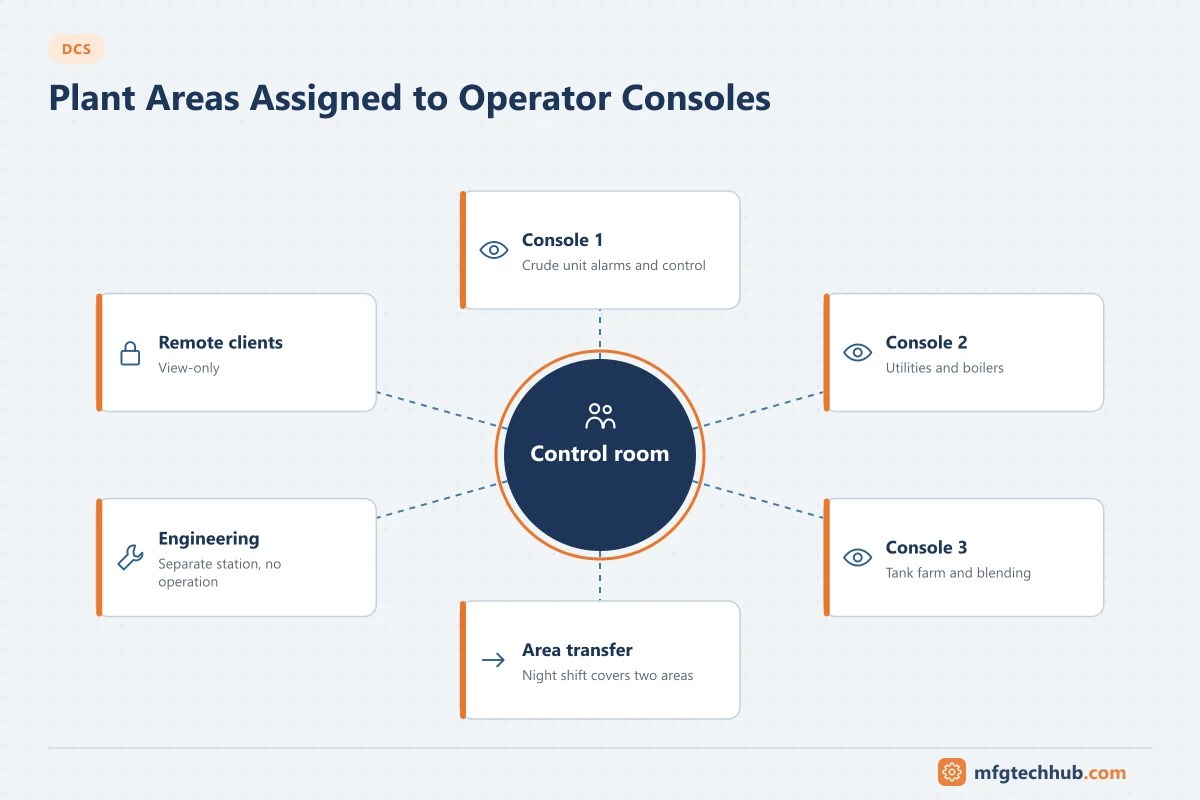
A large plant is divided into plant areas (for example crude unit, utilities, tank farm). Each operator console is assigned the areas it controls:
- Alarms from an area are shown to the consoles responsible for it.
- Commands are allowed only from consoles that hold control of the area.
- Areas can be transferred between consoles, for example at night when one operator covers two units.
Area assignment should follow the operators’ actual responsibilities and be reviewed when staffing or plant layout changes.
Console and control room design
Operator effectiveness depends as much on the room as on the displays. ISO 11064 (ergonomic design of control centres) covers the room layout, console dimensions, viewing distances, lighting and acoustics. Practical points:
- Several monitors per operator position: typically one or two for overview and alarms plus several for detailed work. The exact number depends on the area size.
- Large overview displays give the shift a shared picture of the plant state.
- Group consoles by process area so operators who coordinate often sit together.
- Keep telephones, radios and permit paperwork within reach but outside the main field of view.
- Plan for alarm audibility: distinct tones by priority and area, not one loud horn.
Alarm and display philosophy is covered by ISA-18.2 and ISA-101; see DCS HMI Displays and Alarm Management.
Availability of operator stations
- Provide more than one station per area, so the loss of one station does not blind the operator.
- Where stations depend on servers (server/client architectures), the servers are usually redundant.
- Stations should come back to a usable state after a restart without manual configuration.
- Keep at least one station on separate power from the others, for example on a different UPS distribution.
Thin clients and virtualisation
Many current DCS platforms support virtualised operator and engineering stations: the station software runs on server hardware and the console uses a thin client. Advantages are fewer PCs to maintain, faster recovery (restore a virtual machine instead of reinstalling a PC) and easier hardware refresh. Points to check:
- Only the vendor’s qualified virtualisation platforms and versions are supported.
- Server hardware and networks must be redundant because many stations now depend on them.
- Thin client failure should not lose the session; another client takes over the console.
See Traditional vs Modern DCS Architectures.
User access and audit trail
| Control | Good practice |
|---|---|
| Accounts | Individual accounts; no shared “operator” login where the system allows otherwise |
| Roles | Operator, senior operator, engineer, maintenance, view-only, with least privilege |
| Critical actions | Confirmation or second-person approval for bypasses and forcing |
| Audit trail | Operator actions, configuration changes and logins recorded with user and time |
| Station hardening | Application whitelisting, disabled USB storage, vendor-approved patches and antivirus |
| Remote access | Through a controlled remote access solution, never direct to control stations |
In regulated industries, the audit trail and user management support Data Integrity (ALCOA+) and Computerised System Validation. For security architecture, see ISA/IEC 62443.
Station lifecycle
The DCS controllers may run for decades, but stations are PCs and follow the operating system lifecycle. When Microsoft ends support for a Windows version, the vendor releases a DCS version for the new OS, and stations must be upgraded. Plan for:
- A station hardware and OS refresh every several years, aligned with DCS software releases.
- Vendor compatibility matrices for OS versions, patches and antivirus.
- Backups of each station image and the engineering database, and a tested restore. See the OT Backup and Restore Runbook.
Troubleshooting operator stations
| Symptom | Likely cause | First check |
|---|---|---|
| Displays show values but commands fail | Console does not have control of the area, user lacks privilege | Area assignment and user role |
| All values on a display frozen or grey | Loss of connection to the server or controller | Network and server status; other stations |
| Alarms not heard at one console | Area not assigned, audio device or alarm group settings | Alarm group and area configuration |
| Station slow after a patch | Patch or antivirus not qualified by the vendor | Vendor compatibility list |
| Different values on two stations | One station connected to a stale server or cached data | Server connection and time synchronisation |
Frequently asked questions
What is the difference between an operator station and an engineering station?
An operator station is used to run the process: displays, alarms and commands. An engineering station is used to change the system: configuration, downloads and diagnostics. They are normally separate, with different user rights.
Does the plant stop if the DCS operator stations fail?
No. Control runs in the controllers, which keep the process at the last settings. However, operators lose visibility and the ability to intervene, so plants provide several stations per area, redundant servers and procedures for loss of view.
Which standard covers control room design?
ISO 11064 covers the ergonomic design of control centres. ISA-101 covers HMI display design and ISA-18.2 covers alarm management.
Key takeaways
- A DCS HMI is a set of stations that share the controllers’ engineering database.
- Separate operator, engineering and maintenance roles and stations.
- Assign plant areas to consoles and review them when responsibilities change.
- Design the control room to ISO 11064 principles and provide more than one station per area.
- Plan for station security, backups and the operating system lifecycle.
Related tutorials
Before you apply this in a plant: this article is for education. Always check the current edition of the relevant standards, the manufacturer's documentation for your exact product and version, and your site's procedures. Safety-related work needs qualified personnel. See our editorial policy.