
MES Data Collection and Integration: Machine Data, Counts, States, Operator Input and System Interfaces
On this page
An MES is only as good as its data. If counts are wrong, downtime reasons are missing or material scans are skipped, OEE figures, genealogy and ERP confirmations will be wrong too, and people stop trusting the system. Good MES data collection combines automatic machine data, structured operator input and context (which order, product, lot and shift the data belongs to), then shares it reliably with other systems.
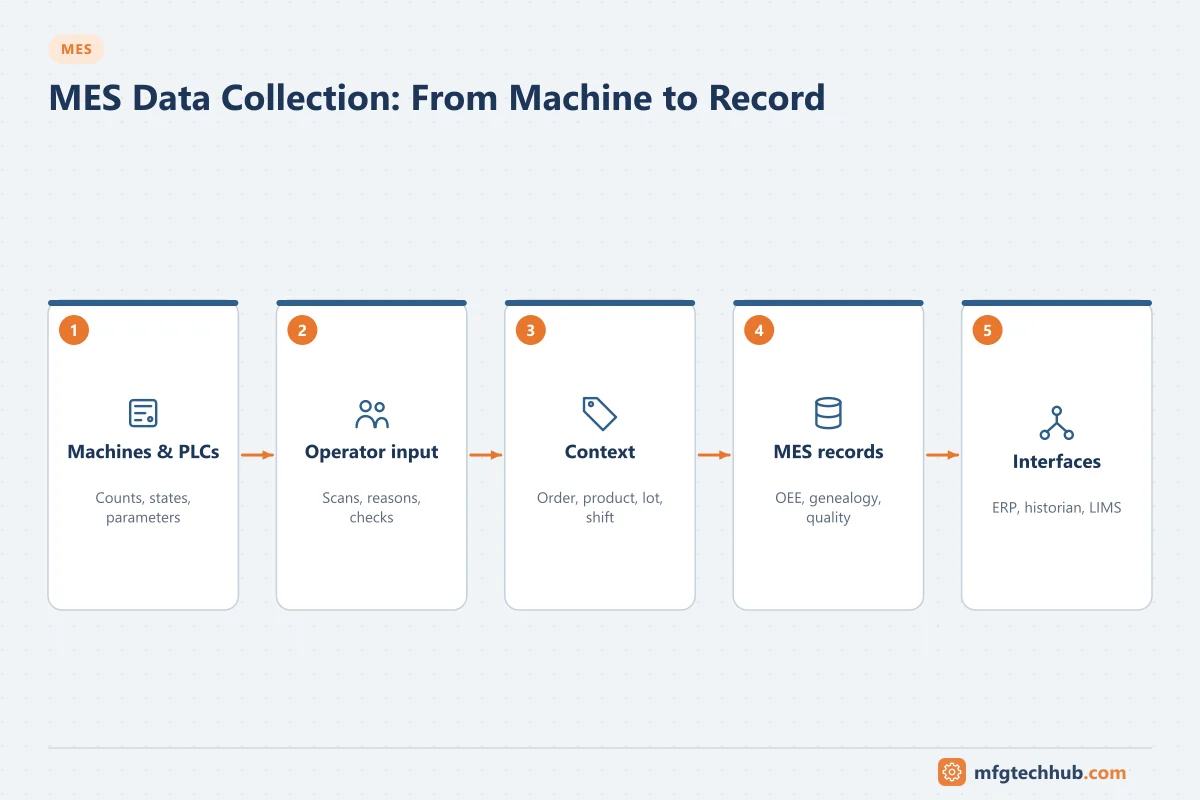
This guide covers what to collect, how to collect it, and how to integrate it.
What an MES collects
| Data | Examples | Typical source | Used for |
|---|---|---|---|
| Production counts | Good count, reject count, total count | PLC counters, machine interface, scales | Order progress, yield, OEE, ERP confirmations |
| Machine states | Running, idle, stopped, faulted, changeover, planned maintenance | PLC state tags, machine interface | Downtime analysis, availability |
| Downtime and scrap reasons | Jam, material shortage, changeover, quality stop | PLC fault codes plus operator selection | Loss analysis, improvement projects |
| Cycle and process data | Cycle times, temperatures, pressures, speeds, recipe parameters | PLC, historian | Performance, process verification, electronic batch records |
| Material consumption and genealogy | Lot or serial numbers consumed and produced | Barcode/RFID scans, weigh stations, automatic identification | Traceability, inventory, recalls |
| Quality results | In-process checks, SPC samples, lab results | Operator entry, gauges, vision systems, LIMS | Release decisions, SPC, non-conformance |
| Labour | Who worked on which order and operation, qualifications | Login at terminals, badge scans | Labour reporting, qualification checks |
| Events | Order start/stop, changeovers, alarms relevant to production | MES transactions, PLC events | Timelines, audit trail |
Collect data because a decision or record needs it, not because it is available. Every data point needs an owner and a use.
Collecting machine data
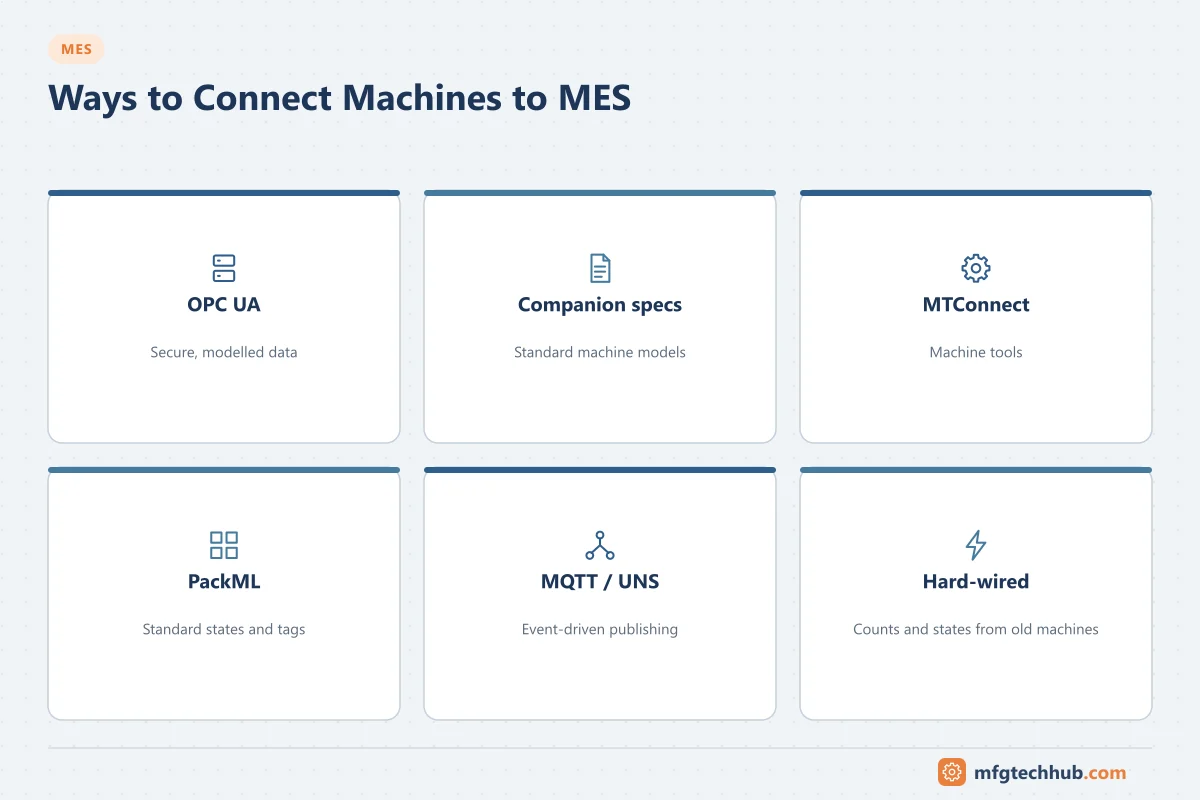
Connection methods
| Method | Description | Notes |
|---|---|---|
| OPC UA | MES or connectivity layer reads PLC or machine data via OPC UA | Preferred for new equipment. See OPC UA Explained |
| OPC UA companion specifications | Standard machine information models | Examples: EUROMAP 77 for injection moulding machines, umati (OPC UA for Machine Tools), PackML-based models for packaging |
| MTConnect | Read-only standard for CNC and machine tool data | Common in machining |
| PackML state model (ISA-TR88.00.02) | Standard machine states and modes, plus standard “PackTags” | Makes state and count collection consistent across packaging machines from different suppliers |
| Native PLC drivers | Via a connectivity server | Mixed or legacy fleets. See Connectivity Software Compared |
| MQTT / unified namespace | Edge devices publish machine data to a broker; MES subscribes | See MQTT and Sparkplug B |
| Hard-wired signals | Running and count pulses from machines without interfaces | Simple, reliable minimum for old equipment; add operator input for reasons |
When buying new machines, specify the interface: protocol, information model, which states, counts and parameters must be available, and how reason codes are provided. Retrofitting later is far more expensive.
Counts
- Read cumulative counters from the PLC rather than counting pulses in the MES. The MES calculates differences, so short communication losses do not lose counts.
- Handle counter rollover and PLC resets explicitly.
- Decide where good and reject counts are measured (infeed, outfeed, reject station), and document it; differences between points explain yield.
- Reconcile counts with material consumption and physical inventory regularly.
Machine states and downtime
- Define a state model for each machine type (for example based on PackML): running, idle/starved, blocked, stopped, faulted, changeover, planned downtime.
- Derive states from PLC signals using clear rules, including a minimum stop duration and a rule for short stops (micro-stops) so they are counted but not all require a reason.
- Take the first fault from the PLC as the automatic reason where possible.
- Ask operators only for reasons the machine cannot know (material shortage, waiting for maintenance, no operator), with a short, structured reason list.
- Review unassigned downtime daily; a high share means the reason list or process is not working.
These definitions directly determine OEE. See the OEE Calculator.
Transactions with the PLC
When the MES must exchange transactions with a machine (download a recipe, start an order, confirm a batch end), use a handshake: the MES writes data and a request flag; the PLC processes it and sets an acknowledge flag with a result code; the MES clears the request. Add timeouts and alarms, and make each step safe to repeat. This avoids lost or duplicated transactions when communication is interrupted.
Operator input
- Use terminals at the point of work, with barcode scanners for orders, materials and equipment.
- Validate at entry: correct material for the order, lot not blocked, operator qualified, value within limits.
- Keep entry screens short: every extra field reduces data quality.
- Record who entered data and when (audit trail). In regulated industries this supports data integrity requirements.
Context: turning data into information
A count of 1,200 is meaningless without context. The MES attaches:
- Equipment: enterprise, site, area, line, work cell, based on the ISA-95 equipment hierarchy
- Order and operation: production order, operation, product, recipe version
- Material: lots consumed and produced
- Time: shift, crew, calendar (planned production time)
- People: operator and qualifications
Consistent master data (equipment IDs, material numbers, reason codes) across MES, ERP and historian is what makes integration work. Agree naming before connecting systems.
Integrating with other systems
| System | Typical data exchanged | Direction |
|---|---|---|
| ERP | Production orders, BOMs, routings down; confirmations, goods movements, scrap up | Both. See SAP–MES Integration |
| Historian | Process data for batch records, trends and analysis; MES context back to the historian | Both. See Industrial Historians |
| SCADA / PLC | States, counts, parameters; recipes and order data | Both |
| LIMS | Sample requests and results | Both |
| Warehouse management | Material staging requests, consumption, finished goods receipts | Both |
| Quality management | Non-conformances, deviations, inspection plans | Both |
| CMMS / maintenance | Machine run hours, fault events; maintenance status | Both |
Integration patterns:
- Standard message models: ISA-95 Part 5 defines business-to-manufacturing transactions; B2MML is a widely used XML implementation.
- APIs and web services for request/response transactions.
- Messaging (queues, event brokers) for reliable, decoupled delivery with retry.
- Unified namespace for distributing current state and events to many consumers; transactions that need guaranteed processing still need acknowledged patterns.
- Database staging tables or files in legacy integrations: simple, but add monitoring and error handling.
Whatever the pattern, every interface needs error queues, retry, monitoring and reconciliation. See How MES Integrates with ERP, SCADA and PLC.
Data quality checks
| Check | Purpose |
|---|---|
| Counts vs material consumption and inventory | Detect counting errors and unrecorded scrap |
| Unassigned downtime percentage | Detect missing reasons or poor reason lists |
| Stale data alarms (no count change while running) | Detect communication or sensor failure |
| Interface error queues empty | Detect failed ERP or LIMS transactions |
| Clock synchronisation across MES, PLCs, historian | Keep event times consistent. See Time Synchronisation in OT |
| Manual entries and corrections reviewed | Keep the audit trail meaningful |
Troubleshooting
| Symptom | Likely causes | First check |
|---|---|---|
| MES count differs from the machine counter | Counter rollover or reset, communication gap, counting at different points | Raw counter values and MES delta calculation |
| Many short, unexplained stops | State rules too sensitive; no micro-stop threshold | State derivation rules and minimum durations |
| Downtime mostly “unassigned” | Too many reason codes, no prompt at the right time, no follow-up | Reason list design and daily review |
| ERP confirmations missing or duplicated | Interface errors, retries without duplicate checks | Interface error queue and message IDs |
| Genealogy gaps | Scans skipped, manual workarounds | Scan compliance by line; enforce validation |
| MES values stop updating | Connectivity, broker or interface failure | See Bad Tag Quality and Communication Failures |
Frequently asked questions
What data does an MES collect?
Production counts, machine states and downtime reasons, cycle and process data, material consumption and genealogy, quality results, labour and production events, each linked to an order, product, lot, equipment and time.
How does an MES get data from machines?
Usually through OPC UA, native PLC drivers via a connectivity server, machine standards such as MTConnect, PackML or EUROMAP, MQTT-based edge devices, or simple hard-wired signals on older equipment, combined with operator input for information machines cannot provide.
How do I get reliable downtime reasons?
Take the first fault automatically from the PLC where possible, ask operators only for reasons the machine cannot know, keep the reason list short and structured, and review unassigned downtime daily.
Key takeaways
- Collect data for a defined use, and attach context: equipment, order, product, lot, shift and people.
- Read cumulative counters, define machine state models and use structured reasons.
- Specify machine interfaces when buying equipment; use standards such as OPC UA companion specifications, PackML and MTConnect.
- Build interfaces with handshakes, error queues, retry and reconciliation, and check data quality continuously.
Related tutorials
Before you apply this in a plant: this article is for education. Always check the current edition of the relevant standards, the manufacturer's documentation for your exact product and version, and your site's procedures. Safety-related work needs qualified personnel. See our editorial policy.