
SAP PM (Plant Maintenance) Explained: Equipment, Notifications, Work Orders, Maintenance Plans and Condition Monitoring
On this page
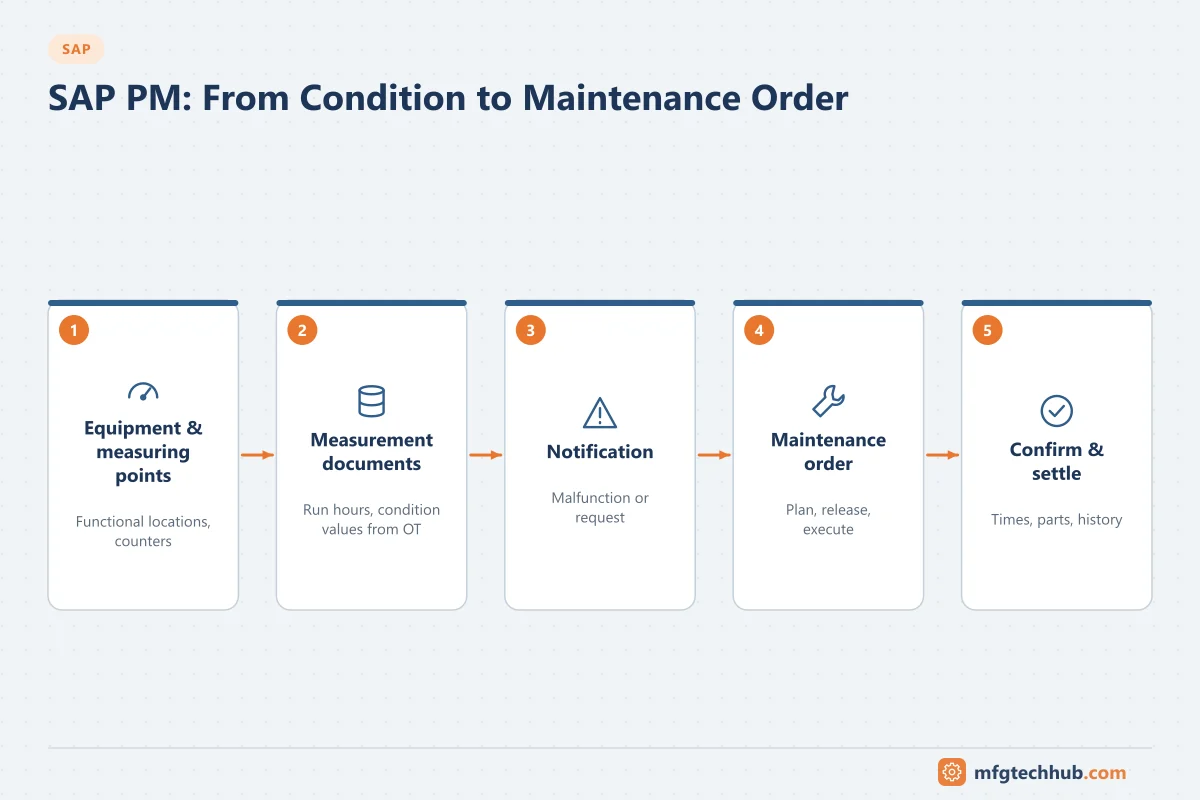
SAP PM (Plant Maintenance), part of SAP’s Enterprise Asset Management (EAM) in SAP S/4HANA, manages the maintenance of physical assets: which equipment exists and where, what breaks, what work is planned and done, what it costs, and when preventive work is due. For automation and reliability engineers, SAP PM is where condition monitoring data should ultimately turn into work.
Note on transactions: the codes below are standard SAP GUI transactions in SAP ERP and SAP S/4HANA on-premise. Fiori apps are widely used for maintenance tasks. Confirm availability in your system.
Technical objects
| Object | Purpose | Common transactions |
|---|---|---|
| Functional location | A place in the technical structure where equipment is installed (for example Plant > Area > Line > Pump position P-101) | IL01 / IL02 / IL03 |
| Equipment | An individual physical asset (a specific pump with serial number), installed at a functional location | IE01 / IE02 / IE03 |
| Bill of materials | Spare parts structure for equipment or functional locations | Equipment BOM transactions (for example IB01) |
| Measuring point | A point where values or counters are recorded (temperature, vibration, run hours) | IK01 / IK02 / IK03 |
Why the distinction matters: when a pump is replaced, the functional location stays the same while the equipment changes. History is kept both for the position (functional location) and for the individual asset (equipment), which travels with it to the workshop.
Align the functional location structure with the plant’s asset hierarchy used in SCADA, historians and MES, so data can be linked. See Industrial Historians.
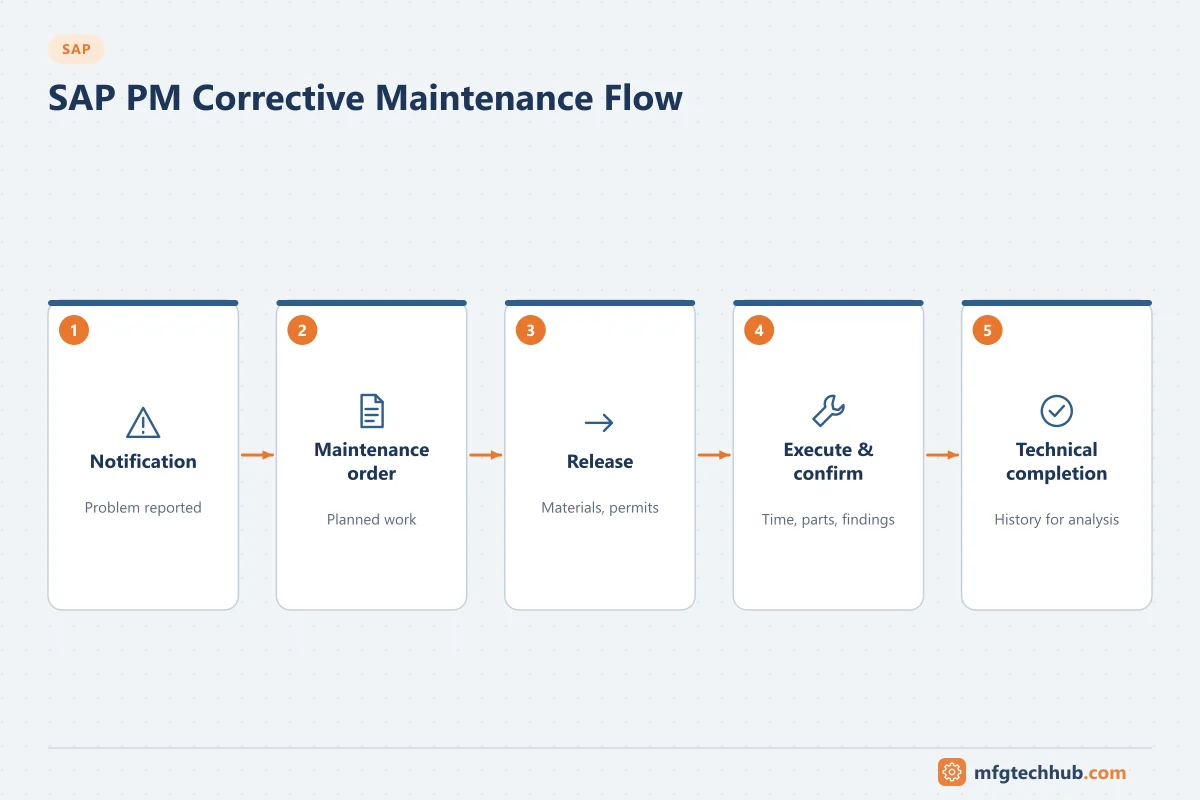
Corrective maintenance: notification to order
- Notification records a problem or request (malfunction report, maintenance request, activity report), with damage, cause and object part codes. Transactions: IW21 (create), IW22 (change), IW23 (display).
- Maintenance order plans and executes the work: operations, work centres, spare parts, external services, costs. Transactions: IW31 (create), IW32 (change), IW33 (display).
- Release the order; spare parts are reserved and can be issued.
- Execution and confirmation: actual times and activities (IW41 for time confirmations), goods issues for parts.
- Technical completion and settlement of costs to a cost centre or asset.
Lists: IW28/IW29 (notifications), IW38/IW39 (orders).
Preventive maintenance
| Plan type | Trigger | Typical use | Create |
|---|---|---|---|
| Single cycle plan | One fixed interval (time or performance) | Simple periodic inspections | IP41 |
| Strategy plan | A maintenance strategy with several packages (for example monthly, quarterly, yearly) | Complex equipment with nested tasks | IP42 |
| Performance-based plan | Counter readings (run hours, cycles, throughput) | Compressors, engines, packaging machines | Plans with counter-based cycles |
- Scheduling calculates call dates and creates orders or notifications when due: IP10 (schedule a plan), IP30 (deadline monitoring for many plans, typically as a background job).
- Task lists define the operations, spare parts and durations used in generated orders.
Condition-based maintenance: connecting OT data to SAP
Measuring points and measurement documents are how condition and counter data enter SAP PM. A measurement document (created with IK11, or through APIs and interfaces) records a reading at a measuring point.
| Pattern | Description |
|---|---|
| Counter-based plans | Run hours or cycles from PLCs or the historian are sent periodically as counter readings; performance-based plans generate orders when thresholds are reached |
| Threshold-based notifications | A condition monitoring system or historian analysis detects an abnormal condition and creates a notification in SAP |
| Predictive maintenance | Analytics or AI models predict failures; results create notifications or adjust plans. See Vibration Monitoring Programs |
Design tips:
- Send meaningful events, not raw sensor streams, to SAP.
- Avoid duplicate notifications: one active notification per condition and equipment until it is resolved.
- Map OT tags to SAP equipment and measuring points through a maintained asset model.
- Include context (value, limit, trend link) so planners can judge urgency.
- Integration typically uses middleware and SAP APIs; verify available APIs for your SAP release on the SAP Business Accelerator Hub.
See Predictive Maintenance Implementation Example and Motor Condition Monitoring.
Configuration step by step
PM configuration is in SPRO → Plant Maintenance and Customer Service. Core settings in a typical order are listed below; exact IMG node names vary between releases, so search the IMG if a path differs in your system.
| Step | What you configure | IMG area (Plant Maintenance and Customer Service →) | Key decisions |
|---|---|---|---|
| 1 | Maintenance planning plants and planner groups | Master Data in Plant Maintenance and Customer Service → Basic Settings | Which plants plan maintenance; planner groups for work lists |
| 2 | Functional location structure indicators | Master Data → Technical Objects → Functional Locations → Create Structure Indicator | Edit mask and hierarchy levels; align with the plant asset hierarchy used in SCADA, historian and MES |
| 3 | Equipment categories | Master Data → Technical Objects → Equipment → Equipment Categories | Categories for machines, instruments, vehicles; history and view settings |
| 4 | Measuring points and characteristics | Master Data → Technical Objects → Measuring Points, Counters and Measurement Documents | Measuring point categories; characteristics with units (via classification) |
| 5 | Catalogues | Maintenance and Service Processing → Maintenance and Service Notifications → Notification Content → Maintain Catalogs | Object parts, damage, cause, activity and task codes; the basis of failure analysis |
| 6 | Notification types | Maintenance and Service Processing → Maintenance and Service Notifications → Notification Creation → Notification Types → Define Notification Types | Malfunction report, maintenance request, activity report; screen layout and catalogue profile |
| 7 | Order types | Maintenance and Service Processing → Maintenance and Service Orders → Functions and Settings of Order Types → Configure Order Types (T-code OIOA) | Corrective, preventive, refurbishment, shutdown orders; number ranges; settlement rules |
| 8 | Assign notification types to order types | Maintenance and Service Notifications → Notification Creation → Notification Types → Assign Notification Types to Order Types | Which order type is proposed when converting a notification |
| 9 | Maintenance plan categories and scheduling parameters | Maintenance Plans, Work Centers, Task Lists and PRTs → Maintenance Plans | Call horizon, scheduling period, shift factors, whether plans create orders or notifications |
| 10 | Priorities and user status profiles | Maintenance and Service Processing → General Data | Priority types and dates; status profiles for approval workflows |
Setting up OT data to SAP PM
For counter-based plans and condition-based notifications, the technical steps are:
- Model the assets: create equipment and functional locations matching the plant hierarchy; create measuring points (IK01) for each counter or condition value, with units and limits.
- Map tags to measuring points: maintain a mapping table (in the historian, edge platform, MES or middleware) from PLC/historian tags to SAP equipment and measuring point numbers.
- Choose the interface: SAP APIs for measurement documents and maintenance notifications (for example the OData Maintenance Notification API API_MAINTNOTIFICATION and the Measurement Document API in S/4HANA), BAPIs in older systems, or an SAP connectivity component. See Connecting SAP to the Shop Floor.
- Define rules at the edge or in analytics: send counter readings periodically (for example daily run hours), and create notifications only for confirmed conditions, with deduplication.
- Configure performance-based plans (IP41 with counter-based cycles) on the measuring points, and schedule deadline monitoring (IP30) as a background job.
- Monitor the interface: failed postings, readings rejected because a counter decreased, and notifications created without equipment.
Worked example: run-hour-based maintenance of a compressor (illustrative)
- Compressor C-201 is equipment 10004567 at functional location PLANT-UTIL-CMP-01. A counter measuring point for run hours is created with IK01.
- The PLC run-hour counter is historised; the integration layer sends the reading to SAP once a day as a measurement document.
- A performance-based maintenance plan calls an inspection order every 2,000 run hours, with a task list for oil change and filter replacement.
- IP30 runs nightly; when the counter reaches the next threshold minus the call horizon, SAP creates the maintenance order automatically.
- Separately, a vibration monitoring system detects rising bearing vibration and creates a malfunction notification through the API, including the value, limit and a link to the trend. A planner converts it to a corrective order (IW32 / IW31) and schedules it with production.
Maintenance and production coordination
- Production scheduling should see planned maintenance windows; maintenance orders can reserve capacity.
- Equipment status from MES or SCADA (running, down) helps plan work without disrupting production.
- Downtime reasons in MES should link to maintenance notifications for root-cause analysis. See MES Benefits and How to Measure Them.
Common issues
| Issue | Typical cause | Fix |
|---|---|---|
| Poor failure history | Notifications without damage/cause codes, or generic text | Simple, enforced code catalogues; training |
| Preventive orders not created | Plan not scheduled, deadline monitoring job not running, call horizon settings | Check IP10/IP30 scheduling and background jobs |
| Counter-based plans wrong | Counter readings missing or with overflow issues | Automate counter readings; handle counter resets |
| Costs not visible | Orders not confirmed or settled | Confirmation discipline; settlement rules |
| Asset data inconsistent with OT systems | Different hierarchies and naming | Common asset model and naming standard |
Frequently asked questions
What is the difference between equipment and a functional location in SAP PM?
A functional location is a position in the plant structure where an asset is installed. Equipment is an individual asset that can be installed, removed and moved between functional locations while keeping its own history.
How can sensor data create maintenance orders in SAP?
Readings are sent to SAP as measurement documents on measuring points (for counters or conditions), or a condition monitoring system creates notifications through an interface. Maintenance plans or planners then create orders.
What is a maintenance strategy plan?
A plan that uses a maintenance strategy containing several maintenance packages with different cycles (for example monthly and yearly tasks), so that combined tasks are scheduled together.
Key takeaways
- SAP PM models assets as functional locations and equipment, with measuring points for readings.
- Corrective work flows from notification to order to confirmation and settlement.
- Preventive maintenance uses single cycle, strategy and performance-based plans scheduled automatically.
- Condition and counter data from OT systems can drive maintenance through measurement documents and notifications.
Related tutorials
Before you apply this in a plant: this article is for education. Always check the current edition of the relevant standards, the manufacturer's documentation for your exact product and version, and your site's procedures. Safety-related work needs qualified personnel. See our editorial policy.