
SAP QM Explained: Inspection Plans, Inspection Lots, Results Recording and Usage Decisions
On this page
SAP QM (Quality Management) plans and records quality inspections and handles quality problems within SAP ERP and SAP S/4HANA. It is tightly integrated with purchasing, production, inventory and batches: a failed inspection can block stock automatically, and a usage decision can release a batch for sale.
Note on transactions: the codes below are standard SAP GUI transactions in SAP ERP and SAP S/4HANA on-premise; many sites use Fiori apps for the same tasks. Confirm availability in your system.
Where QM fits
| Process | QM involvement |
|---|---|
| Purchasing and goods receipt | Incoming inspection of purchased materials; supplier quality |
| Production | In-process inspection during operations; final inspection at goods receipt from production |
| Inventory | Recurring inspection of batches (for example shelf-life retesting); stock blocking and release |
| Sales and delivery | Certificates, inspection before delivery |
| Problems and complaints | Quality notifications for defects, customer complaints and supplier complaints |
Master data
| Object | Purpose | Common transactions |
|---|---|---|
| Master inspection characteristic (MIC) | Reusable definition of what is inspected (quantitative, such as pH 6.5–7.5, or qualitative, such as appearance) | QS21 / QS22 / QS23 |
| Inspection method | How the characteristic is measured | QS31 / QS32 / QS33 |
| Sampling procedure | How many units or samples to inspect | QDV1 / QDV2 / QDV3 |
| Catalogues, code groups and selected sets | Standard codes for defects, causes and usage decisions | QS41 (catalogues and code groups), QS51 (selected sets) |
| Inspection plan | Operations and characteristics for a material and inspection purpose | QP01 / QP02 / QP03 |
| Material master (QM view) | Which inspection types are active for the material | MM02 (quality management view) |
For in-process inspection in production, inspection characteristics are often assigned directly to operations in the routing or master recipe.
Inspection types and lots
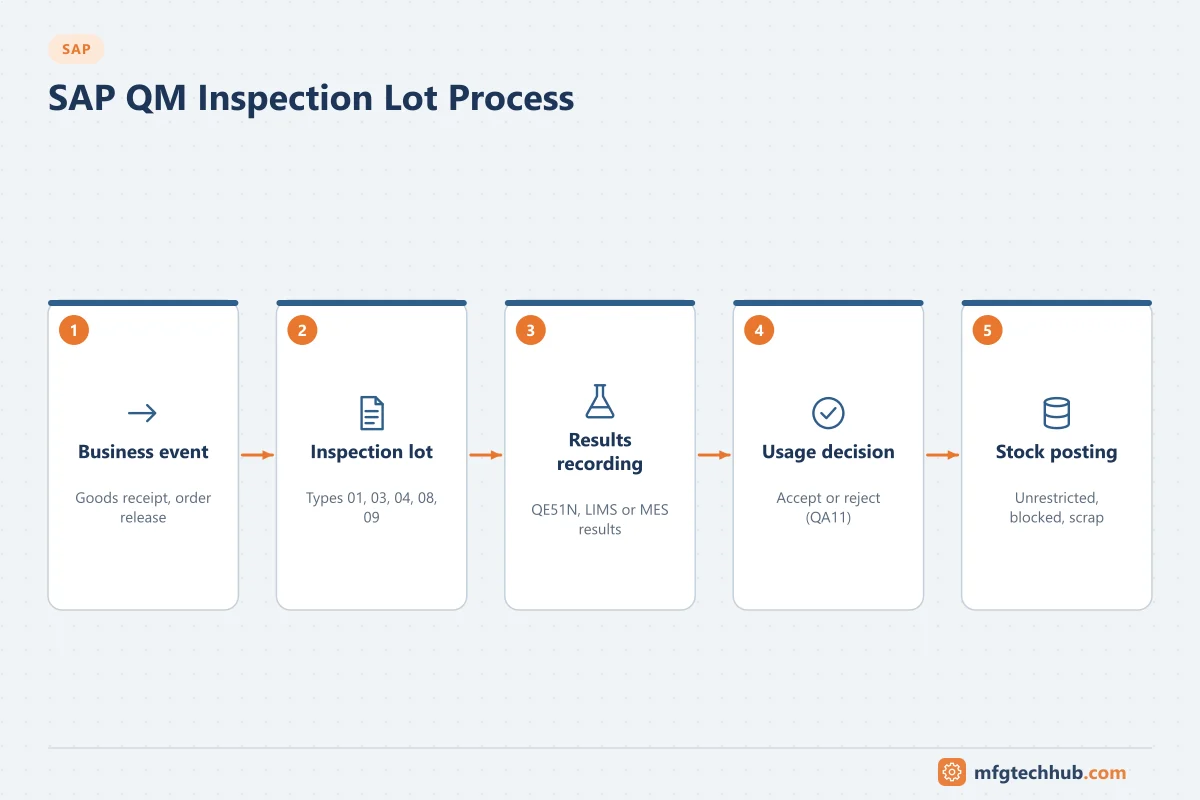
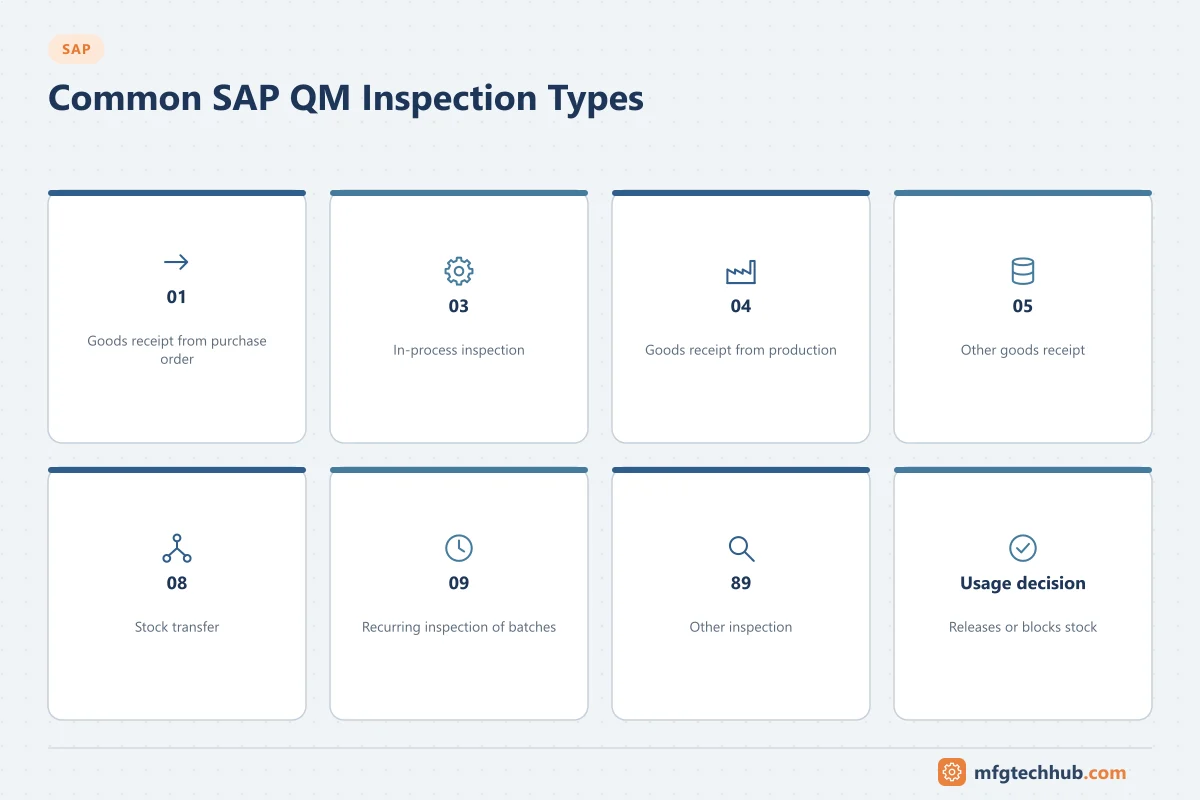
When a relevant business event happens, SAP creates an inspection lot: the record of one inspection. The inspection type determines the origin. Commonly used standard inspection types include:
| Inspection type | Event |
|---|---|
| 01 | Goods receipt inspection for a purchase order |
| 03 | In-process inspection for a production order |
| 04 | Goods receipt inspection from production |
| 05 | Inspection for other goods receipts |
| 08 | Stock transfer inspection |
| 09 | Recurring inspection of batches |
| 89 | Other inspections (manual) |
Inspection lots can also be created manually (QA01). Worklists of inspection lots are available, for example in QA32.
Stock effect: for goods receipt inspections, stock is typically posted to quality inspection stock and is not available for use until a usage decision is made.
Results recording
Inspectors or systems record results for each characteristic:
- Quantitative values (measured values, compared with limits)
- Qualitative results (accepted/rejected, codes)
- Defects, recorded with defect codes
Common transactions: QE51N (results recording worklist), QE01 (record results). Results can also come from LIMS, MES or measuring equipment through interfaces (for example with the QM inspection results BAPIs or APIs), which avoids manual transcription.
Usage decision
The usage decision (QA11 to record, QA12 to change) concludes the inspection lot:
- Accept or reject, with a code from the usage decision catalogue
- Stock postings: move quantities from quality inspection stock to unrestricted, blocked, scrap or return to vendor
- For batch-managed materials, the batch status and characteristics can be updated
In regulated industries, usage decisions may require electronic signatures and are a key part of batch release. See Computerised System Validation and Data Integrity (ALCOA+).
Quality notifications
Quality notifications document and manage quality problems:
| Notification type (examples) | Use |
|---|---|
| Customer complaint | Defects reported by customers |
| Complaint against vendor | Defects in purchased material |
| Internal problem report | Production or internal defects |
Common transactions: QM01 (create), QM02 (change), QM03 (display). Notifications capture defects, causes, tasks and activities, supporting corrective and preventive action (CAPA) processes.
Integration with MES and LIMS
| Pattern | Description |
|---|---|
| SAP QM as master | Inspection lots created in SAP; MES or LIMS receives lot and characteristics, returns results; usage decision in SAP |
| LIMS as master for lab testing | LIMS manages samples and tests; results and disposition sent to SAP for stock and batch status |
| MES in-process checks | MES enforces checks at the line; summarised results or deviations sent to SAP QM |
Key decisions: which system owns specifications, where the usage decision is made, and how results and electronic signatures are kept consistent. See MES Quality Management and SAP–MES Integration.
Configuration step by step
QM configuration is in SPRO → Quality Management. The core settings for a site, in a typical order:
| Step | What you configure | IMG area (Quality Management →) | Key decisions |
|---|---|---|---|
| 1 | Plant-level settings | Environment → Central Settings → Maintain Settings at Plant Level | Defaults for inspection lots, results recording and notifications per plant |
| 2 | Catalogues and code groups | Quality Planning → Basic Data → Catalog | Defect types, causes, tasks, usage decision codes; keep them short and structured (maintained with QS41, selected sets with QS51) |
| 3 | Inspection types | Quality Inspection → Inspection Lot Creation → Maintain Inspection Types | Use standard types (01, 03, 04, 05, 08, 09, 89) where possible; create custom types only for real differences |
| 4 | Inspection lot origins and default values | Quality Inspection → Inspection Lot Creation → Maintain Inspection Lot Origins and Assign Inspection Types; Define Default Values for Inspection Type | Which business events create lots; default control indicators (inspection with plan, with specifications, 100% inspection, skips, automatic usage decision) |
| 5 | Sampling and dynamic modification | Quality Planning → Basic Data → Sample, SPC → Sampling Procedure / Dynamic Modification | Sampling schemes and skip-lot rules |
| 6 | Results recording settings | Quality Inspection → Results Recording | Recording views, valuation rules, digital signature requirements where needed |
| 7 | Usage decision and follow-up actions | Quality Inspection → Inspection Lot Completion | Selected sets for usage decisions, automatic usage decision, follow-up actions, stock posting proposals |
| 8 | Quality notifications | Quality Notification → Notification Creation → Notification Type → Define Notification Types | Notification types for customer, supplier and internal problems; catalogues and partner schemes |
| 9 | QM in procurement (if used) | Quality Planning → Logistics Master Data → Control Keys | Supplier certification, quality agreements, blocking of unreleased suppliers |
Activating QM for a material: in the material master QM view (MM02), activate the relevant inspection types (for example 04 for goods receipt from production) with their settings, then create the inspection plan (QP01) or assign characteristics in the routing or master recipe.
Integrating QM with MES and LIMS: technical options
| Direction | Typical interface | Notes |
|---|---|---|
| SAP → LIMS/MES: inspection lot and characteristics to be measured | IDoc, API, or the QM-IDI subsystem interface | LIMS needs the lot number, characteristics, limits and sample information |
| LIMS/MES → SAP: results | BAPI_INSPOPER_RECORDRESULTS or APIs | Results per characteristic and sample; valuation in SAP or in the LIMS |
| LIMS/MES → SAP: usage decision | BAPI_INSPLOT_SETUSAGEDECISION or APIs | Decide which system makes the decision and who signs |
| MES → SAP: defects and notifications | Notification APIs or BAPIs | Link defects to orders, batches and serial numbers |
Agree one master for specifications (SAP inspection plans or the LIMS), keep characteristic codes aligned in both systems, and monitor interface errors like any other production interface. See SAP–MES Integration.
Worked example: in-process and final inspection (illustrative)
- The material master for product FG-300 has inspection types 03 (in-process) and 04 (goods receipt from production) active.
- When the production order is released, SAP creates an inspection lot of type 03 with characteristics from the routing (fill weight, seal integrity).
- The MES collects fill weights from the checkweigher and sends summarised results per sample to SAP with BAPI_INSPOPER_RECORDRESULTS; seal checks are recorded by operators at the line.
- At goods receipt, a type 04 lot is created and stock is posted to quality inspection stock.
- The lab records microbiological results in the LIMS, which sends them to SAP.
- The quality manager makes the usage decision in QA11: accepted, stock moved to unrestricted use. A seal defect found on one pallet is recorded in a quality notification (QM01) with cause and corrective action.
Common issues
| Issue | Typical cause | Where to look |
|---|---|---|
| No inspection lot created at goods receipt | Inspection type not active in material master, or not relevant for the movement | Material master QM view; inspection setup |
| Stock not available after receipt | Stock in quality inspection awaiting usage decision | Inspection lot status; stock overview |
| Results cannot be recorded | Inspection plan not found (validity, usage, status), lot not released for results | Inspection plan selection; lot status |
| Wrong sample size | Sampling procedure or lot-size assignment | Sampling procedure |
| Usage decision blocked | Open characteristics, missing signature, authorisation | Lot characteristics; user roles |
Frequently asked questions
What is an inspection lot in SAP QM?
An inspection lot is the record of an individual inspection, created automatically by a business event (for example a goods receipt) or manually. It holds the sample, the characteristics to inspect, the results and the usage decision.
What does a usage decision do?
It concludes the inspection by accepting or rejecting the lot and, for stock-relevant lots, posts the quantity from quality inspection stock to unrestricted, blocked or other stock types.
Can LIMS send results to SAP QM?
Yes. Results from LIMS or MES are commonly transferred to SAP QM through interfaces, so the inspection lot contains the results and the usage decision can be made in SAP, or the LIMS disposition is transferred as the decision, depending on the design.
Key takeaways
- QM master data (characteristics, methods, sampling, inspection plans) defines what is inspected and how.
- Business events create inspection lots by inspection type; results and usage decisions conclude them and move stock.
- Quality notifications handle defects and complaints.
- Integrate with LIMS and MES so results are captured once, with clear ownership of specifications and decisions.
Related tutorials
Before you apply this in a plant: this article is for education. Always check the current edition of the relevant standards, the manufacturer's documentation for your exact product and version, and your site's procedures. Safety-related work needs qualified personnel. See our editorial policy.