
SAP PP-PI Explained: Master Recipes, Process Orders, Control Recipes and PI Sheets
On this page
SAP PP-PI (Production Planning for Process Industries) is SAP’s production functionality for chemicals, pharmaceuticals, food and beverage, and other batch-oriented industries. Compared with discrete PP, it uses recipes and resources instead of routings and work centres, and adds process management: sending instructions to the shop floor and receiving process data back.
Note on transactions: the codes below are standard PP-PI transactions in SAP ERP and SAP S/4HANA on-premise. Confirm availability and any Fiori alternatives in your system.
PP vs PP-PI
| Aspect | PP (discrete) | PP-PI (process) |
|---|---|---|
| Where work is done | Work centre | Resource |
| Production instructions | Routing with operations | Master recipe with operations and phases |
| Execution document | Production order | Process order |
| Materials | Components, serial numbers | Ingredients, co-products, by-products, batches |
| Shop-floor communication | Order papers, MES | Control recipes, PI sheets, process messages (plus MES) |
| Typical industries | Automotive, machinery, electronics | Chemicals, pharmaceuticals, food and beverage |
Master data
| Object | Purpose | Common transactions |
|---|---|---|
| Resource | Equipment, lines or people that perform phases; capacities and scheduling | CRC1 / CRC2 / CRC3 |
| Master recipe | Operations and phases, resources, material list (ingredients, products), process instructions, inspection characteristics | C201 / C202 / C203 |
| Production version | Links the recipe and material list valid for the product | C223 |
| Material master and batches | Batch management, shelf life, classification for batch characteristics | MM01 / MM02; batch master MSC1N / MSC2N / MSC3N |
The recipe structure (operations → phases) aligns with the procedural thinking of ISA-88, although SAP’s master recipe is a business-level recipe; detailed equipment control remains in the batch system or DCS.
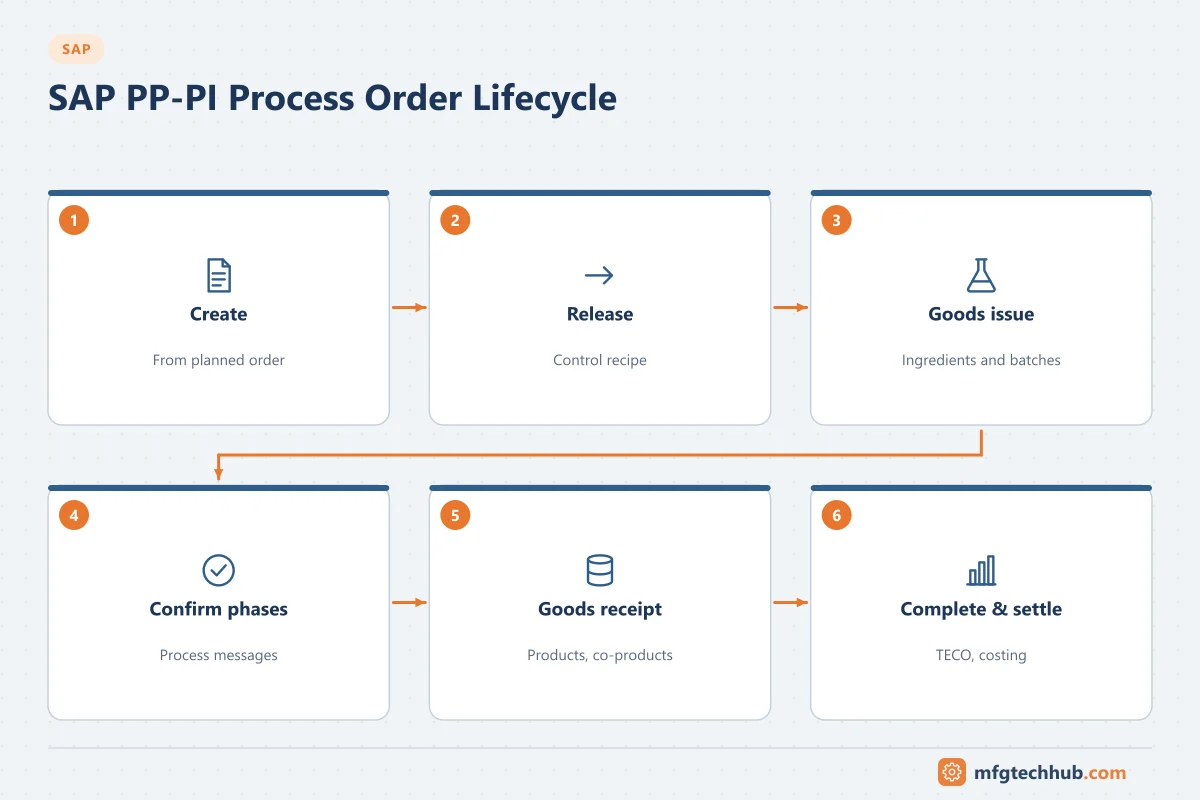
Process order lifecycle
| Step | Common transactions |
|---|---|
| Create process order (from a planned order or directly) | COR1; conversion of planned orders with COR7 |
| Change / display | COR2 / COR3 |
| Release | In COR2 or collectively (for example COHVPI mass processing) |
| Goods issue of ingredients | MIGO or backflush |
| Confirmation of phases | CORK (confirmation for the process order); phase time tickets COR6N |
| Goods receipt of products and co-products | MIGO or automatic goods receipt |
| Technical completion and settlement | Status functions; settlement in controlling |
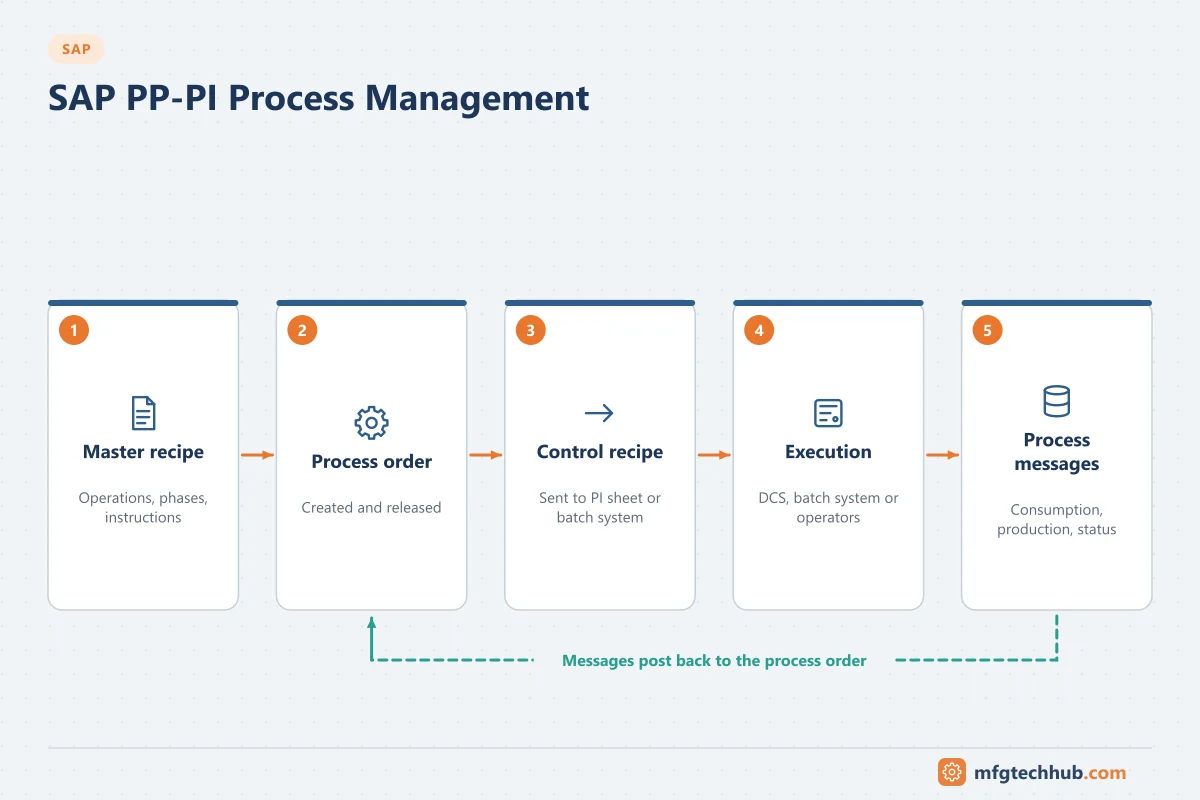
Process management: control recipes, PI sheets and process messages
Process management is the part of PP-PI that communicates with the shop floor:
- Process instructions in the master recipe define what information goes to operators or systems (for example “add ingredient X”, “record temperature”, “confirm batch”).
- When a process order is released, SAP generates control recipes containing the instructions for each destination.
- Control recipes are sent to a control recipe destination:
- a PI sheet for operators (an electronic worksheet to follow instructions and record values), or
- an external system such as a batch system, DCS, MES or LIMS.
- The shop floor returns process messages (for example consumption, production, process data, order status), which SAP posts or forwards to other systems.
| Monitor / worklist | Transaction |
|---|---|
| Control recipe monitor | CO53 |
| Process message monitor | CO54 |
| Worklist for maintaining PI sheets | CO55 |
| Find/maintain PI sheets | CO60 |
Operational tip: failed process messages and unsent control recipes accumulate silently if nobody monitors CO53 and CO54. Assign ownership and schedule regular checks, or alert on errors.
Batch management and traceability
Process industries depend on batches:
- Ingredients, intermediates and products are batch-managed, with characteristics (for example potency, expiry date) in batch classification.
- Batch determination selects which ingredient batches to consume (FEFO, specification-based).
- Batch where-used and traceability reports trace forward and backward through production.
- QM integration: inspection lots for incoming materials and finished batches; usage decisions release or restrict batches.
Integration with MES, batch systems and DCS
| Pattern | Description |
|---|---|
| PP-PI process management to a batch system/DCS | Control recipes to the batch system; process messages back. Used where the control system handles execution |
| Process order to MES | Process orders sent to MES (for example with the LOIPRO IDoc or APIs); MES handles execution, electronic batch records and equipment integration, and returns confirmations and goods movements |
| PI sheets only | Operators use PI sheets for guidance and data capture; suitable for simpler processes |
In regulated industries, the electronic batch record is often held in an MES, with SAP holding orders, inventory, batches, quality decisions and costs. Define clearly which system is the master for each record. See MES Integration Guide.
Configuration step by step
PP-PI shares much of its order configuration with discrete PP (order types, order-type-dependent parameters, scheduling and availability checks, maintained for process order types). The process-industry-specific settings are mainly in process management. A typical sequence:
| Step | What you configure | T-code | Notes |
|---|---|---|---|
| 1 | Process order types and order-type-dependent parameters | OPJH, OPL8 (process order types, category 40) | Recipe and material list selection, batch settings, status profile |
| 2 | Characteristics for process management | O25C | Characteristics with PP-PI attributes used in process instructions and messages (for example actual quantity, batch, temperature) |
| 3 | Process instruction categories | O12C | Which characteristics each instruction category contains, and how values are filled (from order data or entered at execution) |
| 4 | Control recipe destinations | O10C | Destinations per plant: PI sheet (operators) or external system (batch system, DCS, MES); for external systems, an RFC destination in SM59 |
| 5 | Process message categories | O13C | Message categories (for example PI_PROD for goods receipt from production), their characteristics and target fields |
| 6 | Process message destinations | O03C (user-defined destinations) | Where each message goes: an SAP function module (posting goods receipts, consumption, confirmations), an external system, a table or a user |
| 7 | Master recipe with process instructions assigned to phases | C201 / C202 | Instructions refer to destinations and categories configured above |
| 8 | Scheduling of control recipe sending and message processing | Background jobs; monitors CO53 / CO54 | Control recipes and messages should flow automatically; monitors are for exceptions |
Design questions to settle before configuring:
- Which system executes: PI sheets, a batch system/DCS via process management, or an MES receiving process orders? Avoid mixing without a clear reason.
- Which process messages post in SAP (goods receipts, consumption, phase confirmations) and which only carry data to other systems (process data to a historian or quality records)?
- How are batches created and determined, and which system assigns batch numbers?
Worked example: process order through a batch system (illustrative)
- MRP creates a planned order for 5,000 kg of product P-200; the planner converts it to a process order (COR7) and releases it.
- Release generates a control recipe for destination 01 (the batch system). It is sent automatically; CO53 shows status “sent”.
- The batch system creates the batch, runs the phases, and records actual ingredient quantities and batches.
- The batch system returns process messages: consumption for each ingredient batch, phase status, and PI_PROD for 4,930 kg of product in batch B24031.
- SAP processes the messages: goods issues, goods receipt and phase confirmations are posted. One consumption message fails because the ingredient batch is restricted after a QM decision; it appears with an error in CO54.
- Quality releases the batch after review; the message is reprocessed from CO54 and the order is completed.
Common issues
| Issue | Typical cause | Where to look |
|---|---|---|
| Control recipe not sent | Release did not generate it, destination not maintained, job not scheduled | CO53; recipe destinations in customising; background jobs |
| Process messages in error | Missing mandatory characteristic, wrong batch, posting period closed, stock shortage | CO54 message log |
| Batch not found or blocked | Batch determination strategy, restricted status after QM decision | Batch master, QM usage decision |
| Wrong ingredient quantities | Material list scaling, production version, yield settings | Master recipe material list, production version |
| Order cannot be completed | Open reservations, unconfirmed phases, open inspection lots | Order status and logs |
Frequently asked questions
What is a control recipe in SAP?
A control recipe is generated from a released process order and contains the process instructions for a specific destination, such as a PI sheet for operators or an external control system. It carries the order-specific information needed to execute production.
What is a PI sheet?
A process instruction sheet is an electronic worksheet in SAP that guides operators through instructions for a process order and records values such as quantities, batches and process data, which are returned as process messages.
Should we use PI sheets or an MES?
PI sheets suit simpler processes and sites that want to stay inside SAP. An MES is usually chosen for complex execution, equipment integration, detailed electronic batch records and shop-floor performance management.
Key takeaways
- PP-PI uses resources, master recipes with phases, process orders and batches.
- Process management sends control recipes to PI sheets or external systems and receives process messages.
- Monitor control recipes and process messages actively; errors otherwise accumulate unnoticed.
- Decide clearly which system owns execution records when integrating with MES or batch systems.
Related tutorials
Before you apply this in a plant: this article is for education. Always check the current edition of the relevant standards, the manufacturer's documentation for your exact product and version, and your site's procedures. Safety-related work needs qualified personnel. See our editorial policy.