
Plant Shutdown and Startup IT/OT Checklist: Before, During and After a Planned Outage
On this page
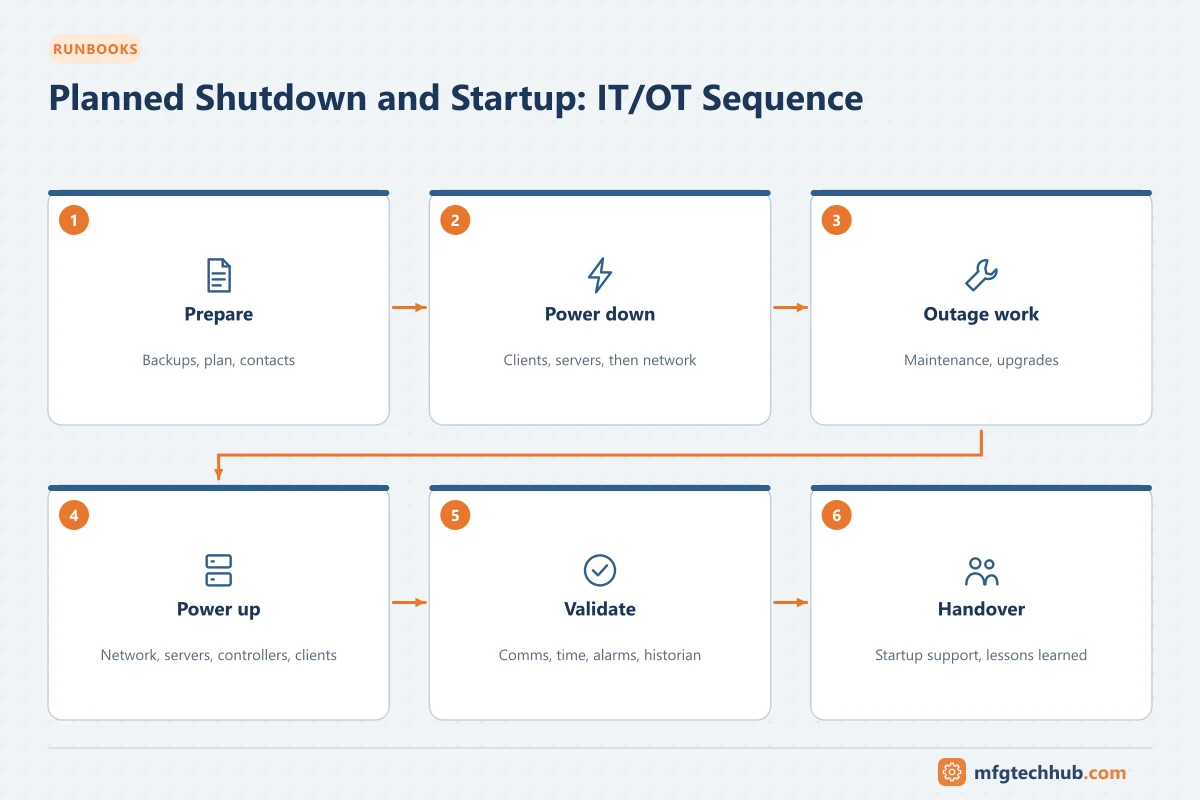
Planned shutdowns (turnarounds, maintenance outages, power work) are when many OT changes are made, and also when problems appear at startup: controllers that lost their programs, servers that do not boot, expired certificates, clocks that reset, interfaces that do not reconnect. This checklist covers the automation and IT/OT side; it complements, and never replaces, the process safety, electrical isolation and operations procedures for the shutdown.
1. Purpose and scope
Make sure control systems, networks and plant IT systems are protected during the outage and return to service correctly, so that startup is not delayed or made unsafe by automation problems.
Scope: controllers (PLC, DCS, safety systems), HMIs and SCADA, historians, MES and interfaces, network and security devices, servers and virtualisation, UPS and power supplies, time and certificate services.
2. Preparation (weeks before)
- List all planned OT changes during the outage, each with an approved change request, test plan and rollback
- Backups of all affected systems taken and verified. See OT Backup and Restore Runbook
- Confirm spares (controllers, I/O modules, power supplies, switches, disks) and compatible firmware
- Check controller batteries and memory cards that retain programs or data during power loss
- Review certificate expiry dates and licence expiry dates that fall during or soon after the outage. See Certificates and PKI for OT
- Check UPS health and runtime; plan shutdown of servers if UPS runtime is insufficient
- Agree the power-down and power-up sequence with electrical and operations teams
- Inform interface owners (ERP/MES, LIMS, remote monitoring) of the outage window
- Prepare contact list and vendor support availability
3. Before power-down
- Change freeze on configurations except planned changes
- Final backup of controllers and servers after the last production run
- Record controller states, forces, bypasses and active overrides (all bypasses must be documented and later removed)
- Confirm historian and MES buffering is enabled so data is not lost
- Put interfaces into a controlled state (queues drained or paused as agreed)
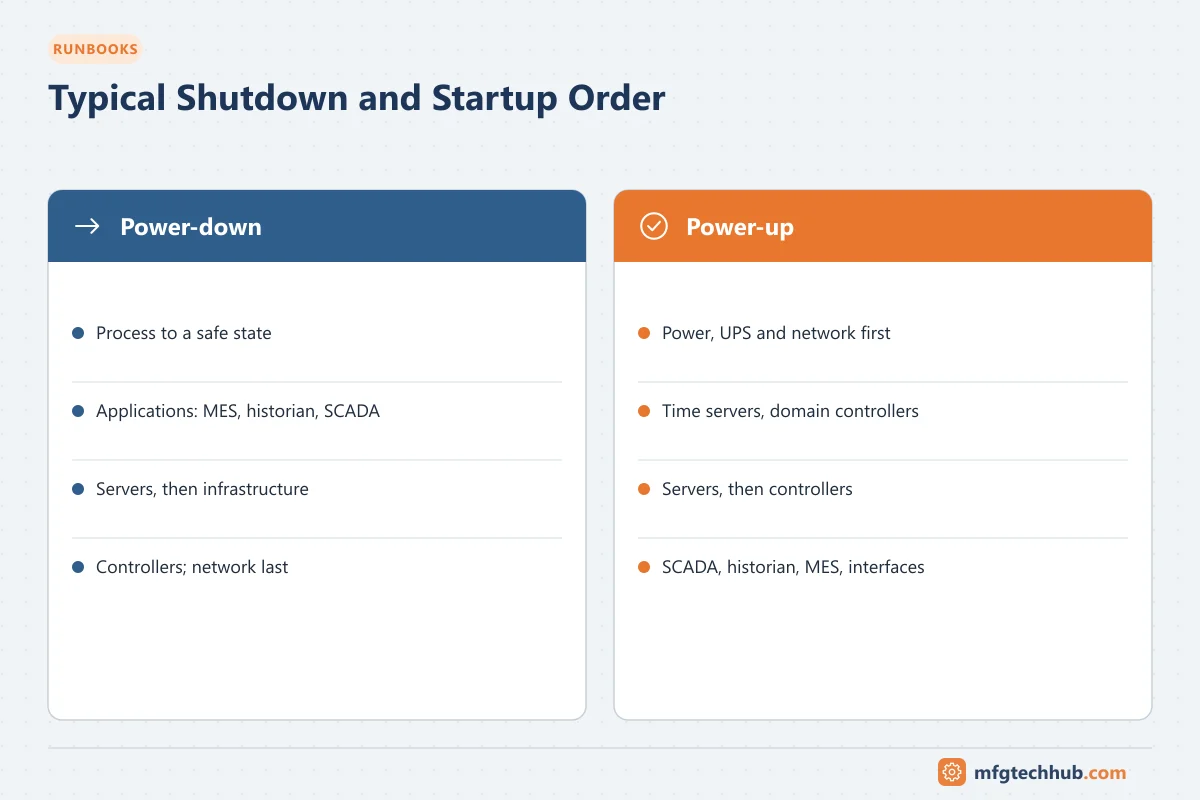
4. Power-down sequence (typical order; adapt to site)
- Stop production and bring the process to a safe state according to operations procedures.
- Shut down applications cleanly: MES, historian collectors, SCADA clients and servers.
- Shut down servers and virtualisation hosts in the correct order (applications, then databases, then infrastructure such as domain controllers last).
- Controllers and field power as required by the electrical isolation plan.
- Network devices last (and restore first), unless isolated by electrical work.
5. During the outage
- Execute planned changes under change control
- Keep a log of every change, download and device replacement
- Protect equipment from dust, water and construction work
- Update drawings and documentation as changes are completed
6. Power-up sequence (typical order)
- Power and UPS verified; network infrastructure (core switches, firewalls) up and healthy.
- Infrastructure services: time servers, domain controllers, certificate services.
- Virtualisation hosts and servers: databases, then applications.
- Controllers: verify they start in the expected mode with the correct program version.
- SCADA and HMIs; then historians and MES; then interfaces to enterprise systems.
7. Validation before startup
- Controllers: running, no faults, program checksums/versions match the approved list, clocks correct
- Safety systems: status verified and proof tests or functional tests completed where required by procedures; all bypasses removed or authorised
- Forces and overrides: none active except documented and approved ones
- Network: redundancy healthy (rings closed), no port errors, all devices reachable
- SCADA/HMI: communication healthy, alarms active, commands tested with operations
- Time synchronisation correct across controllers and servers
- Historian: collecting, buffers flushed, no gaps beyond the outage window
- MES and ERP interfaces: connected, queues processed, order and stock status reconciled
- Certificates and licences valid
- Loop checks completed for instruments that were modified or replaced
8. Startup support and handover
- OT engineers available on shift during startup
- Punch list of open issues with owners
- Backups taken of all changed systems after successful startup
- Documentation updated (drawings, I/O lists, network diagrams, IP registers)
- Handover signed by operations and OT engineering
9. Lessons learned
After startup, review what went well and what delayed startup, and update this checklist.
Related guides
Before you apply this in a plant: this article is for education. Always check the current edition of the relevant standards, the manufacturer's documentation for your exact product and version, and your site's procedures. Safety-related work needs qualified personnel. See our editorial policy.